
1. Product Overview
This manual provides essential information for the safe and effective use of your PK Power AC Power Cord. This cable is designed to provide reliable power connection for compatible audio equipment, specifically the Peavey CS 4080HZ and CS 4000 Crossover Amplifiers.

Image 1.1: The PK Power AC Power Cord, a standard black power cable with a two-prong US plug on one end and an IEC C13 connector on the other.
Key Features:
- Input: 100-240V 50-60Hz, ensuring compatibility with various power standards.
- Certifications: CE / FCC / RoHS certified, meeting international safety and environmental standards.
- Protection: Features OVP (Over Voltage output Protection), OCP (Over Current output Protection), and SCP (Short Circuit output Protection) for enhanced safety and device protection.
- Compatibility: Specifically designed for use with Peavey CS 4080HZ and CS 4000 Crossover Amplifiers, among other compatible devices requiring a standard AC power cord.
2. Setup Instructions
Follow these steps to properly connect your AC power cord to your device and power source.
- Inspect the Cable: Before connecting, visually inspect the entire length of the power cord for any signs of damage, such as cuts, fraying, or bent pins. Do not use a damaged cable.
- Identify Connectors: The power cord has two distinct ends: a standard two-prong (Type A) plug for the wall outlet and an IEC C13 connector (often referred to as a 'kettle lead' connector) for the device.
- Connect to Device: Locate the power input port on your Peavey CS 4080HZ or CS 4000 Crossover Amplifier (or other compatible device). Carefully insert the IEC C13 connector end of the power cord into this port, ensuring a firm and secure fit.
- Connect to Power Outlet: Insert the two-prong plug end of the power cord into a standard, grounded electrical wall outlet. Ensure the outlet provides the correct voltage (100-240V) as specified for your device.
- Verify Connection: Once both ends are connected, ensure there are no loose connections. The device should now be ready to receive power.
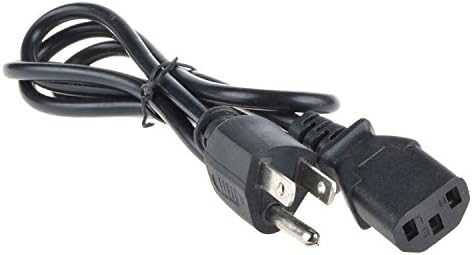
Image 2.1: The power cord displaying both the standard US two-prong plug and the IEC C13 connector, ready for connection.

Image 2.2: An alternative view of the power cord, highlighting the cable's flexibility and the robust construction of its connectors.
3. Operation Guidelines
The PK Power AC Power Cord is a passive component designed to transmit electrical power. Its operation is straightforward, but adherence to safety guidelines is crucial.
- Power On/Off: The power cord itself does not have an on/off switch. Power is controlled by the connected device's power switch and the wall outlet.
- Voltage Compatibility: Ensure the connected device's voltage requirements match the power supply from the wall outlet. This cable is rated for 100-240V.
- Overload Protection: While the cable offers internal protection features (OVP, OCP, SCP), avoid overloading the circuit it is connected to. Use a surge protector if necessary.
- Environmental Conditions: Use the power cord in dry, indoor environments. Avoid exposure to moisture, extreme temperatures, or direct sunlight.
4. Care and Maintenance
Proper care extends the life of your power cord and ensures safe operation.
- Cleaning: Disconnect the power cord from both the device and the wall outlet before cleaning. Wipe the cable and connectors with a dry, soft cloth. Do not use liquid cleaners or solvents.
- Storage: When not in use, coil the cable loosely. Avoid tight coiling or bending, which can damage internal wires. Store in a cool, dry place away from direct sunlight and heat sources.
- Regular Inspection: Periodically inspect the cable for any signs of wear, such as cracks, cuts, or exposed wiring. Check the connectors for bent pins or corrosion. Replace the cable immediately if any damage is found.
- Avoid Stress: Do not pull the cable by the cord itself to disconnect it; always grasp the plug firmly. Avoid placing heavy objects on the cable or running it through high-traffic areas where it could be tripped over or damaged.
5. Troubleshooting
If you encounter issues with your power cord, consider the following common solutions:
| Problem | Possible Cause | Solution |
|---|---|---|
| Device not receiving power. | Loose connection, faulty outlet, or device issue. | Ensure both ends of the power cord are securely plugged in. Test the wall outlet with another device. Check the device's power switch. |
| Cable appears damaged (frayed, cut). | Physical wear and tear. | Immediately discontinue use and replace the power cord. Do not attempt to repair damaged cables. |
| Cable feels hot during use. | Overload, internal damage, or poor ventilation. | Disconnect immediately. Ensure the device's power requirements do not exceed the cable's rating. Check for proper ventilation around the device and cable. If the issue persists, replace the cable. |
6. Technical Specifications
Detailed specifications for the PK Power AC Power Cord:
| Attribute | Value |
|---|---|
| Manufacturer | PKPOWER |
| Brand | PKPOWER |
| ASIN | B0779Q612T |
| UPC | 716833354936 |
| Input Voltage | 100-240V 50-60Hz |
| Connector Gender | Male-to-Male (referring to the overall cable's function, with specific plug types) |
| Plug Format (Source) | Type A (US 2-prong) |
| Plug Format (Device) | IEC C13 |
| Certifications | CE / FCC / RoHS |
| Protection Features | OVP, OCP, SCP |
| Date First Available | November 10, 2017 |
7. Warranty and Support
This PK Power AC Power Cord is covered by the manufacturer's standard warranty. For specific warranty terms, duration, and claim procedures, please refer to the documentation provided with your purchase or visit the official PKPOWER website.
For technical support, troubleshooting assistance beyond this manual, or inquiries regarding product replacement, please contact PKPOWER customer service. Our friendly and reliable customer service team aims to respond to inquiries within 24 hours.
Manufacturer Contact: PKPOWER
Online Store: PKPOWER Amazon Store