
Introduction
This manual provides essential information for the safe and effective use of your PK Power AC Power Cord. This cable is designed to supply power to compatible electronic devices, specifically LG FLATRON M228WA, M228WA-BZ, and M228wd 22-inch Widescreen Multifunction TV LCD Monitors.
Please read this manual thoroughly before connecting and operating the power cord to ensure proper functionality and safety.
Product Overview

Figure 1: The PK Power AC Power Cord, showing the standard two-prong US plug on one end and the C7 figure-8 connector on the other.
The PK Power AC Power Cord is a replacement or spare power cable for various electronic devices. It features a standard US 2-prong plug (NEMA 1-15P) on one end and an IEC C7 (figure-8) connector on the other, commonly used for TVs, monitors, and other small appliances.
Setup
- Identify the Power Port: Locate the power input port on your LG FLATRON M228WA, M228WA-BZ, or M228wd monitor. This port is typically a figure-8 shaped receptacle.
- Connect to Device: Insert the IEC C7 (figure-8) connector end of the PK Power AC Power Cord firmly into the power input port of your monitor. Ensure it is fully seated.

Figure 2: Close-up view of the C7 (figure-8) connector, which plugs into the device.
- Connect to Power Outlet: Insert the standard US 2-prong plug end of the power cord into a grounded electrical wall outlet. Ensure the outlet provides the correct voltage (100-240V AC).
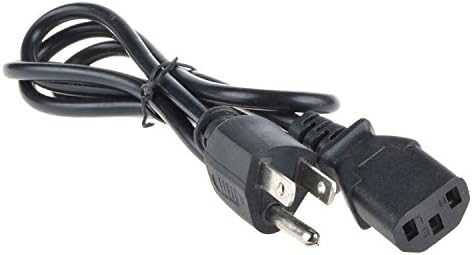
Figure 3: Close-up view of the standard US 2-prong plug, which plugs into the wall outlet.
- Verify Connection: Confirm that both ends of the power cord are securely connected.
Operating
Once the PK Power AC Power Cord is correctly connected to your device and a power outlet, the device should receive power. Turn on your device using its power button. No further operation is required for the power cord itself.
Maintenance
- Cleaning: Disconnect the power cord from both the device and the wall outlet before cleaning. Wipe the cord and connectors with a dry, soft cloth. Do not use liquid cleaners or abrasive materials.
- Storage: When not in use, store the power cord in a cool, dry place, away from direct sunlight and excessive heat. Avoid tightly coiling or bending the cord sharply, as this can damage the internal wires.
- Inspection: Periodically inspect the power cord for any signs of damage, such as frayed insulation, exposed wires, or bent/corroded pins. If any damage is observed, discontinue use immediately and replace the cord.
Troubleshooting
| Problem | Possible Cause | Solution |
|---|---|---|
| Device does not power on. |
|
|
| Power cord feels warm. |
|
|
Specifications
- Input Voltage: 100-240V AC
- Frequency: 50-60Hz
- Connector Type (Wall): US 2-prong (NEMA 1-15P)
- Connector Type (Device): IEC C7 (Figure-8)
- Protection Features: Over Voltage Protection (OVP), Over Current Protection (OCP), Short Circuit Protection (SCP)
- Certifications: CE / FCC / RoHS certified
Compatibility
This PK Power AC Power Cord is specifically designed for and compatible with the following LG FLATRON monitor models:
- LG FLATRON M228WA
- LG FLATRON M228WA-BZ
- LG FLATRON M228wd
It may also be compatible with other devices requiring a 2-prong US plug to IEC C7 figure-8 power cord with similar voltage and current requirements.
Support and Warranty
For any questions, technical assistance, or support regarding your PK Power AC Power Cord, please contact our customer service. Our friendly and reliable customer service team aims to respond to inquiries within 24 hours.
Information regarding specific warranty terms and conditions can be obtained by contacting PKPOWER customer support directly or by referring to the product packaging.