Introduction
This manual provides detailed instructions for the safe installation, operation, and maintenance of your Kichler 4D Series Cabinet Puck, Model 4D12V30WHT. This compact, low-voltage LED light is designed to create accent lighting within glass-faced cabinets or above small niche spaces. Please read these instructions thoroughly before beginning installation or use.
Important Safety Information
- Always disconnect power at the fuse or circuit breaker before installation or servicing.
- Consult a qualified electrician if you are unsure about the installation process.
- This product is designed for 12V DC systems only. Do not connect to 120V AC.
- Ensure all electrical connections are made in accordance with local codes and ordinances.
- Do not modify the fixture or its components.
- This fixture is Damp Rated, suitable for use in locations subject to moderate degrees of moisture, such as bathrooms or covered outdoor areas. However, it is not suitable for direct water exposure.
What's Included
Verify that all components are present before beginning installation.
- Kichler 4D Series Cabinet Puck (Model 4D12V30WHT)
- Mounting Hardware
- Instruction Manual (this document)

Image: The Kichler 4D Series Cabinet Puck in Textured White finish. This image shows the compact, circular design of the LED light fixture.
Setup and Installation
The Kichler 4D Series Cabinet Puck can be installed as either a recessed or surface-mounted fixture. It requires a Kichler 12V power supply (sold separately) for operation.
Tools Required (Not Included):
- Screwdriver
- Drill (for recessed mounting or pilot holes)
- Wire Strippers
- Measuring Tape
Installation Steps:
- Turn Off Power: Before starting, ensure the power to the installation area is turned off at the circuit breaker or fuse box.
- Choose Mounting Method:
- Surface Mount: Position the fixture in the desired location. Mark the screw holes. Drill pilot holes if necessary. Secure the fixture using the provided mounting screws.
- Recessed Mount: For recessed installation, a cutout of appropriate diameter (refer to specifications for exact dimensions) is required. Ensure there is sufficient clearance behind the mounting surface. Insert the fixture into the cutout and secure it according to the specific recessed mounting mechanism (e.g., spring clips, if included).
- Wire Connections: Connect the fixture's low-voltage wires to your Kichler 12V power supply. Ensure polarity is correct (positive to positive, negative to negative). Use appropriate wire connectors.
- Secure Wiring: Route and secure all wiring to prevent pinching or damage.
- Restore Power: Once installation is complete and all connections are secure, restore power at the circuit breaker.
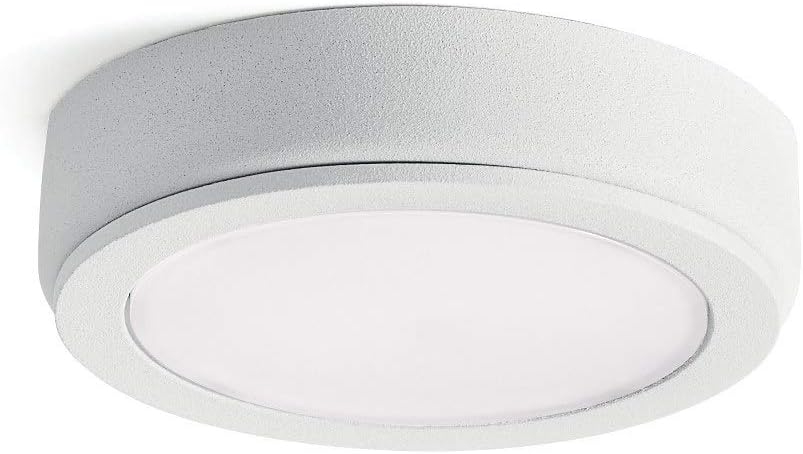
Image: An example of the Kichler 4D Series Cabinet Puck installed under a cabinet, demonstrating its low-profile design and integrated lighting.
Operating Instructions
The Kichler 4D Series Cabinet Puck operates as part of a 12V lighting system. Its operation is controlled by the connected Kichler 12V power supply and any associated switches or dimmers.
- Power On/Off: Use the switch connected to your 12V power supply to turn the puck light on or off.
- Dimming: This fixture is dimmable. If connected to a compatible Kichler 12V dimming power supply or dimmer switch, you can adjust the light intensity. Refer to your dimmer's instructions for specific operation.
Care and Maintenance
The Kichler 4D Series Cabinet Puck requires minimal maintenance.
- Cleaning: To clean the fixture, ensure power is off. Wipe with a soft, dry, or slightly damp cloth. Do not use abrasive cleaners, solvents, or polishes as they may damage the finish or electrical components.
- LEDs: The integrated LED light source is designed for long life and is not user-replaceable.
- Inspection: Periodically inspect the fixture and wiring for any signs of damage or wear. If damage is observed, disconnect power and consult a qualified electrician.
Troubleshooting
| Problem | Possible Cause | Solution |
|---|---|---|
| Light does not turn on. |
|
|
| Light flickers or is dim. |
|
|
| Fixture is hot to the touch. |
|
|
If troubleshooting steps do not resolve the issue, contact Kichler customer support or a qualified electrician.
Product Specifications
| Model Number | 4D12V30WHT |
| Brand | Kichler |
| Finish Color | Textured White |
| Material | Aluminum (Fixture Body), Polycarbonate (Lens) |
| Dimensions (L x W x H) | 2.75" x 2.75" x 0.5" |
| Lamping Type | Integrated LED |
| Wattage | 4 Watts |
| Voltage | 12 Volts DC |
| Lumens | 150 Lumens |
| Color Temperature | 2700 Kelvin |
| CRI (Color Rendering Index) | 90 |
| Dimmable | Yes |
| Moisture Rating | Damp Rated |
| Installation Type | Flush Mount, Surface Mount |
| UPC | 783927539166 |
Warranty Information
This Kichler product comes with a limited warranty. For specific details regarding warranty coverage, terms, and conditions, please refer to the official Kichler website or contact Kichler customer support. Keep your proof of purchase for warranty claims.
Customer Support
For technical assistance, replacement parts, or further information, please contact Kichler customer support:
- Website: www.kichler.com (Please visit the official website for contact information and support resources.)
- Phone: Refer to the Kichler website for current customer service phone numbers.
When contacting support, please have your product model number (4D12V30WHT) and purchase date available.


