
1. Introduction
The Marantz SR8012 is an 11.2-channel AV receiver designed to deliver high-performance audio and video for home theater systems. It incorporates advanced technologies such as Dolby Atmos, DTS:X, and Auro 3D for immersive surround sound. The receiver features Marantz's exclusive HDAM (Hyper Dynamic Amplifier Module) and Current Feedback technologies, ensuring wideband response and dynamic range for optimal sound quality with high-resolution audio formats. With 205W of power per channel, it supports comprehensive home cinema setups and integrates with HEOS wireless multi-room music networks.
2. What's in the Box
Carefully unpack the contents of the box. Ensure all items listed below are present:
- Marantz SR8012 11.2-channel AV Receiver
- Remote Controller
- Quick Start Guide
- 6' AC Power Cord
- Sound Calibration Microphone (ACM1HB)
- Microphone Stand
- 2 WLAN/Bluetooth Antennas
- FM Wire Antenna
- "Bluetooth/WiFi Certified" Sheet
3. Setup
3.1 Initial Setup
The SR8012 includes an intuitive Setup Assistant with an Advanced Graphical User Interface (GUI) to guide you through the initial configuration process. Connect the receiver to your television via HDMI to view the on-screen instructions for speaker calibration, network setup, and input assignments.
3.2 Connections
Before making any connections, ensure the receiver is powered off and unplugged from the wall outlet. Connect all audio and video sources, speakers, and network cables as described in the Setup Assistant or the detailed user manual.

Figure 1: Rear panel connections of the Marantz SR8012 AV Receiver. This view illustrates the comprehensive array of input and output ports, including multiple HDMI inputs, speaker terminals, and network connections, facilitating integration with various home theater components.

Figure 2: Detailed view of the 11.2 channel speaker terminals. Each terminal is clearly labeled for easy and accurate speaker wire connection, supporting various surround sound configurations.
HDMI Connections:
The SR8012 features 11 HDMI ports, supporting full-rate pass-through, SD/HD video upscaling to UHD, 4:4:4 Pure Color sub-sampling, HDR10, BT.2020, 3D, 21:9 video, Dolby Vision, HLG, and eARC. Connect your Ultra HD TV and other HDMI-enabled devices to the appropriate input ports.
Speaker Connections:
Connect your speakers to the corresponding terminals on the rear panel. The receiver supports 11.2, 9.1.2, and 7.1 channel configurations, including Dolby Atmos elevation speakers. Ensure correct polarity (+/-) for all speaker connections.
Network Connections:
Connect the receiver to your home network via Ethernet cable or use the built-in Wi-Fi for wireless connectivity. Attach the two WLAN/Bluetooth antennas to the designated ports on the rear panel for optimal wireless performance.
3.3 Speaker Calibration (Audyssey MultEQ XT32)
The SR8012 includes Audyssey MultEQ XT32 for automatic speaker setup and room acoustic correction. Place the supplied microphone at your primary listening position and follow the on-screen instructions to calibrate your speaker system for optimal sound performance.

Figure 3: Audyssey MultEQ XT32 interface on a tablet. This system automatically measures and corrects room acoustics for balanced and accurate sound reproduction.
4. Operating the Receiver
4.1 Basic Controls
The front panel of the SR8012 features an input selector knob and a volume control knob. A hidden panel provides additional controls for quick access to various settings and input options, including a front HDMI input and USB port.

Figure 4: Front panel of the Marantz SR8012 AV Receiver. The design features two prominent knobs for input selection and volume, with a central display and a hidden panel for additional controls.
4.2 Remote Control
The included remote control provides full functionality for operating the SR8012, including power, input selection, volume adjustment, sound mode selection, and access to system settings. Refer to the detailed user manual for a complete overview of remote control functions.

Figure 5: The remote control for the Marantz SR8012. It offers dedicated buttons for input sources, sound modes, volume, and navigation through the receiver's menu system.
4.3 Audio and Video Modes
The SR8012 supports a variety of advanced audio and video formats:
- Dolby Atmos, DTS:X, Auro 3D: For object-based, immersive surround sound.
- IMAX Enhanced: Delivers a premium audio and video experience with IMAX digitally re-mastered content.
- Dolby Vision, HDR10, HLG: High Dynamic Range video formats for enhanced contrast and color.
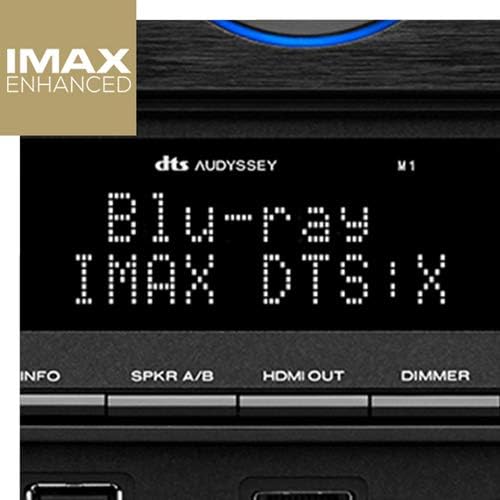
Figure 6: Receiver display indicating 'Blu-ray IMAX DTS:X'. This confirms the receiver is processing an IMAX Enhanced audio track from a Blu-ray source.
4.4 Network Features (HEOS, AirPlay 2, Bluetooth)
The SR8012 integrates built-in HEOS technology, allowing it to become part of a wireless multi-room music network. Stream music wirelessly from popular services like Spotify, TuneIn, Deezer, Tidal, Netflix, and Amazon Prime. It also supports Bluetooth and Apple AirPlay 2 for direct streaming from compatible devices.
5. Specifications
| Feature | Description |
|---|---|
| Brand | Marantz |
| Model Number | SR8012 |
| Connectivity Technology | Ethernet, USB, Wireless (Wi-Fi, Bluetooth, AirPlay) |
| Controller Type | Amazon Alexa, Google Assistant |
| Special Feature | DAB (Digital Audio Broadcasting) |
| Compatible Devices | Television, Speaker, Personal Computer |
| Total HDMI Ports | 11 |
| Audio Output Mode | Surround |
| Surround Sound Channel Configuration | 11.2, 9.1.2, 7.1 |
| Output Power | 205 Watts per channel |
| Supported Internet Services | Amazon Prime, Pandora, Tidal, Spotify |
| Control Method | Voice |
| Audio Output Type | Speakers |
| Supported Audio Formats | WAV, WMA (and others via network/USB) |
| Item Weight | 8.3 Kilograms |
| Color | Black |
6. Maintenance
To ensure the longevity and optimal performance of your Marantz SR8012 AV Receiver, follow these maintenance guidelines:
- Cleaning: Gently wipe the exterior surfaces with a soft, dry cloth. Avoid using abrasive cleaners, solvents, or chemical sprays, as these can damage the finish.
- Ventilation: Ensure adequate ventilation around the receiver. Do not block the ventilation openings on the top, sides, or rear. Allow sufficient space (at least 4 inches) above and around the unit for proper airflow to prevent overheating.
- Dust Accumulation: Periodically use a soft brush or a vacuum cleaner with a brush attachment to remove dust from the ventilation grilles and ports.
- Power Cord: Regularly check the power cord for any signs of damage. If damaged, replace it immediately with an approved cord.
- Environmental Conditions: Avoid exposing the receiver to extreme temperatures, humidity, direct sunlight, or excessive vibrations.
7. Troubleshooting
If you encounter issues with your Marantz SR8012, refer to the following basic troubleshooting steps. For more detailed solutions, consult the comprehensive user manual or the Marantz support website.
- No Power: Ensure the power cord is securely connected to both the receiver and a working wall outlet. Check the power indicator light on the front panel.
- No Sound: Verify that the correct input source is selected. Check all speaker connections for proper polarity and secure fit. Ensure the volume is not muted or set too low. Confirm that your speakers are properly configured in the setup menu.
- No Video: Confirm that the HDMI cables are securely connected to both the receiver and your display device. Ensure the correct HDMI input is selected on your TV. Try a different HDMI cable or input port.
- Network Connection Issues: Check your Ethernet cable connection or Wi-Fi settings. Ensure the WLAN/Bluetooth antennas are properly attached. Restart your router and the receiver.
- Remote Control Not Working: Check the batteries in the remote control and replace them if necessary. Ensure there are no obstructions between the remote and the receiver's IR sensor.
8. Warranty and Support
8.1 Warranty Information
The Marantz SR8012 AV Receiver comes with a 3-year warranty from the date of purchase. This warranty covers defects in materials and workmanship under normal use. Please retain your proof of purchase for warranty claims. For full terms and conditions, refer to the warranty card included with your product or visit the official Marantz website.
8.2 Customer Support
For technical assistance, troubleshooting beyond these basic steps, or warranty service, please contact Marantz customer support. You can find contact information and additional resources on the official Marantz website (www.marantz.com).


