
AUVON PRO18AB
Contents
AUVON PRO18AB Rechargeable TENS Unit Muscle Stimulator User Manual
Model: PRO18AB
Introduction
This manual provides comprehensive instructions for the safe and effective use of your AUVON PRO18AB Rechargeable TENS Unit Muscle Stimulator. Please read this manual thoroughly before operating the device and retain it for future reference.
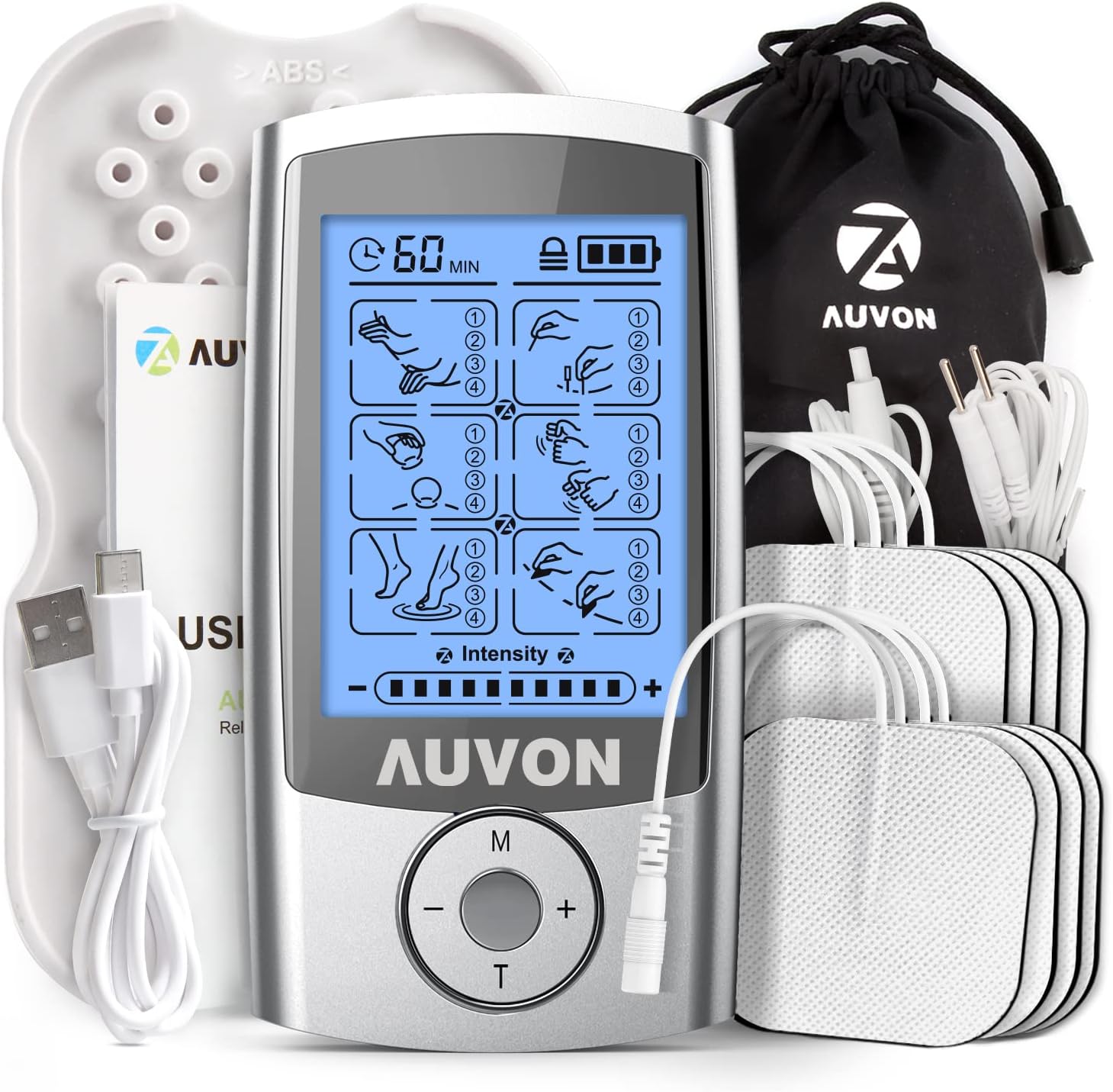
Image: The AUVON TENS Unit, electrode pads, lead wires, USB cable, and storage pouch.

Image: Visual representation of common body areas where the TENS unit can be applied for pain relief, including shoulder, arm, wrist, ankle, neck, elbow, knee, and lower back.
Safety Information and Warnings
WARNING: Failure to follow these safety instructions may result in injury or adverse reactions.
This product is not suitable for individuals with certain medical conditions or circumstances. Consult with your physician before using this device if you have any of the following conditions:
- Implanted defibrillator, cardiac pacemaker, or any other implanted metallic or electronic device.
- Heart rhythm problems, epilepsy, brain diseases, or neurological disorders.
- Undiagnosed chronic pain.
- Pregnancy or labor.
- Cancer.
- Sensitivity to electrotherapy.
- Lack of skin sensation or an abnormal skin condition.
- Any condition requiring the active supervision of a physician.
Additional Precautions:
- Avoid excessive use of electrotherapy.
- Avoid use above the neck, especially on the head or neck area.
- Do not use this product if you are under 22 years of age.
- Individual symptoms, situations, circumstances, and results may vary. The information provided is not intended to be used for medical diagnosis or treatment or as a substitute for professional medical advice. Please consult your physician or qualified health care provider regarding your condition and appropriate medical treatment.

Image: Illustration of a person experiencing neck discomfort, indicating a potential area for TENS application.
Package Contents
Upon opening your AUVON TENS Unit package, please verify that all the following items are included:
- 1 x AUVON TENS Muscle Relaxer (Main Unit)
- 8 x Square Electrode Pads (2"x2" Premium)
- 2 x Lead Wires (1/2 Wire)
- 1 x Pads Holder
- 1 x USB Cable
- 1 x Pouch
- 1 x Professional User Manual

Image: All components included in the AUVON TENS Machine package, laid out for inspection.
Product Features
- Professional TENS Machine: Designed to stimulate sensory nerves and muscles for pain management.
- Upgraded Gel Pads: Low impedance solid gel for improved self-stick performance and extended lifespan (up to 45 uses). Compatible with 2mm pigtail TENS unit pads.
- 24 Pre-programmed Modes: Offers 24 user-friendly massage modes and adjustable timing for varied therapy.
- Rechargeable Lithium Battery: Provides up to 10 hours of continuous use. Features a power indicator for battery life monitoring. Fully recharges in approximately 1 hour.

Image: AUVON TENS Unit display highlighting 24 modes, 20 intensity levels, 10-hour usage, steady current, and USB rechargeable capability.

Image: Table comparing AUVON gel pads with other brands, detailing country of origin, reuses, resistance, biocompatibility, production tool, and certification.

Image: Visual comparison between AUVON pin-style electrodes and button-style electrodes, emphasizing AUVON's better conductivity stability.

Image: Exploded diagram showing the internal components and precise electronic circuitry of the AUVON TENS unit.
Setup
- Charge the Device: Connect the TENS unit to a power source using the provided USB cable. The power indicator will show charging status. Ensure the unit is fully charged before first use.
- Attach Lead Wires: Insert the lead wires into the ports on the top of the TENS unit.
- Connect Electrode Pads: Attach the electrode pads to the ends of the lead wires. Ensure a secure connection.
- Prepare Skin: Clean and dry the skin area where the pads will be applied. Avoid applying pads over broken skin, rashes, or irritated areas.
- Apply Electrode Pads: Carefully peel the electrode pads from their protective film and firmly place them on the desired treatment area. Ensure both pads are applied to the skin for the unit to function correctly.

Image: The AUVON TENS unit connected to a laptop via USB cable for charging.
Operating Instructions
- Power On: Press and hold the power button (usually the 'M' button) to turn on the device.
- Select Main Mode: Press the 'M' button to cycle through the main massage modes. The display will show the selected mode.
- Select Sub-Mode: After selecting a main mode, press the round button (often labeled 'T' or the central button) to select a sub-mode if available.
- Adjust Intensity: Use the '+' and '-' buttons to increase or decrease the intensity level. Start with a low intensity and gradually increase until a comfortable sensation is felt.
- Set Timer: Press the 'T' button to adjust the treatment duration. The device will automatically shut off once the timer expires.
- Lock Function: Long press the round button (often the 'T' button) to lock the screen and prevent accidental changes during treatment. Repeat to unlock.
- Power Off: Press and hold the power button to turn off the device after use.

Image: A three-step visual guide demonstrating how to select modes, adjust intensity, and set the timer/lock function on the AUVON TENS unit.
Electrode Placement Guidelines
Proper placement of electrode pads is essential for effective therapy. Refer to the diagram below for common application areas:

Image: Diagram illustrating recommended electrode pad placements for the neck, shoulder, back, arm, and knee.
For optimal results, place pads on clean, dry skin. Ensure pads are not overlapping and are at least one inch apart. Consult a healthcare professional for specific placement recommendations for your condition.
Maintenance
- Cleaning the Device: Wipe the TENS unit with a soft, damp cloth. Do not use abrasive cleaners or immerse the device in water.
- Electrode Pad Care: After each use, place the electrode pads back onto the provided pads holder or the original plastic sheet. To prolong adhesion, you may lightly dab the sticky side with a drop of water.
- Storage: Store the device and accessories in the provided pouch in a cool, dry place, away from direct sunlight and extreme temperatures.
- Battery Care: Recharge the device regularly, even if not in frequent use, to maintain battery health.
Troubleshooting
| Problem | Possible Cause | Solution |
|---|---|---|
| No sensation or weak sensation |
|
|
| Device does not turn on |
|
|
| Pads losing stickiness |
|
|
Specifications
- Model Number: PRO18AB
- Manufacturer: AUVON
- Product Dimensions: 9.47 x 4.98 x 3.53 cm
- Weight: 250 g
- Power Source: Rechargeable Lithium Battery (included)
- Modes: 24 Pre-programmed modes
- Intensity Levels: 20
- Country of Origin: China
Warranty and Support
AUVON provides a 12-month warranty for this product. For any questions, concerns, or technical assistance, please contact AUVON customer service. Refer to the contact information provided with your product packaging or visit the official AUVON website for support details.
Documents and downloads
Ask a question about this manual
Ask about setup, troubleshooting, compatibility, parts, safety, or missing instructions. Manuals+ will review the question and use this page’s manual context to help answer it.