
Lepro 3300023
Lepro 10W 1000 lm Rechargeable LED Work Light User Manual
Model: 3300023
Introduction
Thank you for choosing the Lepro 10W 1000 lm Rechargeable LED Work Light. This versatile and durable work light is designed for various applications, including construction sites, camping, hiking, fishing, and emergency situations. It features three lighting modes, a built-in power bank function, and an IP44 waterproof rating for reliable outdoor use. Please read this manual carefully before use to ensure proper operation and to maximize the product's lifespan.
Important Safety Instructions
- Do not look directly into the LED light when it is on, as it can cause eye damage.
- Keep the device away from extreme temperatures, direct sunlight, and corrosive environments.
- Do not disassemble, repair, or modify the product yourself. Contact qualified service personnel for any repairs.
- Ensure the charging cable and adapter are in good condition before charging.
- Keep out of reach of children.
- Dispose of the battery according to local regulations. Do not dispose of in fire.
- Although rated IP44, avoid submerging the light in water.
Package Contents
Please check the package for the following items:
- 1 x Lepro 10W 1000 lm Rechargeable LED Work Light
- 1 x USB Charging Cable
- 1 x User Manual
Product Overview
Familiarize yourself with the components of your LED work light:

Image: Front view of the Lepro 10W 1000 lm Rechargeable LED Work Light, showcasing its compact design and bright LED panel.

Image: The flexible handle of the work light, demonstrating its 180-degree rotation capability for versatile positioning.

Image: Close-up view of the back panel, showing the power button, Micro USB charging input, USB charging output, and LED battery status indicators.
- LED Panel: Provides bright illumination.
- Flexible Handle/Stand: Rotates 180 degrees for adjustable positioning or carrying.
- Power Button: Turns the light on/off and cycles through lighting modes.
- Micro USB Charging Input: For recharging the work light's internal battery.
- USB Charging Output: Functions as a power bank to charge external devices.
- Battery Status LEDs: Indicate the remaining battery charge.
Setup
Initial Charging
Before first use, fully charge the LED work light. This typically takes 6-7 hours.
- Connect the provided USB charging cable to the Micro USB input port on the work light.
- Connect the other end of the USB cable to a compatible USB power adapter (not included) or a computer's USB port.
- The battery status LEDs will illuminate to indicate charging progress. All LEDs will be solid when fully charged.
- Disconnect the charging cable once fully charged.
Operating Instructions
Power On/Off and Mode Selection
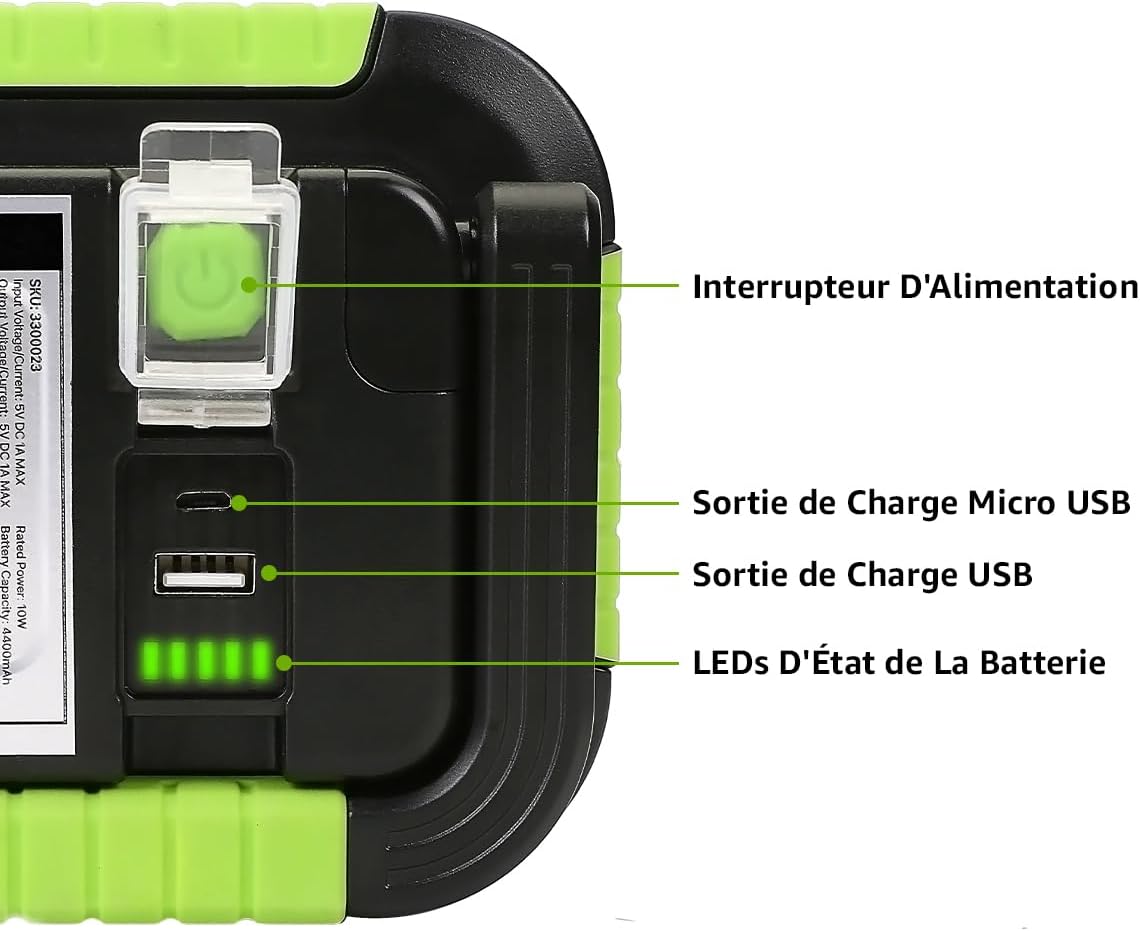
Image: Illustration of the three lighting modes: High Brightness, Low Brightness, and Strobe Light.
- Press the Power Button once to turn on the light in Full Brightness mode (approx. 5 hours runtime).
- Press the Power Button a second time to switch to Low Brightness mode (approx. 9 hours runtime).
- Press the Power Button a third time to activate the Flashing (Strobe) mode.
- Press the Power Button a fourth time to turn off the light.
Using as a Power Bank
The work light can be used to charge other USB-powered devices (e.g., smartphones) in emergency situations.

Image: The work light connected via its USB output port to charge a smartphone, demonstrating its power bank functionality.
- Connect your device's USB charging cable to the USB output port on the work light.
- The work light will begin charging your device. The output is 5V/1A.
- Monitor the battery status LEDs on the work light to ensure sufficient charge remains for its primary function.
Adjusting the Stand
The integrated handle/stand can be rotated up to 180 degrees to direct the light beam or to stand the unit upright on various surfaces.

Image: The work light shown in different angled positions, illustrating the versatility of its adjustable stand.
Maintenance
- Cleaning: Wipe the surface of the light with a soft, damp cloth. Do not use abrasive cleaners or solvents.
- Storage: When not in use for extended periods, store the work light in a cool, dry place. It is recommended to charge the battery every 3 months to maintain its lifespan.
- Battery Care: Avoid fully discharging the battery frequently. Recharge promptly when the battery indicator shows low power.
Troubleshooting
| Problem | Possible Cause | Solution |
|---|---|---|
| Light does not turn on. | Battery is depleted. | Charge the work light fully. |
| Light is dim or flickers. | Low battery charge. | Recharge the work light. |
| Device not charging from USB output. | Work light battery is too low or cable is faulty. | Ensure the work light has sufficient charge. Try a different USB cable. |
| Work light not charging. | Faulty charging cable or adapter. | Try a different USB charging cable and power adapter. Ensure connections are secure. |
Specifications
| Feature | Detail |
|---|---|
| Model Number | 3300023 |
| Light Source Type | LED |
| Brand | Lepro |
| Color | Green |
| Power Source | Battery Powered (Lithium-ion) |
| Material | Aluminum |
| Product Dimensions (L x W x H) | 12.2L x 3.9W x 16.2H cm |
| Max Luminous Flux | 1000 Lumens |
| Battery Type | Lithium-ion (2 included) |
| Water Resistance Level | IP44 (Waterproof) |
| LED Lifespan | 15000 hours |
| Wattage | 10 Watts |
| Voltage | 5 Volts |
| Current Intensity (USB Output) | 1 A |
| Beam Angle | 120 Degrees |
| Color Temperature | 6000 Kelvin (Cool White) |
| Special Features | Dimmable, Flashing Light, Rechargeable, 3 Modes, USB Power Bank, IP44, Adjustable Stand |
| Certifications | CE, ROHS |
| Manufacturer | Lighting EVER |
Warranty and Support
This Lepro product comes with a manufacturer's warranty of 24 months from the date of purchase. This warranty covers defects in materials and workmanship under normal use.
The availability of spare parts is 1 year.
For warranty claims, technical support, or any questions regarding your product, please contact Lepro customer service through the retailer where you purchased the product or visit the official Lepro website for contact information.
Online Support: www.lepro.com
Ask a question about this manual
Ask about setup, troubleshooting, compatibility, parts, safety, or missing instructions. Manuals+ will review the question and use this page’s manual context to help answer it.