
1. Introduction and Overview
The Benro T560 Digital SLR Camera Tripod is designed to provide stable support for your camera equipment, suitable for both photography and video applications. Constructed from aluminum, this portable tripod features a 3-way head for precise control and a quick-release plate for easy camera attachment and removal. Its adjustable design allows for versatile use in various shooting environments.
2. Product Features
- 3-Way Head: Provides independent pan, tilt, and lateral tilt control for precise camera positioning.
- Spirit Level: Integrated bubble level for accurate horizontal alignment.
- Quick-Release Plate: Allows for rapid attachment and detachment of your camera with a standard 1/4"-20 screw and video register pin.
- Adjustable Leg Sections: Four-section aluminum legs with quick-release leg locks for height adjustment.
- Reversible Center Column: Extends for additional height or can be inverted for low-angle shots.
- Versatile Feet: Rubber feet can be rotated to reveal metal spikes for stability on various surfaces.
- Portable Design: Lightweight aluminum construction with a folded length of 16.7 inches (45 cm) for easy transport.
3. Package Contents
- 1 x Benro T560 Tripod (includes 3-way head)
- 1 x Benro Instruction Manual
- 1 x Benro Carrying Bag
4. Setup and Assembly
4.1 Unfolding the Tripod
Carefully remove the tripod from its carrying bag. Extend the legs by releasing the leg locks and pulling each section outwards. Ensure all leg locks are securely fastened once the desired height is achieved. The tripod can reach a maximum height of 56.5 inches (139 cm) with the center column extended, and a minimum height of 14 inches (42.5 cm).

Figure 1: Benro T560 Tripod in its fully extended position, ready for use.

Figure 2: Benro T560 Tripod in its folded, compact state for transport.
4.2 Attaching the Camera
- Locate the quick-release plate on the tripod head.
- Release the quick-release lever and slide the plate off the tripod head.
- Attach the quick-release plate to the bottom of your camera using the 1/4"-20 screw. Ensure it is tightened securely.
- Slide the camera with the attached quick-release plate back onto the tripod head until it clicks into place. Secure the quick-release lever.
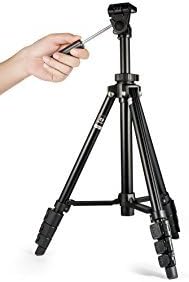
Figure 3: Demonstrating the attachment of the quick-release plate to the tripod head.
Video 1: General demonstration of quick release plate and fluid head operation.
This video illustrates the process of attaching a camera to a tripod head using a quick-release plate and demonstrates the fluid movement of a 3-way pan head. While featuring a different brand, the mechanics are similar to the Benro T560.
5. Operation
5.1 Adjusting Height and Angle
- Leg Adjustment: Unlock the leg section clips to extend or retract the legs to the desired height. Ensure all clips are securely locked before use.
- Center Column: Loosen the center column lock to raise or lower the column for additional height adjustment. Tighten the lock firmly once set.
- Head Movement: Use the handle on the 3-way head to control pan (horizontal rotation) and tilt (vertical movement). Loosen the corresponding knobs for free movement and tighten to lock the position. The head also allows for 90° lateral tilt for portrait orientation by adjusting the side knob.
- Spirit Level: Refer to the integrated spirit level on the tripod head to ensure your camera is perfectly horizontal.
Video 2: General demonstration of tripod leg extension and head adjustment.
This video provides a general overview of extending tripod legs and adjusting the head for various shooting angles. While featuring a different brand, the principles of operation are applicable to the Benro T560.
6. Specifications
| Feature | Specification |
|---|---|
| Brand | Benro |
| Model Number | T560 |
| Material | Aluminum |
| Load Capacity | 5.51 lb (2.5 kg) |
| Pan Range | 360° |
| Tilt Range | 180° |
| Lateral Tilt | 90° |
| Maximum Height (w/o Column Extended) | 56.5" (139 cm) |
| Minimum Height | 14" (42.5 cm) |
| Folded Length | 16.7" (45 cm) |
| Leg Sections | 4 |
| Item Weight | 948 Grams |
| Tripod Head Type | Pan Heads |
| Compatible Devices | Camcorder, Camera (DSLR, Mirrorless) |
7. Maintenance
- Cleaning: Wipe down the tripod with a soft, dry cloth after each use to remove dust and dirt. For stubborn grime, use a slightly damp cloth and mild soap, then dry thoroughly. Avoid harsh chemicals.
- Lubrication: Periodically check moving parts for smooth operation. If any part feels stiff, apply a small amount of silicone-based lubricant.
- Storage: Store the tripod in its included carrying bag in a cool, dry place away from direct sunlight and extreme temperatures.
- Inspection: Regularly inspect all screws, levers, and leg locks to ensure they are tight and functioning correctly.
8. Troubleshooting
- Tripod Instability:
- Ensure all leg sections are fully extended and their locks are securely fastened.
- Verify the center column lock is tightened.
- Check that the tripod is placed on a stable, level surface. Utilize the metal spikes if on soft ground.
- Stiff Head Movement:
- Ensure the pan and tilt locking knobs are sufficiently loosened.
- Clean any debris from the head mechanism.
- Camera Not Secure:
- Confirm the quick-release plate is firmly attached to the camera and the quick-release lever on the tripod head is fully engaged and locked.
9. Safety Information
- Do not exceed the maximum load capacity of 5.51 lb (2.5 kg) to prevent damage to the tripod and attached equipment.
- Always ensure the tripod is stable and all locks are secured before mounting your camera or leaving it unattended.
- Avoid placing the tripod in areas where it could be easily knocked over.
- Keep hands and fingers clear of moving parts, especially during leg extension and retraction.
- Do not attempt to modify the tripod, as this may compromise its stability and void any warranty.
10. Warranty and Support
For warranty information or technical support regarding your Benro T560 Tripod, please refer to the specific warranty documentation included with your product or contact Benro customer service directly. Keep your purchase receipt as proof of purchase.

