
1. Product Overview
This BOMAZ replacement remote controller is designed to function as a direct substitute for your original Panasonic TV remote. It features a slim and ergonomic design for comfortable handling. This remote is ready to use without any complex setup procedures.
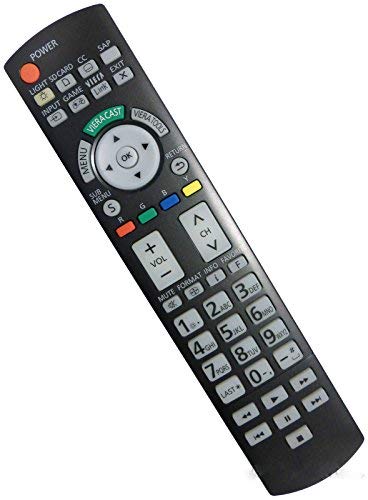
Image 1.1: The BOMAZ Replacement Remote Controller, showcasing its button layout and ergonomic design.
Compatible Panasonic TV Models:
- TC-P50VT25
- TC-P65ST30
- TC-P50V10
- TC-P55ST30
- TC-P58VT25
2. Setup
The BOMAZ replacement remote controller requires two AA batteries for operation. No programming or pairing is necessary; simply insert the batteries, and the remote is ready to control your compatible Panasonic TV.
- Locate the battery compartment on the back of the remote control.
- Slide the battery compartment cover downwards or in the direction indicated by an arrow to open it.
- Insert two (2) AA batteries, ensuring the positive (+) and negative (-) terminals align correctly with the markings inside the compartment.
- Replace the battery compartment cover by sliding it back into position until it clicks securely.
3. Operating Instructions
Once batteries are installed, point the remote control directly at your Panasonic TV and press the desired function buttons. The remote operates using infrared (IR) technology.
- Power Button: Press to turn the TV on or off.
- Channel Buttons: Use "CH+" and "CH-" to change channels.
- Volume Buttons: Use "VOL+" and "VOL-" to adjust the volume.
- Mute Button: Press to mute or unmute the TV audio.
- Navigation Buttons: Use the arrow keys (Up, Down, Left, Right) and "OK" button to navigate menus and confirm selections.
- Input/Source Button: Press to cycle through available input sources (HDMI, AV, etc.).
The effective operating distance for this remote is more than 8 meters (approximately 26 feet).
4. Maintenance
Proper maintenance ensures the longevity and optimal performance of your remote control.
- Cleaning: Wipe the remote with a soft, dry cloth. Do not use liquid cleaners or abrasive materials, as they may damage the surface or internal components.
- Battery Replacement: Replace batteries when the remote's response becomes sluggish or it stops functioning. Always replace both batteries at the same time with new AA batteries.
- Storage: If the remote will not be used for an extended period, remove the batteries to prevent leakage and potential damage.
5. Troubleshooting
If you encounter issues with your remote control, refer to the following troubleshooting steps:
- Remote is not responding:
- Ensure the batteries are inserted correctly with the correct polarity (+/-).
- Replace old batteries with new AA batteries.
- Check for any obstructions between the remote and the TV's infrared sensor.
- Ensure you are within the operating range (within 8 meters) and pointing the remote directly at the TV.
- Buttons are not working:
- Clean the remote's surface and buttons to remove any dirt or debris that might be obstructing button presses.
- If only specific buttons are not working, it might indicate a fault with the remote.
6. Specifications
| Feature | Detail |
|---|---|
| Brand | BOMAZ |
| Model Number | 8541714718 |
| Connectivity Technology | Infrared |
| Maximum Range | 8 Meters |
| Battery Type | 2 AA batteries (not included) |
| Compatible Devices | Panasonic Televisions |
| Special Feature | Ergonomic design, No setup required |
| Material | ABS Material |
7. Warranty and Support
This BOMAZ replacement remote controller comes with a 30-day warranty from the date of purchase.
If you encounter any issues with your remote control, or if the remote you receive has a problem, please do not hesitate to contact the seller for assistance. We test every remote before shipment to ensure quality.
For support, please refer to your purchase documentation or the seller's contact information provided at the time of purchase.