
Introduction
Thank you for purchasing the SoundLogic XT Wireless Bluetooth Touchlight Speaker. This device combines a portable wireless speaker with a versatile color-changing lamp, offering both audio entertainment and ambient lighting. This manual provides detailed instructions on how to set up, operate, and maintain your speaker to ensure optimal performance.
Package Contents
Please check the box for the following items:
- SoundLogic XT Touchlight Speaker
- USB Charging Cable
- AUX Cable
- Instruction Manual (this document)
Product Overview
Familiarize yourself with the main components of your SoundLogic XT Touchlight Speaker.

Figure 1: SoundLogic XT Touchlight Speaker. The top surface is touch-sensitive for light control, and control buttons are located on the side.
- Touch Sensor Top: Controls light brightness and color modes.
- Speaker Grille: Audio output.
- Microphone: For hands-free calls.
- Control Buttons: Power, Volume, Play/Pause, Mode selection (located on the side/bottom).
- Charging Port (Micro USB): For recharging the internal battery.
- AUX-in Port: For wired audio connection.
- Micro SD Card Slot (TF Slot): For playing music directly from a memory card.
Setup
Charging the Speaker
Before first use, fully charge the speaker. The built-in rechargeable battery provides up to 5 hours of play time.
- Ensure the speaker is OFF.
- Connect the small end of the USB charging cable to the speaker's charging port.
- Connect the large end of the USB charging cable to a USB power adapter (not included) or a computer's USB port.
- A red LED indicator will illuminate to show that the speaker is charging.
- The red LED will turn off or change color when charging is complete.
Powering On/Off
- To power on, press and hold the Power button until you hear an audible prompt.
- To power off, press and hold the Power button again until you hear an audible prompt.
Operating Instructions
Bluetooth Pairing
The speaker supports Bluetooth Version 2.1 + EDR with a range of 27-33 feet (approximately 8-10 meters).
- Ensure the speaker is powered on and in Bluetooth pairing mode (indicated by a flashing blue LED or audible prompt).
- On your Bluetooth-enabled device (smartphone, tablet, laptop), go to the Bluetooth settings.
- Search for available devices. You should see "SoundLogic XT" or a similar name appear in the list.
- Select "SoundLogic XT" to connect. Once paired, you will hear a confirmation sound, and the LED indicator will stop flashing.
- You can now stream music wirelessly from your device to the speaker.
Note: The speaker will automatically try to reconnect to the last paired device when powered on.
Light Control (Touch Sensor)
The top surface of the speaker is a touch sensor for controlling the light features.
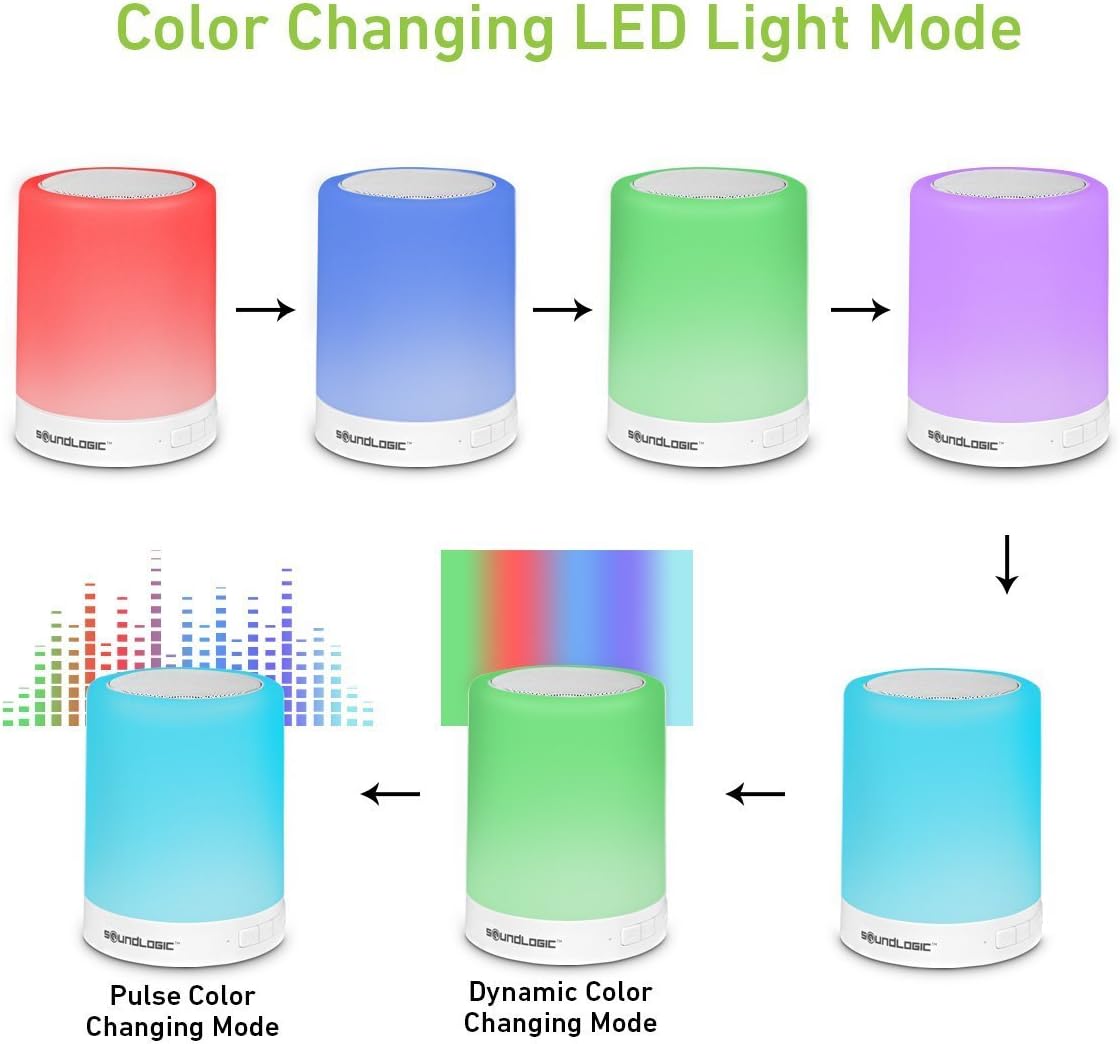
Figure 2: Various Color Changing LED Light Modes.
- Brightness Adjustment: Lightly tap the top surface to cycle through three brightness settings (Low, Medium, High) for white light.
- Color Changing Modes: Press and hold the top surface to switch to color changing mode. Tap again to cycle through 7 different multicolor modes, including static colors (red, blue, green, purple, etc.), pulse color changing, and dynamic color changing.
- Turn Light Off: Continue tapping through the modes until the light turns off.
Audio Playback (Bluetooth/AUX/Micro SD)
- Volume Control: Use the volume buttons on the speaker or your connected device to adjust the volume.
- Play/Pause: Press the Play/Pause button on the speaker to pause or resume playback.
- Next/Previous Track: Use the track skip buttons on the speaker (if available) or your connected device.
- AUX Mode: Insert the provided AUX cable into the speaker's AUX-in port and connect the other end to your audio device's headphone jack. The speaker will automatically switch to AUX mode.
- Micro SD Card Mode: Insert a Micro SD card (TF card) with MP3 files into the designated slot. The speaker will automatically detect and play music from the card.
Hands-Free Calling
When connected via Bluetooth, the built-in microphone allows for hands-free calling.
- Answer Call: Press the Play/Pause button once to answer an incoming call.
- End Call: Press the Play/Pause button once during a call to end it.
- Reject Call: Press and hold the Play/Pause button to reject an incoming call.
Maintenance
- Cleaning: Wipe the speaker with a soft, dry cloth. Do not use abrasive cleaners or solvents.
- Storage: Store the speaker in a cool, dry place away from direct sunlight and extreme temperatures.
- Battery Care: To prolong battery life, avoid fully discharging the battery frequently. Recharge the speaker regularly, even if not in use for extended periods.
Troubleshooting
| Problem | Possible Cause | Solution |
|---|---|---|
| Speaker does not turn on. | Battery is depleted. | Charge the speaker fully using the provided USB cable. |
| Cannot pair with Bluetooth device. | Speaker is not in pairing mode; Device Bluetooth is off; Speaker is too far from device; Already connected to another device. | Ensure speaker is in pairing mode (flashing LED). Turn on Bluetooth on your device. Move device closer to speaker (within 33 feet). Disconnect from other devices. |
| No sound from speaker. | Volume is too low; Incorrect mode selected; Device not playing audio. | Increase volume on speaker and device. Ensure correct mode (Bluetooth, AUX, SD) is active. Check if audio is playing on the connected device. |
| Light function not working. | Speaker is off; Incorrect touch input. | Ensure speaker is powered on. Lightly tap or press and hold the top surface as per instructions. |
Specifications
| Model Number | TLS-6/0258 |
| Connectivity Technology | Bluetooth |
| Bluetooth Version | 2.1 + EDR |
| Wireless Range | 27-33 Feet (approx. 8-10 meters) |
| Speaker Output Power | 3.5 Watts |
| Battery Life | Up to 5 Hours |
| Compatible Devices | Laptop, Tablet, Smartphone |
| Dimensions (L x W x H) | 9.91 x 9.91 x 12.7 cm |
| Item Weight | 467 Grams |
| Light Modes | 3 Brightness settings (white), 7 Multi-Colored Light Modes |
| Manufacturer | Midwest Trading Group |
Warranty and Support
For warranty information or technical support, please refer to the contact details provided with your purchase documentation or visit the official SoundLogic XT website. Please retain your proof of purchase for any warranty claims.