
1. Introduction
This manual provides essential information for the installation, operation, and maintenance of your ASUS GeForce GTX 1070 TI Turbo Edition graphics card. This card is powered by NVIDIA Pascal architecture, featuring 8GB GDDR5 memory and 2432 CUDA cores, designed for demanding graphical applications and virtual reality experiences.
Key features include a dual-ball bearing fan design for extended lifespan, Auto-Extreme manufacturing with Super Alloy Power II components for enhanced reliability, and a customizable backlit logo plate.

Figure 1: The ASUS GeForce GTX 1070 TI Turbo Edition graphics card, shown alongside its retail packaging, highlights the product's design and branding.
2. Setup
2.1. Installation Steps
- Preparation: Power off your computer and disconnect all cables. Open the computer case. It is recommended to wear an anti-static wrist strap to prevent electrostatic discharge.
- Locate PCIe Slot: Identify an available PCI Express x16 slot on your motherboard.
- Insert Graphics Card: Carefully align the graphics card with the PCIe slot and press down firmly until it is securely seated. Ensure the retention clip locks into place.
- Connect Power: Connect the required 8-pin PCI Express power connector from your power supply unit (PSU) to the graphics card. A minimum 500-watt PSU is recommended for stable operation.
- Secure Card: Fasten the graphics card to the computer case using the screw provided with your case.
- Close Case: Close your computer case and reconnect all cables.
- Connect Display: Connect your monitor(s) to the graphics card using DisplayPort, HDMI, or DVI-D cables.
- Power On: Power on your computer.
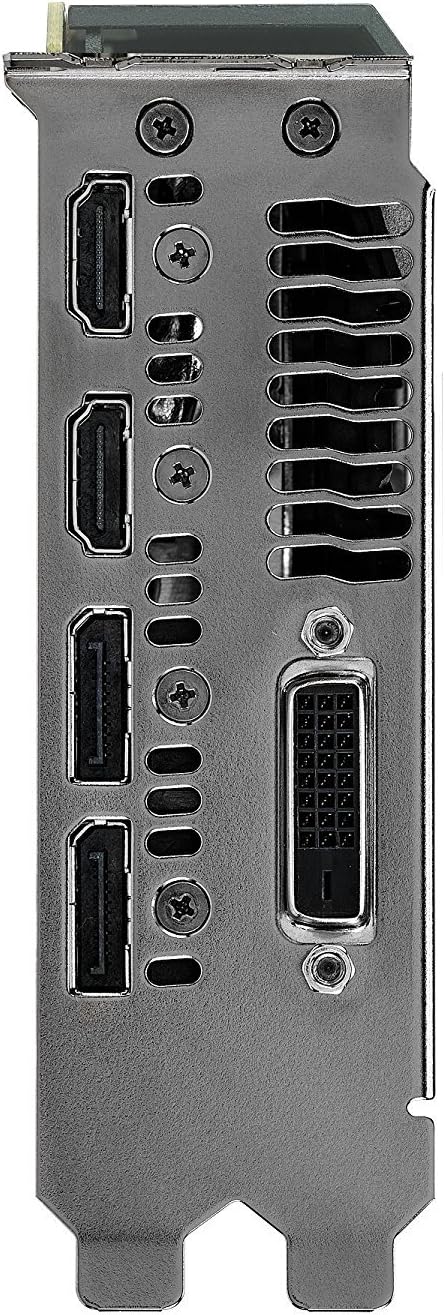
Figure 2: This image displays the available video output ports on the graphics card, including DisplayPort, HDMI, and DVI-D connectors.
2.2. Driver Installation
After physical installation, it is crucial to install the latest graphics drivers. You can download these from the official ASUS support website or NVIDIA's website. Follow the on-screen instructions to complete the driver installation.
3. Operating
3.1. Software Utilities
The ASUS Turbo GTX 1070 Ti is compatible with GPU Tweak II software. This utility allows for monitoring performance, adjusting clock speeds, and optimizing graphics settings. Refer to the GPU Tweak II documentation for detailed usage instructions.
3.2. Display Configuration
The graphics card supports multiple display configurations. Use your operating system's display settings to configure extended desktop, duplicate displays, or other multi-monitor setups.
4. Maintenance
4.1. Cleaning
Regular cleaning helps maintain optimal performance and extends the lifespan of your graphics card. Use compressed air to gently remove dust from the fans and heatsink fins. Ensure the computer is powered off and unplugged before cleaning.
4.2. Driver Updates
Periodically check for and install the latest graphics drivers from the ASUS or NVIDIA websites. Driver updates often include performance enhancements, bug fixes, and compatibility improvements for new games and applications.
5. Troubleshooting
- No Display Output: Ensure the graphics card is properly seated in the PCIe slot and the 8-pin power connector is securely attached. Verify that display cables are correctly connected to both the graphics card and the monitor.
- Performance Issues: Update your graphics drivers to the latest version. Check for overheating by monitoring GPU temperatures using software like GPU Tweak II. Ensure your power supply meets the recommended wattage.
- System Instability/Crashes: Reseat the graphics card in its PCIe slot. Check for adequate power delivery from your PSU. Ensure your system's cooling is sufficient to prevent overheating.
6. Specifications
| Feature | Specification |
|---|---|
| Graphics Coprocessor | NVIDIA GeForce GTX 1070 TI |
| Brand | ASUS |
| Graphics RAM Size | 8 GB GDDR5 |
| Video Output Interface | DisplayPort, HDMI, DVI-D |
| Graphics Processor Manufacturer | NVIDIA |
| Item Model Number | TURBO-GTX1070TI-8G |
| Product Dimensions | 10.5 x 1.5 x 4.38 inches |
| Item Weight | 2.5 pounds |
| Max Power Consumption | 180 watts (requires 8-pin PCI Express power connector) |
| Recommended PSU | 500 watts |

Figure 3: This image details the graphics card's internal components, emphasizing the Auto-Extreme manufacturing process and Super Alloy Power II for enhanced reliability.
7. Warranty and Support
7.1. Warranty Information
Your ASUS GeForce GTX 1070 TI Turbo Edition graphics card comes with a limited manufacturer's warranty. Please refer to the warranty card included in your product packaging or visit the official ASUS website for detailed terms and conditions.
7.2. Technical Support
For technical assistance, driver downloads, or further product information, please visit the official ASUS support website at www.asus.com/support/.