
1. Introduction
Thank you for purchasing the Medeli DD620NR Electronic Drum Kit. This comprehensive electronic drum kit is designed for both practice and performance, offering a rich set of features to enhance your drumming experience. It includes advanced functions such as Auto-Fill (AFI), Double Bass Trigger (DBT), and a Coach mode to assist in learning and skill development. With 226 high-quality sounds, 25 preset drum kits, and 60 sequencer patterns, the DD620NR provides versatility for various musical styles. This manual will guide you through the setup, operation, maintenance, and troubleshooting of your new instrument.
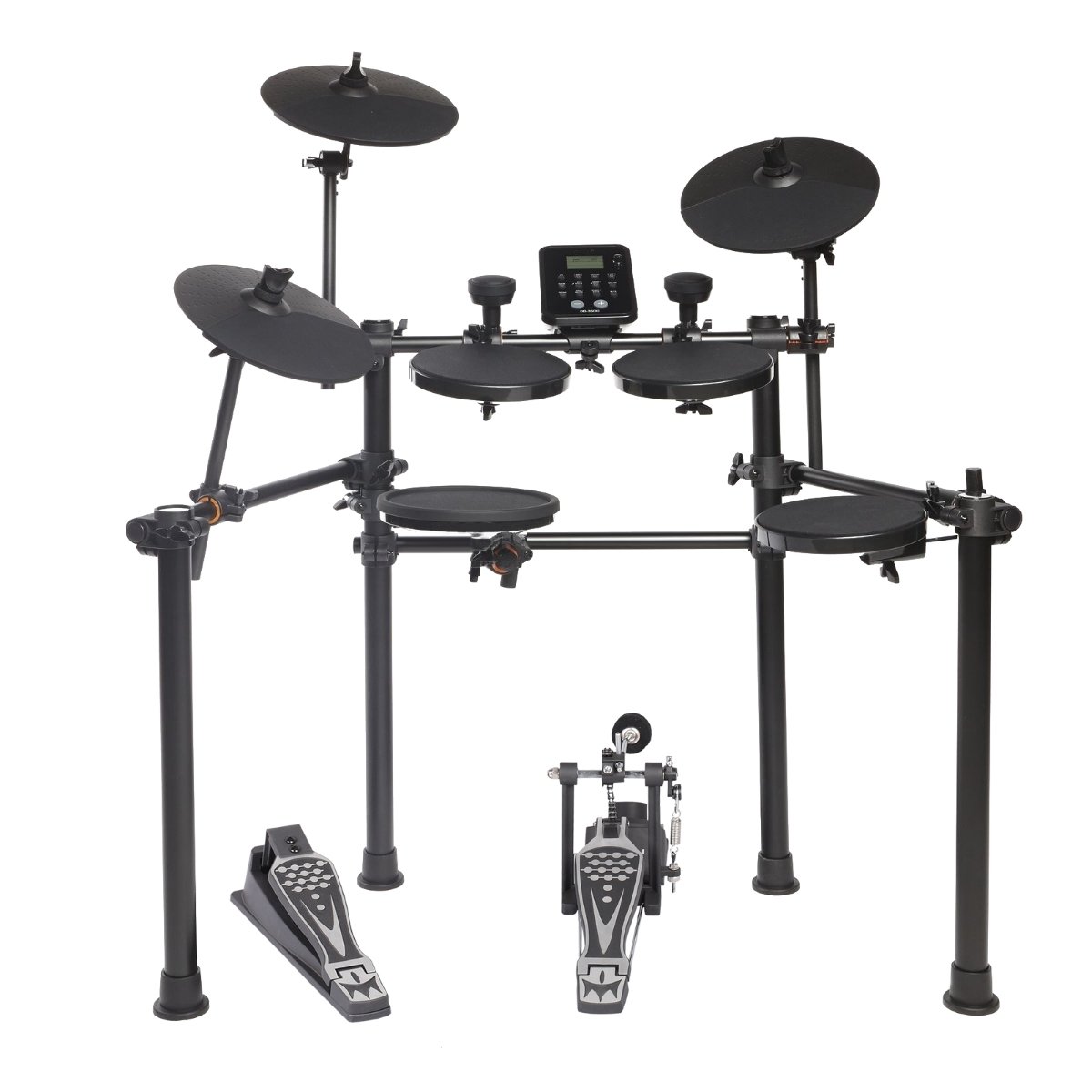
Figure 1.1: The Medeli DD620NR Electronic Drum Kit, showcasing its compact and robust design.
2. Safety Information
Please read these safety instructions carefully before using your Medeli DD620NR Electronic Drum Kit to ensure safe and optimal performance. Keep this manual for future reference.
- Power Supply: Use only the specified power adapter. Ensure the voltage matches your local power supply.
- Water and Moisture: Do not expose the unit to rain, moisture, or excessive humidity. Keep liquids away from the drum kit.
- Ventilation: Do not block any ventilation openings. Ensure adequate airflow around the module.
- Placement: Place the drum kit on a stable, level surface to prevent it from falling. Avoid placing it near heat sources or in direct sunlight.
- Cleaning: Clean the unit only with a dry, soft cloth. Do not use abrasive cleaners or solvents.
- Servicing: Do not attempt to service the unit yourself. Refer all servicing to qualified service personnel.
- Children: Keep small parts and packaging materials out of reach of children to prevent choking hazards.
3. Setup
3.1 Package Contents
Before assembly, please verify that all components are present in the package:
- DD620NR Drum Module
- Drum Pads (Snare, Tom x3, Crash x2, Ride, Hi-Hat)
- Kick Pad and Kick Pedal
- Hi-Hat Control Pedal
- Drum Rack Frame
- Cables for Pad Connections
- Power Adapter
- User Manual (this document)
- Drum Sticks (optional, may vary by region)
3.2 Assembly Instructions
Follow these steps to assemble your drum kit:
- Unpack Components: Carefully remove all parts from the packaging.
- Assemble the Rack: Connect the frame tubes as shown in the assembly diagram. Ensure all clamps are securely tightened.
- Mount Pads and Cymbals: Attach the snare, tom pads, and cymbal pads (crash, ride, hi-hat) to the rack using the provided clamps and arms. Adjust their positions for comfortable playing.
- Position Kick Pad and Pedals: Place the kick pad in front of the rack and attach the kick pedal. Position the hi-hat control pedal on the floor.
- Mount Drum Module: Secure the DD620NR drum module to the rack using its dedicated mount.

Figure 3.1: Assembly diagram illustrating the correct placement and connection points for the drum kit components.
3.3 Connecting the Cables
Once the physical assembly is complete, connect the pads and pedals to the drum module:
- Pad Cables: Connect each drum pad and cymbal pad to its corresponding input on the DD620NR module using the included trigger cables. Labels on the module indicate "Snare," "Tom1," "Crash," etc.
- Pedal Cables: Connect the kick pad cable and the hi-hat control pedal cable to their respective inputs on the module.
- Power Adapter: Connect the power adapter to the DC IN jack on the module, then plug it into a wall outlet.
- Audio Output: For sound, connect headphones to the PHONES jack or connect the OUTPUT jacks to an amplifier, mixer, or speakers.
- USB/MIDI: To connect to a computer, use a standard USB cable to connect the module's USB TO HOST port to your computer.
- Auxiliary Input: To play along with external audio, connect a mobile device or audio player to the AUX IN jack.
4. Operating Instructions
This section details the basic operation and functions of your DD620NR drum kit.
4.1 Power On/Off
- Power On: Press the POWER button located on the drum module. The display will illuminate.
- Power Off: Press and hold the POWER button until the display turns off. Always power off the unit when not in use.
4.2 Basic Functions
The DD620NR module features an intuitive control panel for accessing various functions.

Figure 4.1: The DD620NR drum module control panel, showing the display, navigation buttons, and function keys.
- Drum Kit Selection: Use the KIT button and the +/- buttons or data dial to select from 25 preset drum kits or 5 user-defined kits.
- Sound Selection: In Voice mode, use the VOICE button and +/- buttons to browse through 226 available sounds.
- Sequencer (Patterns): Press the SONG button to enter sequencer mode. Use +/- to select from 60 preset patterns or 1 user-defined pattern. Press START/STOP to play/pause.
- Auto-Fill (AFI): This function automatically adds drum fills to your playing. Refer to the module's display and dedicated button (if present) for activation and settings.
- Double Bass Trigger (DBT): Enhances the response for double bass drumming techniques. Consult the module's settings menu for configuration.
- Coach Function: Engage the COACH mode to access various exercises and timing drills designed to improve your drumming skills.
4.3 Connectivity
- Mobile Device Connection: Connect your smartphone or tablet to the AUX IN jack using a stereo audio cable. You can then play along with your favorite music through the drum kit's audio output.
- USB/MIDI Connection: The USB TO HOST port allows you to connect the DD620NR to a computer. This enables MIDI communication for recording, using virtual instruments, or updating firmware (if applicable). No special drivers are usually required for basic MIDI functionality on modern operating systems.
5. Maintenance
Proper maintenance will ensure the longevity and optimal performance of your Medeli DD620NR.
- Cleaning: Regularly wipe down the drum pads, cymbals, and module with a soft, dry, lint-free cloth. For stubborn dirt, a slightly damp cloth can be used, followed immediately by a dry cloth. Avoid using chemical cleaners, waxes, or solvents.
- Pad Care: Avoid striking the pads with excessive force, which can reduce their lifespan. Rotate pad positions periodically to distribute wear evenly.
- Cable Management: Keep cables neatly organized and avoid sharp bends or kinks. Periodically check cable connections for looseness.
- Storage: When not in use for extended periods, store the drum kit in a clean, dry environment away from extreme temperatures and direct sunlight. If disassembling, store components carefully to prevent damage.
6. Troubleshooting
If you encounter issues with your DD620NR, refer to the following common problems and solutions:
| Problem | Possible Cause | Solution |
|---|---|---|
| No sound from headphones/speakers. | Volume too low; cables disconnected; incorrect output selected. | Check master volume and individual pad volumes. Ensure headphones/speakers are properly connected and powered on. Verify correct output (PHONES/OUTPUT) is used. |
| A specific pad is not triggering sound. | Pad cable loose or damaged; pad sensitivity too low; pad faulty. | Check the cable connection for the specific pad at both the pad and module ends. Adjust pad sensitivity in the module settings. If issue persists, try swapping cables with a working pad to isolate the problem. |
| Module does not power on. | Power adapter not connected; power outlet faulty; adapter damaged. | Ensure the power adapter is securely connected to the module and a working power outlet. Try a different outlet. Verify the power adapter is the correct one for the unit. |
| MIDI connection to computer not working. | USB cable faulty; incorrect driver/software settings; module not recognized. | Try a different USB cable. Ensure your computer's software (DAW, MIDI utility) is configured to recognize the DD620NR as a MIDI input device. Restart both the module and computer. |
If the problem persists after trying these solutions, please contact Medeli customer support.
7. Specifications
- Model: Medeli DD620NR
- Sounds: 226
- Drum Kits: 25 Preset, 5 User-defined
- Sequencer Patterns: 60 Preset, 1 User-defined
- Functions: Auto-Fill (AFI), Double Bass Trigger (DBT), Coach Mode
- Connectivity: USB TO HOST (MIDI), AUX IN, PHONES Out, OUTPUT L/MONO, R
- Manufacturer: MEDELI
- Manufacturer Reference: E010E
- ASIN: B0774RDYY7
- Product Launch Date: 4 November 2017
8. Warranty and Support
Medeli products are manufactured to high-quality standards and are backed by a limited warranty. Please refer to the warranty card included with your product or visit the official Medeli website for detailed warranty terms and conditions specific to your region.
For technical support, service, or inquiries regarding your Medeli DD620NR, please contact your local dealer or visit the official Medeli support website. Have your product model and serial number ready when contacting support.


