
1. Introduction
Whether recording in government halls, wedding venues, events or corporate environments, the XA11 Professional Camcorder delivers high performance and quality in a powerful, versatile and portable package. This manual provides essential information for setting up, operating, and maintaining your camcorder.
Key features include:
- Genuine Canon 20x High Definition Optical Zoom Lens
- New, Advanced HD CMOS Pro Image Sensor with Improved Low-light Performance
- Full HD 1920x1080 Recording Capabilities
- 3.0-inch LCD Capacitive Touchscreen with Tiltable Electronic Viewfinder
- Video Recording System: Compression: MPEG-4 AVC/H.26. Television System: NTSC
2. What's in the Box
Upon unpacking your Canon XA11 Professional Camcorder, ensure all the following items are present:
- XA11 Camcorder Body
- Lens Hood (with Lens Barrier)
- Battery Pack BP-820
- Compact Power Adapter CA-570
- Handle Unit HDU-1
- Mic Holder
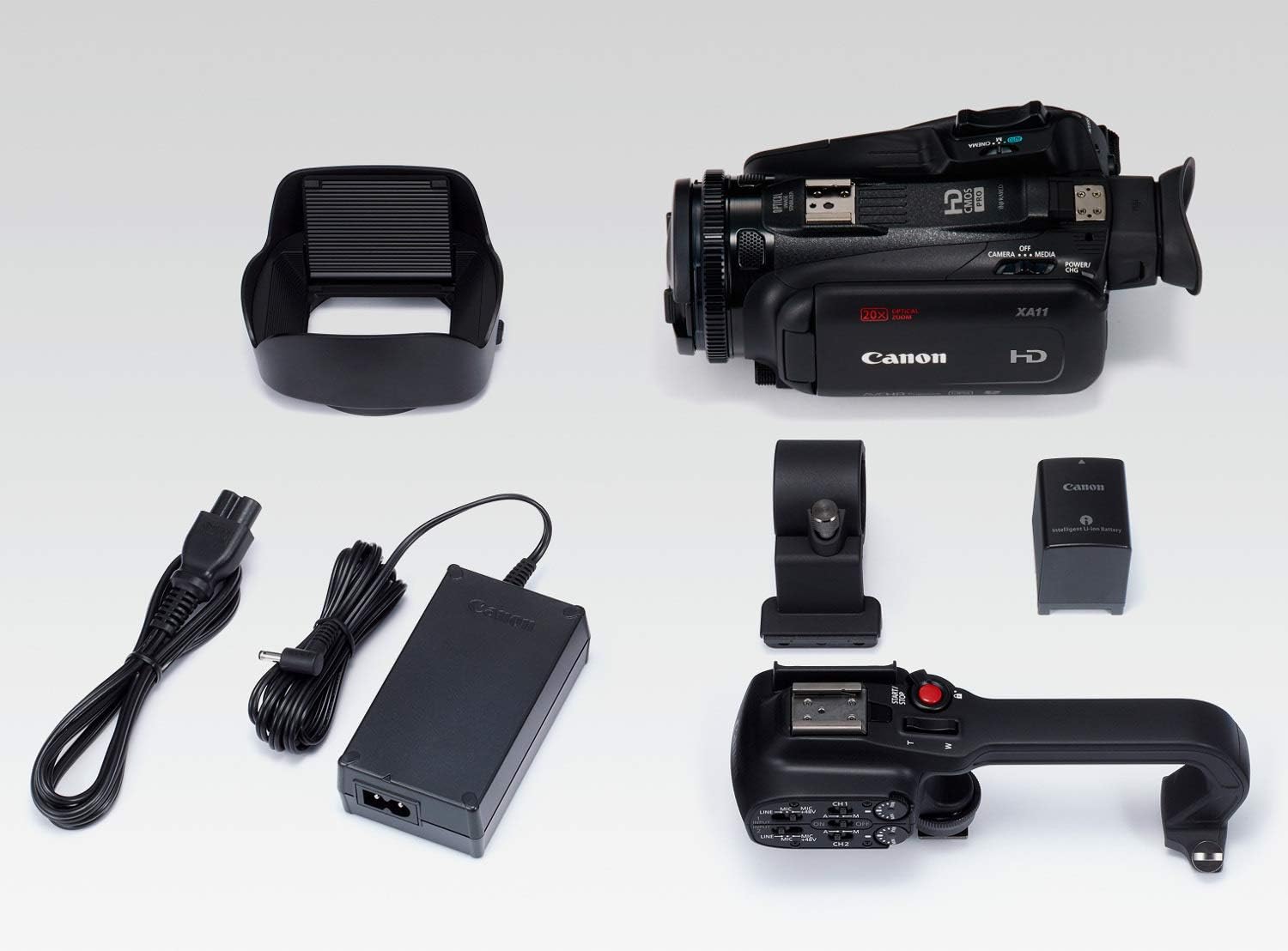
Image: All components included in the Canon XA11 Professional Camcorder package, laid out on a white surface.
3. Setup and Initial Operation
3.1 Attaching the Handle Unit
The detachable handle unit provides expanded audio performance and added flexibility. Align the handle unit with the hot shoe mount on top of the camcorder and secure it firmly.

Image: The Canon XA11 camcorder with its detachable handle unit, showing the top-mounted audio controls and microphone holder.
3.2 Powering On and Battery Installation
Insert the provided Battery Pack BP-820 into the battery slot at the rear of the camcorder. Connect the Compact Power Adapter CA-570 for charging or continuous power. The camcorder requires 1 Lithium Ion battery (included).

Image: Rear view of the Canon XA11 camcorder, highlighting the battery compartment and various input/output ports.
3.3 Inserting SD Cards
The camcorder supports dual SD card slots for simultaneous or relay recording. Insert SDXC memory cards into slots A and B. This allows for extended recording times and instant backup of your footage.
4. Operating the Camcorder
4.1 Lens and Zoom
The Canon XA11 features a Genuine Canon 20x High Definition Optical Zoom Lens with a focal length range of 26.8mm (wide) to 576mm (tele) at f/1.8 to f/2.8. This broad spectrum covers various shooting scenarios while maintaining a compact design.
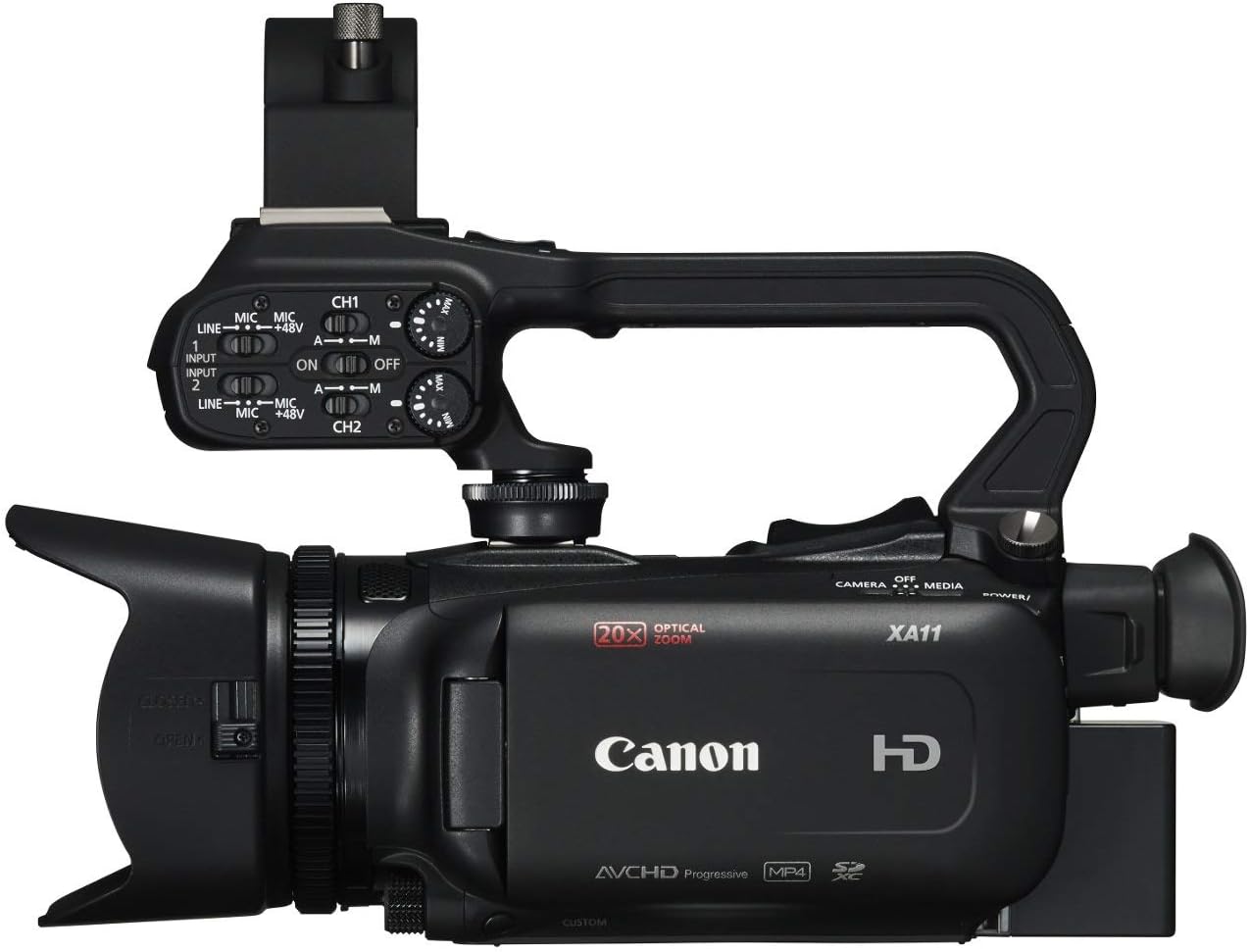
Image: Frontal view of the Canon XA11 Professional Camcorder, showcasing its lens and lens hood.
4.2 Image Stabilization
The 5-axis image stabilization system helps reduce image blur, even when zooming far into the distance or while walking. It supports three modes: Dynamic IS, Macro IS, and Powered IS. Intelligent IS can automatically detect movement and apply the proper stabilization mode.
4.3 Recording Modes and Formats
The camcorder supports Full HD 1920x1080 recording in both AVCHD and MP4 codecs at multiple bit rates and up to 60p. Dual slot recording allows simultaneous recording to both SD memory cards for instant backup, or relay recording to extend recording times by automatically switching cards when one becomes full.
Slow & Fast Recording allows you to record from 0.4x up to 1200x, offering a variety of slow-motion and time-lapse effects.
4.4 Display and Controls
The 3.0-inch LCD Capacitive Touchscreen with a tiltable Electronic Viewfinder (EVF) provides clear visibility. Operations can be performed quickly and intuitively from the large touch panel. The EVF is a 1.56 million dot display, ensuring fine details are displayed crisply and clearly, even under bright outdoor conditions.

Image: The Canon XA11 camcorder with its LCD screen articulated outwards, showing the touch interface.
4.5 Look Modes
The XA11 features three look modes to enhance the recording's visual quality:
- Standard: For a practically finished look.
- Wide DR Gamma: Helps deliver an expansive range of colors and tones.
- Highlight Priority: Ensures colors and tones are consistent with how they're seen by the naked eye, especially in bright areas.
The View Assist Function allows you to adjust the brightness and gamma settings of the LCD panel and EVF to ensure subjects are displayed and captured in the most realistic way.
4.6 Inputs and Outputs
The camcorder provides extensive connectivity options:
- USB Connection
- HDMI 2.0 Port
- Microphone Input
- Dedicated Headphone Jack
- Remote Terminal
- Two built-in XLR audio input terminals with Phantom Power (on handle unit)
These terminals are optimally positioned to the left and right of the grip area, allowing for handheld shooting while cables are attached.
5. Maintenance
To ensure the longevity and optimal performance of your Canon XA11 Professional Camcorder:
- Keep the lens and LCD screen clean using a soft, lint-free cloth specifically designed for optical surfaces.
- Avoid exposing the camcorder to extreme temperatures, humidity, or dust.
- Store the camcorder in a dry, cool place when not in use, preferably in a protective case.
- Regularly check for firmware updates on the official Canon website to ensure the best performance and compatibility.
6. Specifications
| Feature | Detail |
|---|---|
| Brand | Canon |
| Model Number | 2218C002 |
| Photo Sensor Technology | CMOS |
| Video Capture Resolution | 1080p |
| Optical Zoom | 20x |
| Digital Zoom | 20x |
| Screen Size | 3 Inches |
| Connectivity Technology | XLR, USB, HDMI |
| Image Stabilization | Electronic, Optical (5-axis) |
| Item Weight | 4.75 Pounds |
| Battery Average Life | 165 minutes |
| Video Capture Format | AVCHD format and web-ready MP4 format |
| Supported Audio Format | AAC, PCM |
7. Official Product Video
Watch this official video from Canon for an overview of the XA11 Professional Camcorder's features and capabilities.
Video: An official Canon video demonstrating the key features and benefits of the Canon XA11 Professional Camcorder, including its imaging system, zoom capabilities, image stabilization, recording modes, and various input/output options.
8. Warranty and Support
The Canon XA11 Professional Camcorder comes with a 1 Year Limited Warranty.
For further support, product details, and additional resources, please visit the official Canon Store:


