
Introduction
Thank you for purchasing the SAMVIX BT Box BASS X65 Wireless Bluetooth Speaker System. This manual provides essential information for setting up, operating, and maintaining your speaker. Please read it carefully to ensure optimal performance and longevity of your device.
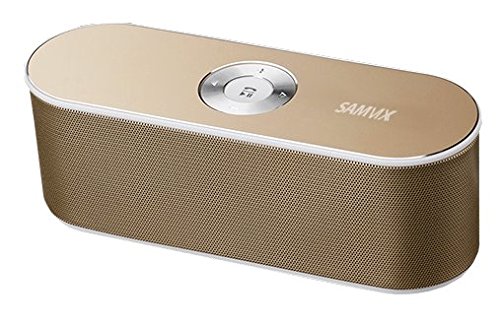
Image: The SAMVIX BT Box BASS X65 speaker in gold, positioned next to a laptop and a smartphone, demonstrating its portable design and connectivity.
Product Overview: Controls and Ports
Familiarize yourself with the speaker's controls and connection ports for proper operation.

Image: A detailed diagram illustrating the top and rear panels of the SAMVIX BT Box BASS X65 speaker, labeling the 3.5mm audio port, Line In/On/Off switch, USB port, Micro SD port, Micro USB input, and the central control buttons for volume, track navigation, and play/pause/answer.
- Central Control Buttons:
- Play/Pause/Answer: Press to play or pause music. Press to answer or end a call.
- Forward: Press to skip to the next track.
- Previous: Press to go to the previous track.
- Volume Increase: Press to increase volume.
- Volume Decrease: Press to decrease volume.
- 3.5 mm Audio Port (AUX-IN): For wired connection to audio devices.
- Line In / On / Off Switch: Power switch for the speaker.
- USB Port: For playing music from a USB flash drive.
- Micro SD Port (TF Card): For playing music from a Micro SD card.
- Micro USB Input (DC IN): For charging the speaker.
Setup
1. Charging the Speaker
Before first use, fully charge the speaker. Connect the provided Micro USB cable to the speaker's Micro USB Input port and the other end to a USB power source (e.g., computer USB port, USB wall adapter). The charging indicator will illuminate during charging and turn off when fully charged. A full charge provides approximately 8 hours of playback at 50% volume.
2. Powering On/Off
Locate the Line In / On / Off switch on the rear panel. Slide the switch to the 'On' position to power on the speaker. Slide it to 'Off' to power off.
Operating Instructions
1. Bluetooth Pairing
To connect your speaker wirelessly via Bluetooth:
- Ensure the speaker is powered on. It will automatically enter Bluetooth pairing mode, indicated by a flashing LED light.
- On your smartphone, tablet, or other Bluetooth-enabled device, go to the Bluetooth settings.
- Search for available devices and select "SAMVIX X65" (or similar) from the list.
- Once connected, the speaker will emit a confirmation tone, and the LED light will stop flashing.

Image: A silver SAMVIX BT Box BASS X65 speaker next to a smartphone, illustrating the wireless Bluetooth connection process.
The speaker has a wireless Bluetooth range of up to 100 unobstructed feet.
2. AUX-IN Connection
For devices without Bluetooth, use the 3.5mm audio port:
- Connect one end of a 3.5mm audio cable (not included) to the speaker's 3.5 mm Audio Port.
- Connect the other end to the headphone jack or audio output of your device.
- The speaker will automatically switch to AUX mode.
3. USB Flash Drive Playback
To play music from a USB flash drive:
- Insert a USB flash drive containing audio files into the USB Port.
- The speaker will automatically detect the drive and begin playing music.
4. Micro SD Card Playback
To play music from a Micro SD (TF) card:
- Insert a Micro SD card containing audio files into the Micro SD Port.
- The speaker will automatically detect the card and begin playing music.

Image: A blue SAMVIX speaker in a living room, with graphics indicating its multi-function music capabilities including USB Flash, TF Micro Card, Audio AUX, and Wireless BT inputs.
5. Speakerphone Function
When connected via Bluetooth, the speaker can be used as a speakerphone:
- Answering a Call: Press the central Play/Pause/Answer button once.
- Ending a Call: Press the central Play/Pause/Answer button once during a call.
- Rejecting a Call: Press and hold the central Play/Pause/Answer button.
Maintenance
- Keep the speaker away from water, moisture, and extreme temperatures.
- Clean the speaker with a soft, dry cloth. Do not use abrasive cleaners or solvents.
- Avoid dropping the speaker or subjecting it to strong impacts.
- When not in use for extended periods, store the speaker in a cool, dry place and charge it periodically to maintain battery health.
Troubleshooting
| Problem | Possible Cause | Solution |
|---|---|---|
| Speaker does not power on. | Battery is depleted. | Charge the speaker for at least 2-3 hours. |
| Cannot pair via Bluetooth. | Speaker is not in pairing mode or too far from device. | Ensure speaker is on and in pairing mode. Move speaker closer to the device (within 10m/33ft). Restart both devices. |
| No sound. | Volume too low, incorrect input mode, or device not playing. | Increase speaker and device volume. Ensure correct input mode (Bluetooth, AUX, USB, SD) is selected. Check if the source device is playing audio. |
| Poor audio quality. | Device too far, interference, or low battery. | Move device closer to speaker. Avoid obstacles. Charge the speaker. |
Specifications
| Feature | Detail |
|---|---|
| Model Name | BT Box BASS X65 |
| Brand | SAMVIX |
| Connectivity Technology | Bluetooth, Auxiliary, USB |
| Bluetooth Version | 4.0 |
| Wireless Range | Up to 100 feet (unobstructed) |
| Speaker Output Power | 6 Watts (3W + 3W) |
| Battery Type | 1500mAh Lithium-ion (rechargeable) |
| Battery Life | Up to 8 hours (at 50% volume) |
| Inputs | Micro USB (charging), USB (playback), Micro SD (playback), 3.5mm AUX-IN |
| Dimensions | Approximately 20 cm (Length) x 7.5 cm (Width) x 6 cm (Height) |
| Weight | 128g |
| Speaker Type | Outdoor/Indoor Portable |
| Special Features | Built-in Microphone (Speakerphone) |
Warranty and Support
SAMVIX offers a full warranty on its Bluetooth speaker range. If you encounter any issues or are not completely satisfied with your purchase, please contact SAMVIX customer support for assistance. Refer to your purchase documentation for specific warranty terms and contact information.