1. Introduction
This manual provides comprehensive instructions for the proper use and maintenance of your SKMEI Gmarks-1245 Digital Watch. Please read this manual thoroughly to ensure optimal performance and longevity of your timepiece. Keep this manual for future reference.
2. Product Overview
The SKMEI Gmarks-1245 is a versatile digital watch designed for daily wear, featuring a robust construction and multiple functions. It includes a digital display, chronograph, alarm, date display, and luminous elements for visibility in low light.
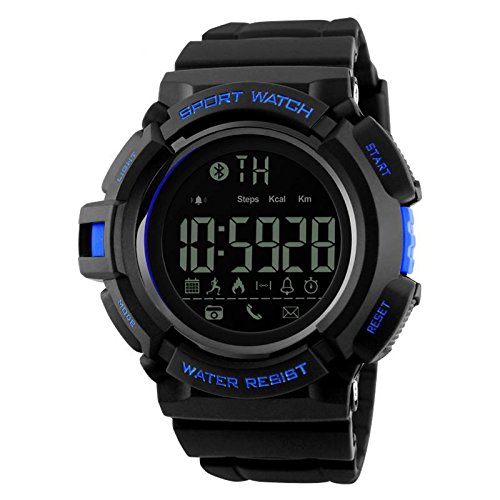
Figure 2.1: Front view of the SKMEI Gmarks-1245 Digital Watch, showing the digital display and control buttons.
Key Features:
- Digital Time Display
- Date Display
- Water Resistant construction
- Luminous display for low-light conditions
- Chronograph (Stopwatch) function
- Alarm Clock function
- Durable Stainless Steel Back Case
- Reliable JAPAN Movement
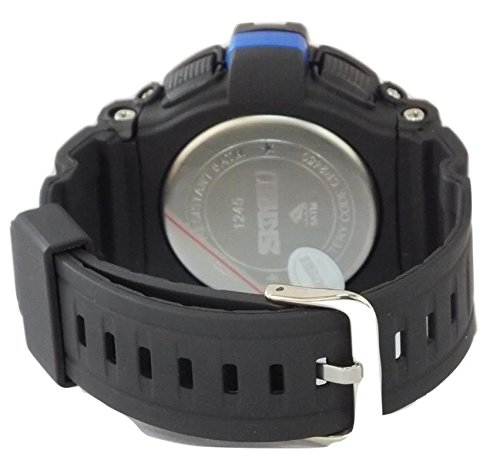
Figure 2.2: Back view of the SKMEI Gmarks-1245 Digital Watch, showing the stainless steel case back with model number and water resistance markings.
3. Setup
3.1 Button Functions:
- LIGHT: Activates the backlight.
- MODE: Cycles through display modes (Time, Alarm, Chronograph).
- START: Used to start/stop chronograph, adjust values in setting mode.
- RESET: Used to reset chronograph, select items in setting mode.
3.2 Initial Time Setting:
- From the normal time display, press the MODE button three times to enter time setting mode. The seconds digits will begin to flash.
- Press the RESET button to select the hour digits. The hour digits will flash.
- Press the START button to adjust the hour.
- Press the RESET button to select the minute digits. The minute digits will flash.
- Press the START button to adjust the minutes.
- Continue pressing RESET to cycle through year, month, and day settings, adjusting each with the START button.
- Once all settings are correct, press the MODE button to exit time setting mode and return to the normal time display.
4. Operating Instructions
4.1 Using the Chronograph (Stopwatch):
- From the normal time display, press the MODE button once to enter Chronograph mode. The display will show "00:00:00".
- Press the START button to begin timing.
- Press the START button again to pause timing.
- Press the RESET button while paused to reset the chronograph to "00:00:00".
- Press the MODE button to exit Chronograph mode.
4.2 Setting the Alarm:
- From the normal time display, press the MODE button twice to enter Alarm setting mode. The hour digits of the alarm will flash.
- Press the START button to adjust the alarm hour.
- Press the RESET button to select the alarm minute digits. The minute digits will flash.
- Press the START button to adjust the alarm minutes.
- Press the MODE button to exit Alarm setting mode.
- To turn the alarm ON/OFF, in normal time display, press and hold START and then press RESET. An alarm icon will appear/disappear.
4.3 Using the Backlight:
Press the LIGHT button at any time to illuminate the display for a few seconds, improving visibility in dark environments.
5. Maintenance
5.1 Cleaning:
- Wipe the watch case and strap with a soft, damp cloth.
- Avoid using chemical cleaners, as they may damage the watch's finish or seals.
5.2 Water Resistance:
- This watch is water resistant. However, avoid pressing buttons underwater to prevent water ingress.
- Do not expose the watch to hot water or steam, as this can compromise the water-resistant seals.
5.3 Battery Replacement:
When the display becomes dim or functions become erratic, the battery may need replacement. Battery replacement should be performed by a qualified watch technician to ensure proper sealing and function.
6. Troubleshooting
| Problem | Solution |
|---|---|
| Display is blank or dim. | The battery may be low or depleted. Replace the battery. |
| Buttons are unresponsive. | Ensure the watch is not in a locked mode (if applicable). If issue persists, battery may be low. |
| Time is incorrect after setting. | Re-enter time setting mode and carefully follow the instructions. Ensure the correct AM/PM is selected if applicable. |
| Water appears inside the watch. | Immediately take the watch to a qualified technician for inspection and repair. Avoid further water exposure. |
7. Specifications
| Feature | Detail |
|---|---|
| Model Number | Gmarks-1245 |
| Movement Type | Quartz (JAPAN Movement) |
| Display Type | Digital |
| Case Diameter | 55 Millimetres |
| Band Material Type | Rubber |
| Band Colour | Black |
| Case Back Material | Stainless Steel |
| Water Resistance | Yes (Specific ATM/Bar not provided, general statement based on "Water Resistant") |
| Item Weight | 62 Grams |
8. Warranty Information
This SKMEI Gmarks-1245 Digital Watch comes with a 6 Months Manufacturer Warranty. For warranty claims or service, please contact the Seller of Record directly. Proof of purchase may be required.
9. Support
For further assistance, technical support, or inquiries regarding your SKMEI Gmarks-1245 Digital Watch, please refer to the following:
- Contact Seller: For product-specific support and warranty claims, please contact the seller through your purchase platform.
- SKMEI Official Store: Visit the SKMEI Store on Amazon for additional product information and brand details.


