
PALUMMA C7
PALUMMA 24W/4.8A Dual USB Car Charger Instruction Manual
Brand: PALUMMA | Model: C7
1. Introduction
This manual provides essential information for the safe and effective use of your PALUMMA 24W/4.8A Dual USB Car Charger. This device is designed to provide efficient charging for your USB-powered devices while simultaneously monitoring your vehicle's battery voltage. Please read this manual thoroughly before operation and retain it for future reference.
2. Key Features
- Dual USB Charging Ports: Equipped with two USB ports, each delivering up to 2.4A (4.8A total) for high-speed charging.
- Smart IC Technology: Automatically detects and delivers the optimal charging current for connected devices, ensuring efficient and safe charging. Charging ceases when the device battery is full.
- Real-time Voltage & Amperage Display: Features a concise LCD screen that displays your vehicle's operating voltage when idle and alternates to show the total charging current (amperage) when devices are connected and charging.
- Integrated Voltage Meter: Continuously monitors your vehicle's battery health, providing immediate feedback on voltage levels.
- Low Voltage Warning: Soft LED lights illuminate the ports in darkness and flash green to alert you of low battery voltage, helping to prevent battery drain.
- Robust Construction: Crafted with an all-metal housing made from PC Fireproof material and anti-oxidative Zinc Alloy, ensuring durability, anti-static properties, and efficient heat dissipation.
- Comprehensive Safety Protections: Built-in safeguards protect against short-circuiting, over-heating, over-current, over-charging, over-voltage, and overload. Certified by CE, FCC, and RoHS.

Image: The PALUMMA Dual USB Car Charger, showcasing its compact design, dual USB ports, and integrated digital voltage display.
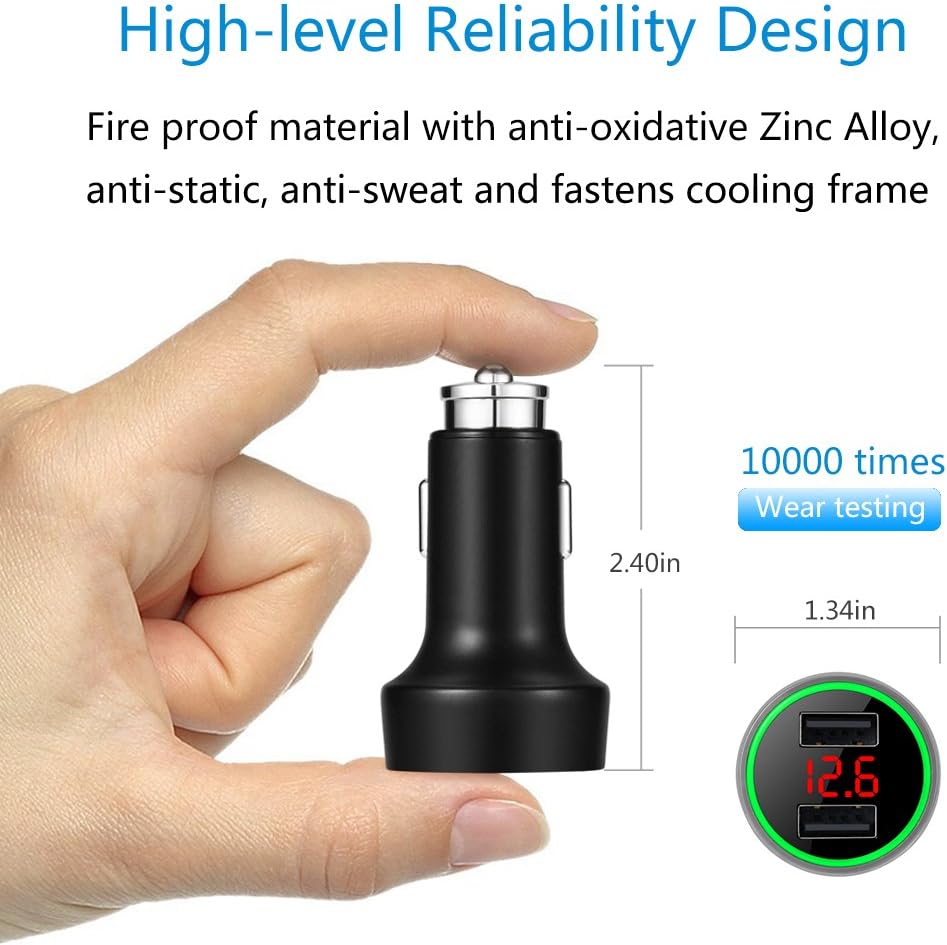
Image: Diagram illustrating the compact dimensions of the car charger (2.40 inches length, 1.34 inches width) and its durable construction materials.
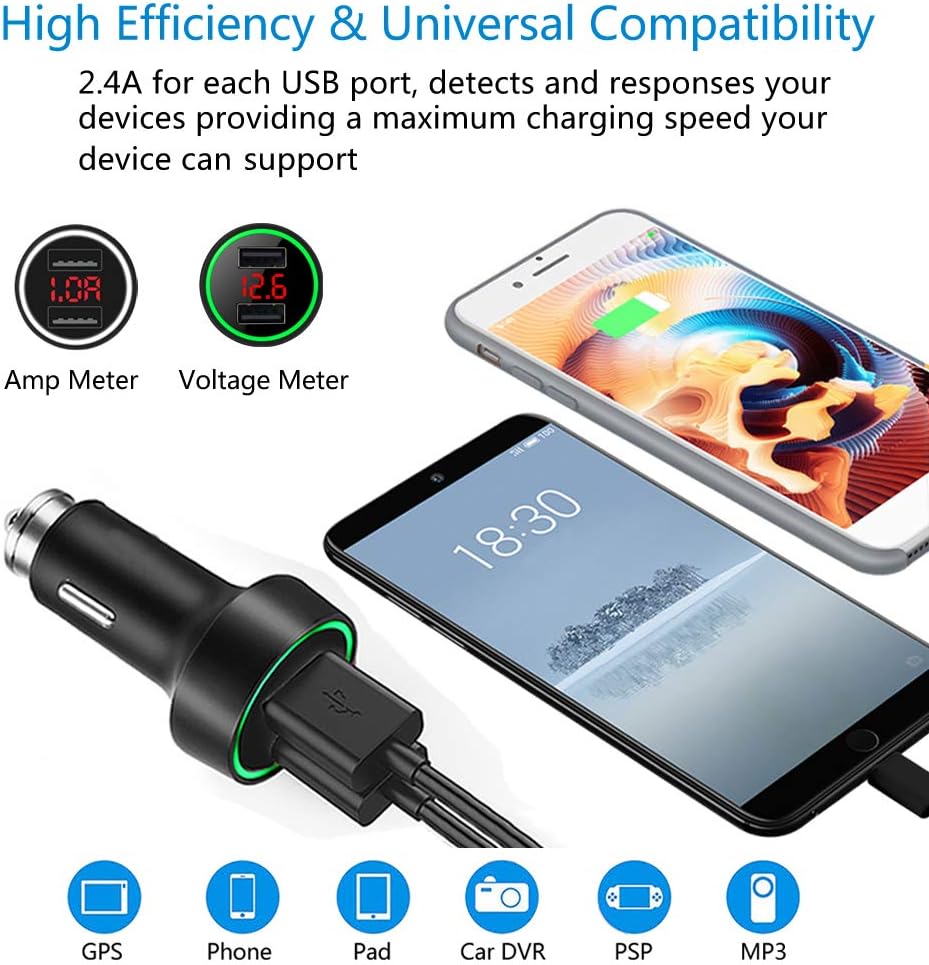
Image: Visual representation of the charger's universal compatibility with various devices (GPS, phones, tablets, car DVRs, PSPs, MP3 players) and its ability to display both amperage and voltage.

Image: Illustrations of the user-friendly design, showing the green LED ring for normal state and low voltage alarm (flashing green), and the white light breathing effect during charging.

Image: Chart detailing normal voltage ranges for a car battery before and after starting the car, emphasizing the importance of checking battery health if voltage drops below 12V.

Image: Diagram highlighting the multiple protection features including over-charge, over-current, short-circuit, over-temperature, over-voltage, and overload protection, along with the Smart IC Chip and Zinc Alloy construction.

Image: The car charger plugged into a vehicle's cigarette lighter socket, demonstrating how the soft LED light illuminates the ports for easy visibility in low light conditions without causing distraction.
3. Technical Specifications
| Attribute | Specification |
|---|---|
| Model Number | C7 |
| Input Voltage | DC 12 - 24V |
| Output Voltage | 5V ± 0.25 |
| Output Current | 2.4A per port (4.8A total) |
| Product Dimensions (L x W x H) | 2.4 x 1.34 x 1.34 inches |
| Item Weight | 2.82 ounces |
| Material | PC Fireproof + Zinc Alloy |
| Color | Black |
| Special Features | 12V Voltage Meter, All Metal, LED Display, LED Ring Light |
4. Package Contents
- 1 x PALUMMA 24W/4.8A Dual USB Car Charger
5. Setup
- Locate Vehicle's Cigarette Lighter Socket: Identify the 12V cigarette lighter or power outlet in your vehicle.
- Insert the Charger: Firmly insert the PALUMMA Car Charger into the vehicle's cigarette lighter socket. Ensure it is fully seated for proper contact.
- Power On: Once inserted, the charger's LCD display will illuminate, showing the current voltage of your vehicle's battery. The LED ring will also light up.
6. Operation
- Voltage Monitoring: When no devices are connected for charging, the LCD screen will continuously display your vehicle's battery voltage. This allows for real-time monitoring of your battery's health.
- Charging Devices: Connect your USB-powered devices (e.g., smartphones, tablets, GPS units) to either of the two USB ports using a compatible USB cable.
- Amperage Display: While a device is charging, the LCD screen will automatically alternate between displaying the vehicle's voltage and the total charging current (amperage) being drawn by the connected devices.
- Low Voltage Warning: If your vehicle's battery voltage drops to a critically low level, the green LED ring around the USB ports will begin to flash, indicating a potential issue with your battery or charging system.
7. Maintenance
- Cleaning: To clean the charger, disconnect it from the power source and wipe it with a soft, dry cloth. Do not use liquid cleaners or abrasive materials.
- Storage: When not in use for extended periods, store the charger in a cool, dry place away from direct sunlight and extreme temperatures.
- Avoid Moisture: Keep the charger away from water and other liquids.
8. Troubleshooting
| Problem | Possible Cause | Solution |
|---|---|---|
| Charger display is off / No power | Not properly inserted; Vehicle's power outlet is off or faulty; Vehicle battery is dead. | Ensure charger is fully inserted. Check vehicle's ignition or power outlet fuse. Check vehicle battery. |
| Device not charging | Faulty USB cable; Device charging port issue; Charger malfunction. | Try a different USB cable. Test with another device. If problem persists, charger may be faulty. |
| Inaccurate voltage reading | Poor connection in the socket; Extreme temperature fluctuations. | Re-insert the charger firmly. Ensure the vehicle's electrical system is stable. |
| LED ring flashing green | Vehicle battery voltage is low. | Start your vehicle's engine to charge the battery. If the issue persists, have your vehicle's battery and charging system inspected. |
9. Warranty and Support
PALUMMA products are manufactured to high-quality standards. For any issues or support inquiries, please refer to the retailer's return policy or contact PALUMMA customer service through the official channels provided at the point of purchase. Please retain your proof of purchase for warranty claims.
Ask a question about this manual
Ask about setup, troubleshooting, compatibility, parts, safety, or missing instructions. Manuals+ will review the question and use this page’s manual context to help answer it.