
PetSpy P620
PetSpy P620 Extra Remote Transmitter User Manual
Replacement Part for PetSpy Dog Training Collars P620 and P620B
Product Overview
This manual provides essential information for the PetSpy P620 Extra Remote Transmitter, designed as a replacement part for your existing PetSpy P620 and P620B Dog Training Collar systems. This remote allows you to control the training collar with various modes to assist in effective dog training.

Image: The PetSpy P620 Extra Remote Transmitter, a black handheld device with an antenna, a digital display, and control buttons for various training modes.
Compatibility
The PetSpy P620 Extra Remote Transmitter is specifically designed to be compatible with PetSpy Dog Training Collar Models P620 and P620B. It is important to note that this product includes only the remote transmitter; the receiver collar is not included and must be purchased separately or already owned.

Image: The PetSpy P620 Remote Transmitter shown alongside a graphic indicating its compatibility with PetSpy P620 and P620B Dog Training Collars.
Setup
Charging the Remote
Before initial use, ensure the remote transmitter is fully charged. The remote requires approximately 4 hours for a full charge. Use the provided charging cable to connect the remote to a power source.
Pairing the Remote with the Collar
To ensure proper functionality, the replacement remote transmitter must be paired with your existing PetSpy P620 or P620B receiver collar. Follow these steps for synchronization:
- Step 1: Charge the remote and the receiver collar for 4 hours.
- Step 2: Press and hold the power button on the receiver collar for 5 seconds to turn the collar receiver off.
- Step 3: Press and hold the power button on the receiver collar for 5 seconds until a flashing light appears. After this, you will have 16 seconds to complete the next step.
- Step 4: Press the Vibration and Tone buttons on the remote transmitter together until you hear a long beep. Then, press the Shock button once more to complete the pairing process.
If you have two collars, repeat the steps above for both collars. Remember to set each collar to a different mode (mode A or B) on the remote if applicable.
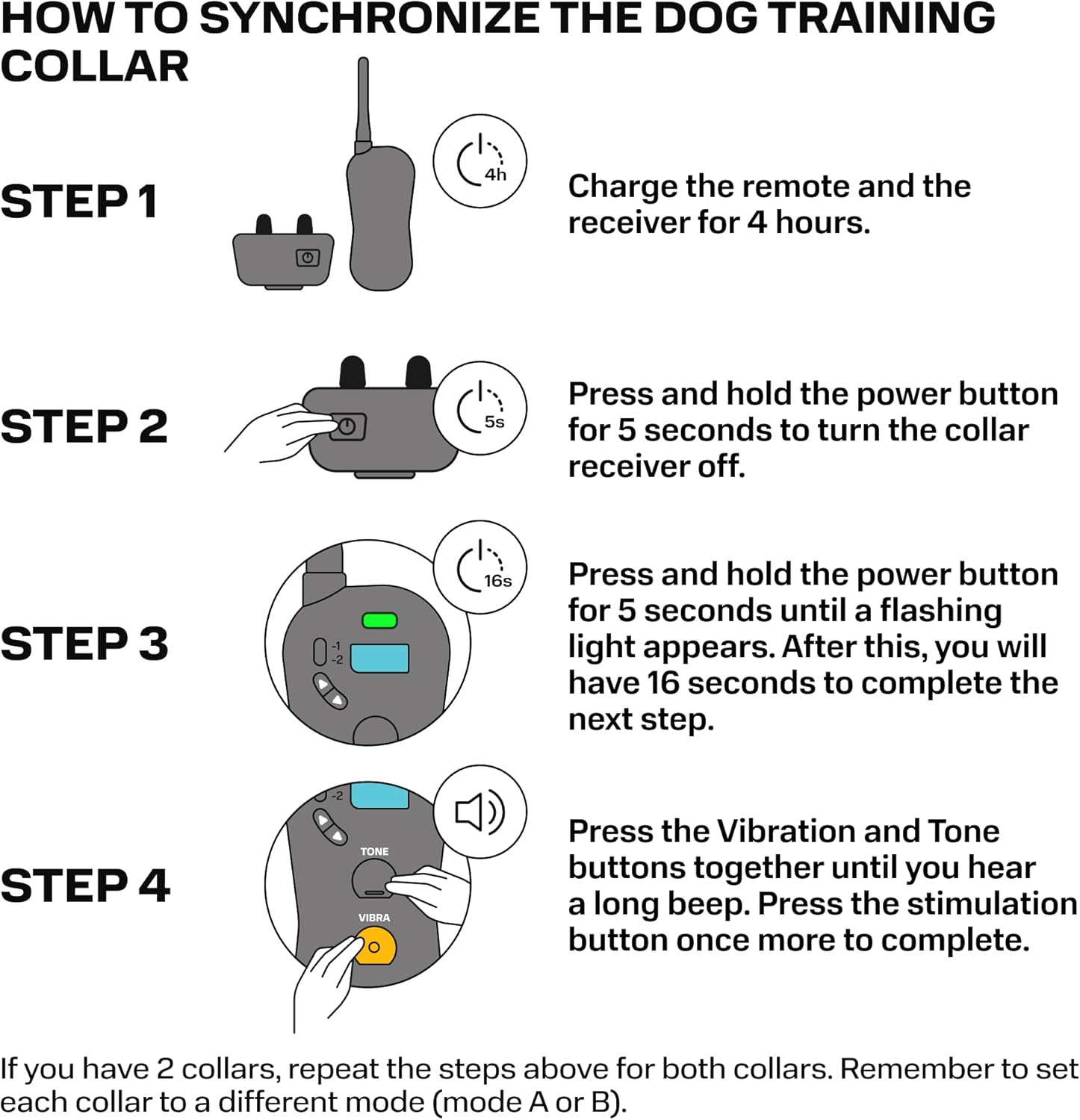
Image: A visual guide illustrating the four steps required to synchronize the PetSpy P620 Remote Transmitter with a dog training collar, including charging, turning off the collar, activating pairing mode, and pressing remote buttons.
Operating Instructions
The PetSpy P620 Remote Transmitter offers three primary training modes: Shock, Vibration, and Sound. These modes are designed to aid in effective dog training, not to punish. Always use the lowest effective stimulation level.
- Sound Mode: Emits an audible tone. Useful for attracting attention or as a warning.
- Vibration Mode: Delivers a non-harmful vibration. Recommended as a primary stimulation before using static correction.
- Shock Mode: Provides a static correction. This mode should always be the last stimulation to use, and only after other modes have been attempted without success.
Refer to the original user manual for your PetSpy P620 or P620B system for detailed guidance on proper training techniques and appropriate use of each mode.
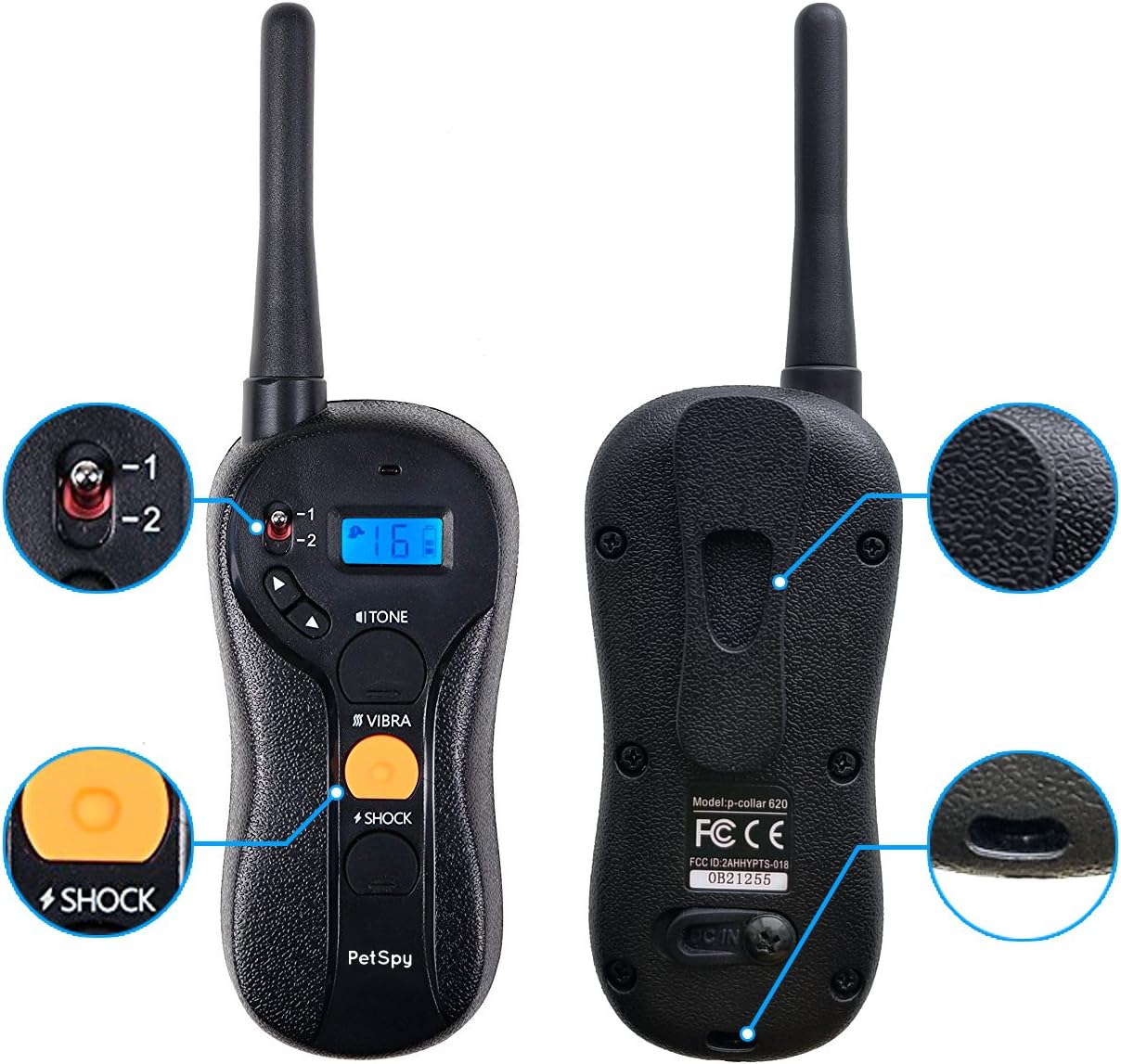
Image: Close-up views of the PetSpy P620 Remote Transmitter highlighting its various buttons and ports, including the tone, vibration, and shock buttons, and the charging port.
Maintenance
To ensure the longevity and optimal performance of your PetSpy P620 Extra Remote Transmitter, follow these maintenance guidelines:
- Keep the remote clean and dry. Wipe with a soft, damp cloth as needed.
- Avoid exposing the remote to extreme temperatures or direct sunlight for prolonged periods.
- Store the remote in a safe place when not in use to prevent loss or damage.
- Regularly charge the remote to maintain battery health, even if not used frequently.
Troubleshooting
If you encounter issues with your PetSpy P620 Extra Remote Transmitter, consider the following common solutions:
| Problem | Possible Cause | Solution |
|---|---|---|
| Remote not pairing with collar. | Incorrect pairing procedure; collar not in pairing mode; low battery. | Ensure both remote and collar are fully charged. Re-attempt pairing following the "Pairing the Remote with the Collar" steps precisely. Ensure the collar's light is flashing during the 16-second pairing window. |
| Remote not responding. | Low battery; remote malfunction. | Charge the remote fully. If the issue persists, contact customer support. |
| Reduced range. | Environmental interference; obstacles; low battery. | Ensure clear line of sight between remote and collar. Avoid using near large metal objects or strong electromagnetic fields. Charge both devices. |
For further assistance, please refer to the original product manual or contact PetSpy customer support.
Specifications
| Feature | Detail |
|---|---|
| Model Number | 4334766930 (P620) |
| Compatibility | PetSpy P620 and P620B Dog Training Collars |
| Training Modes | Sound, Vibration, Shock |
| Range | Up to 650 yards |
| Battery Type | 1 Lithium Polymer battery (included) |
| Item Weight | 3.53 ounces (100 Grams) |
| Color | Black |
| Included Components | Remote Transmitter |
Warranty and Customer Support
PetSpy offers a 1-year replacement warranty for the P620 Extra Remote Transmitter. For any questions, technical support, or warranty claims, please contact PetSpy customer support. They are available 24/7 to assist you.
For more information, visit the official PetSpy store: PetSpy Store on Amazon.
Related documentsP620


Ask a question about this manual
Ask about setup, troubleshooting, compatibility, parts, safety, or missing instructions. Manuals+ will review the question and use this page’s manual context to help answer it.