
Razor 13111813
Razor E Prime Adult Electric Scooter User Manual
Model: 13111813 | Brand: Razor

The Razor E Prime Adult Electric Scooter, showcasing its sleek design and robust build.
1. General Safety Information
Always prioritize safety when operating the Razor E Prime Electric Scooter. Read and understand all instructions before use. Failure to follow safety guidelines can result in serious injury.
- Always wear a helmet and appropriate safety gear (knee pads, elbow pads, wrist guards).
- Do not ride at night or in low visibility conditions.
- Avoid riding on wet surfaces, loose gravel, or uneven terrain.
- Maintain a safe distance from pedestrians and other vehicles.
- Do not exceed the maximum weight limit of 176 lbs (80 kg).
- Recommended for ages 14 and above.
- Always check local laws and regulations regarding electric scooter use.

A rider demonstrating safe operation of the Razor E Prime scooter, wearing a helmet for protection.
2. Setup
2.1 Unboxing and Initial Assembly
Your Razor E Prime scooter comes partially assembled. Follow these steps to prepare it for use.
- Carefully remove the scooter and all components from the packaging.
- Unfold the scooter by releasing the folding mechanism. Ensure it locks securely into the upright position.
- Insert the handlebars into the steering tube. Ensure the spring-loaded buttons snap into place, securing the handlebars.

The scooter's folding mechanism, designed for compact storage and portability.
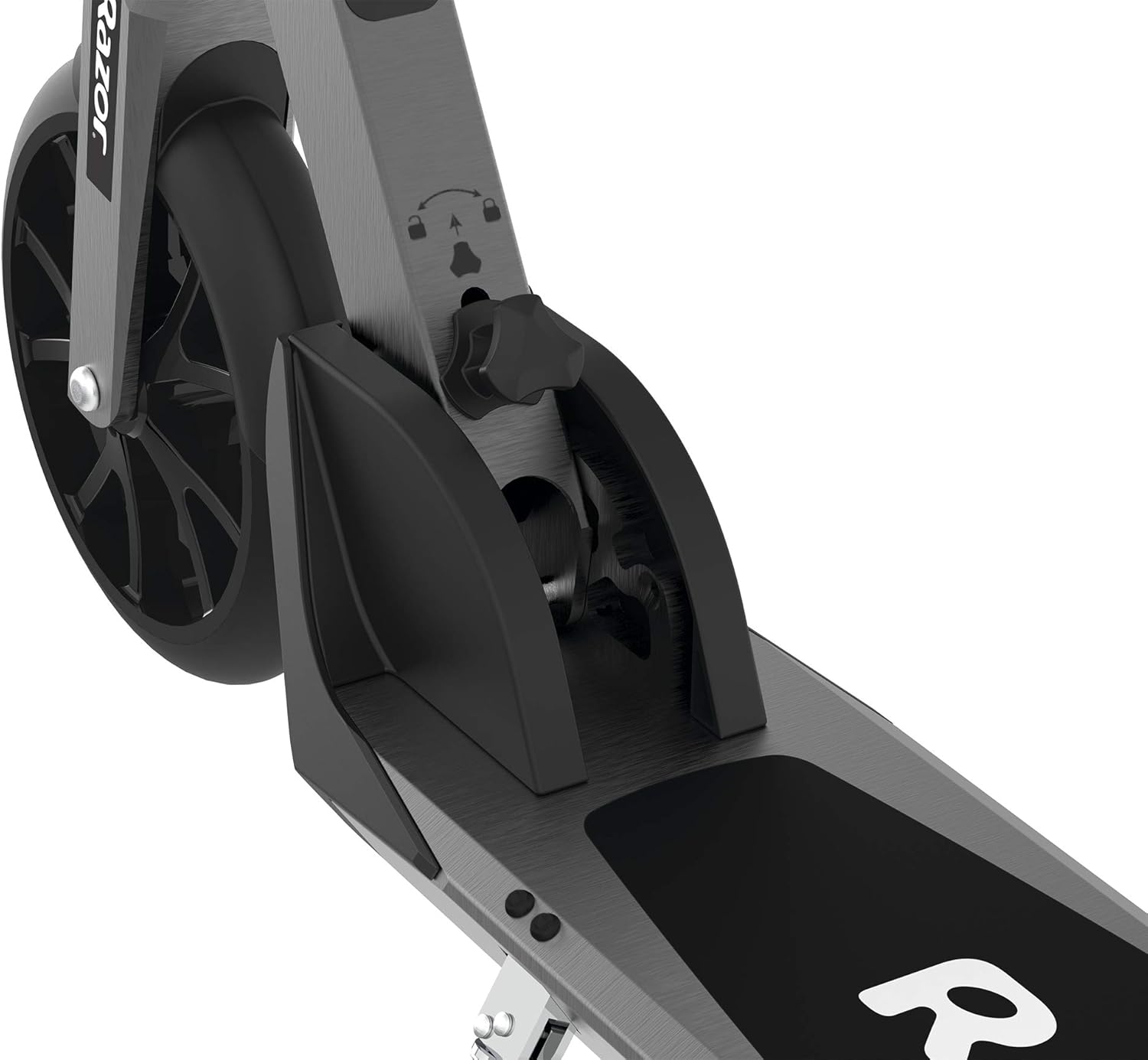
A detailed view of the latch that secures the scooter in its folded or unfolded position.
2.2 Adjusting Handlebars
The handlebars are adjustable to suit different rider heights for optimal comfort and control.
- Loosen the quick-release clamp on the steering tube.
- Adjust the handlebar height to a comfortable position, typically around waist level.
- Securely tighten the quick-release clamp. Ensure the handlebars are firmly in place before riding.

The adjustable handlebar mechanism, allowing riders to customize height for comfort.

A visual representation of the adjustable handlebars, highlighting the range of height options.
2.3 Initial Battery Charge
Before first use, fully charge the scooter's battery. This ensures optimal performance and battery longevity.
- Locate the charging port on the scooter's deck.
- Connect the charger to the port and then to a standard wall outlet.
- The charging indicator light on the charger will change (e.g., from red to green) when fully charged.
- Initial charge time may be up to 12 hours. Subsequent charges typically take 4-6 hours.
Official product video demonstrating the setup and initial use of the Razor E Prime Electric Scooter, including folding and unfolding. (Source: Razor USA LLC)
3. Operating Instructions
3.1 Powering On/Off
To turn the scooter on, press the power button located on the deck. The LED battery indicator will light up. To turn off, press and hold the power button until the lights extinguish.

A hand pressing the power button on the scooter's deck, activating the unit.

The 5-stage LED display indicating the current battery charge level.
3.2 Riding the Scooter
The Razor E Prime features a kick-to-start mechanism and a thumb-activated accelerator.
- Place one foot firmly on the scooter's deck.
- Use your other foot to push off the ground, gaining initial momentum (kick-start).
- Once moving, gently press the thumb-activated accelerator on the right handlebar to engage the motor.
- Maintain balance and steer by leaning into turns.

Proper foot placement on the scooter's large aluminum deck for stability.

Close-up of the variable-speed paddle control, which acts as the thumb-activated accelerator.
3.3 Braking
The Razor E Prime features dual braking systems for reliable stopping power.
- Thumb-Activated Electric Brake: Located on the left handlebar, gently press down to engage the electric brake.
- Foot-Activated Fender Brake: Press your foot down on the rear fender to activate the mechanical brake.
- For optimal stopping, use both braking systems simultaneously.

The thumb-activated electric brake lever on the left handlebar.
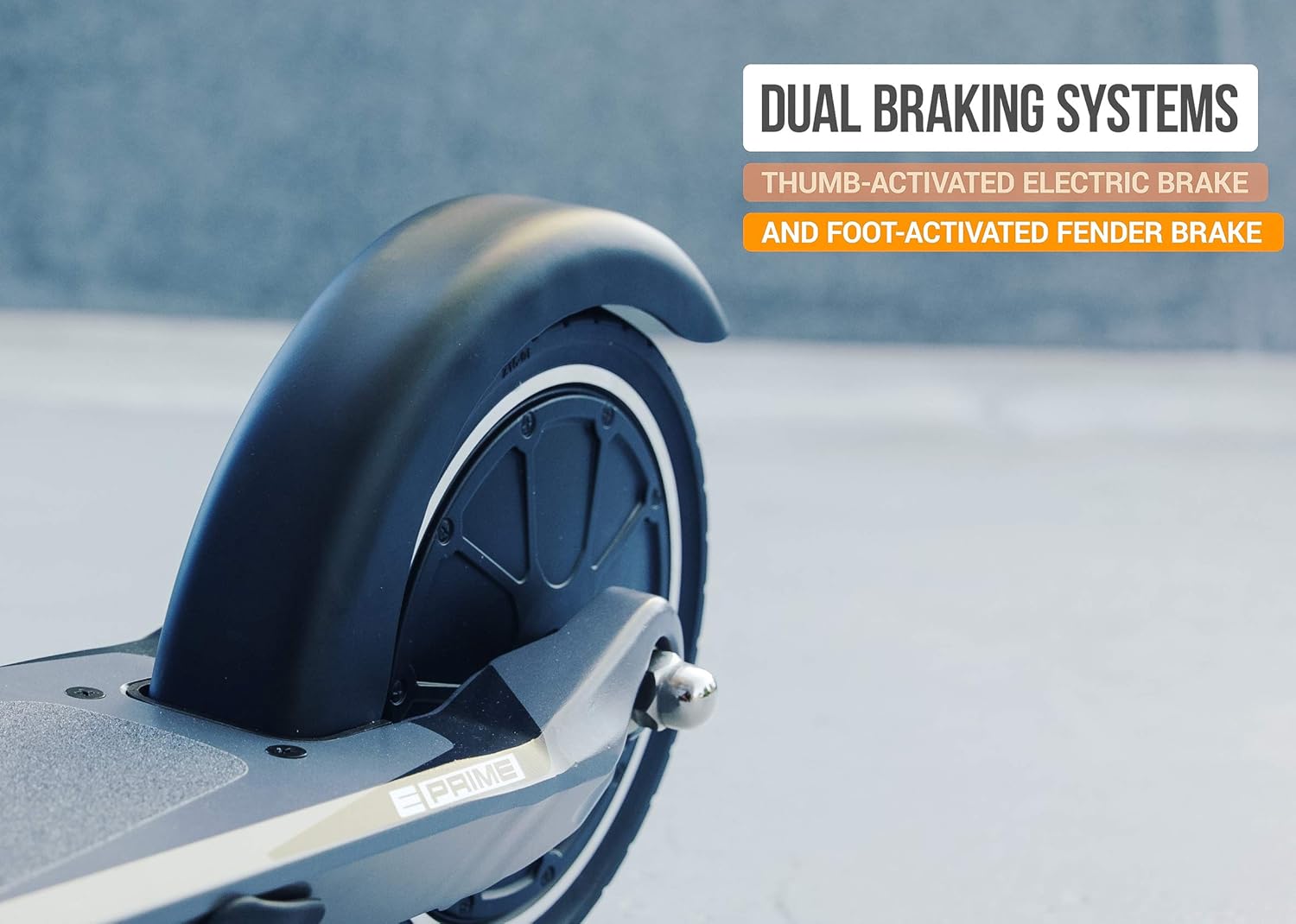
The rear fender brake, activated by pressing down with your foot.
A short video showcasing the Razor E Prime Electric Scooter in action, highlighting its features and smooth ride. (Source: Merchant Video)
4. Maintenance
Regular maintenance ensures the longevity and safe operation of your Razor E Prime scooter.
4.1 Cleaning and Storage
- Wipe the scooter clean with a damp cloth after each use. Avoid using harsh chemicals or abrasive cleaners.
- Store the scooter in a dry, cool place away from direct sunlight and moisture.
- For long-term storage, ensure the battery is fully charged and recharge it every 30 days.
4.2 Battery Care
- Always use the original charger provided with the scooter.
- Do not overcharge the battery. Disconnect the charger once the indicator light turns green.
- Avoid completely draining the battery before recharging, as this can reduce battery life.

The integrated 36V Lithium-Ion battery system, providing up to 40 minutes of continuous use per charge.
4.3 Wheel and Tire Inspection
- Regularly inspect the 8-inch airless, flat-free rubber tires for wear and tear.
- Ensure the wheels spin freely and are not obstructed by debris.
- Check the front and back fenders for any damage or looseness.

The large diameter front wheel, designed to provide a smoother ride.

The rear wheel and fender, which protects the rider from dirt and debris.
4.4 Brake Check
- Before each ride, test both the electric brake and the fender brake to ensure they are functioning correctly.
- If brakes feel loose or unresponsive, do not ride the scooter and contact customer support.
5. Troubleshooting
This section addresses common issues you might encounter with your Razor E Prime scooter.
| Problem | Possible Cause | Solution |
|---|---|---|
| Scooter does not turn on. | Battery is low or depleted. | Charge the battery fully. |
| Scooter does not accelerate. | Not kick-started sufficiently. | Ensure you kick-start the scooter to at least 3 mph (5 km/h) before engaging the accelerator. |
| Reduced speed or range. | Low battery charge; riding uphill; heavy load; extreme temperatures. | Recharge battery; avoid steep inclines; reduce load; ride in moderate temperatures. |
| Brakes are not effective. | Brake mechanism worn or loose. | Inspect brake components. Contact customer support for repair or replacement. |
| Rattling noise from folding mechanism. | Folding mechanism not fully secured. | Ensure the anti-rattle folding technology is properly engaged and tightened. |
6. Specifications
Key technical specifications for the Razor E Prime Adult Electric Scooter.
| Feature | Detail |
|---|---|
| Model Name | Razor E Prime Electric Scooter |
| Motor | 250W Brushless Hub Motor |
| Max Speed | Up to 15 mph (24 km/h) |
| Battery | 36V Lithium-Ion |
| Run Time | Up to 40 minutes of continuous use |
| Frame Material | Aluminum |
| Wheels | 8-inch (200 mm) Airless, Flat-free Rubber |
| Brake Style | Rear Braking (Thumb-activated electric and Foot-activated fender) |
| Weight Limit | 176 lbs (80 kg) |
| Item Weight | 21.56 lbs (9.78 kg) |
| Handlebar Type | Adjustable Height |

The durable aluminum frame with anti-rattle folding technology.

The powerful and quiet hub motor, quickly reaching speeds up to 15 mph.
7. Warranty Information
The Razor E Prime Adult Electric Scooter comes with a limited warranty.
- Warranty Type: 90-day Warranty
- This warranty covers manufacturing defects in materials and workmanship.
- It does not cover normal wear and tear, tires, tubes, or any damage, failure or loss caused by improper assembly, maintenance, storage, or use of the Razor E Prime.
- For full warranty details, please refer to the official Razor website or contact customer support.
8. Support
For further assistance, parts, or service, please contact Razor customer support.
- Visit the official Razor website: www.razor.com
- Refer to the contact section on their website for phone numbers or email support.
Ask a question about this manual
Ask about setup, troubleshooting, compatibility, parts, safety, or missing instructions. Manuals+ will review the question and use this page’s manual context to help answer it.