1. Product Overview
The RapidX LunaX is a portable Bluetooth speaker designed for outdoor and indoor use, featuring an integrated LED light. It combines audio playback with illumination, making it suitable for various activities such as camping, hiking, picnics, and beach outings. The device is water-resistant (IPX5 rated) and designed for portability.
Package Contents:
- LunaX Portable Speaker with LED Lamp
- Micro USB Charging Cable
- User Guide (this document)
2. Getting Started (Setup)
2.1 Charging the Speaker
Before initial use, fully charge the LunaX speaker. The charging port is located under the top cap of the device. Unscrew and remove the top cap to access the micro USB port.
- Unscrew and remove the top cap of the LunaX speaker.
- Connect the provided micro USB cable to the charging port on the speaker.
- Connect the other end of the USB cable to a standard USB power supply (e.g., wall adapter, computer USB port).
- The LED indicator light will blink red while charging and turn solid red once fully charged.
- A full charge typically takes a few hours.

Image: Micro USB charging port located under the top cap.
2.2 Powering On/Off
- To power on: Press and hold the Power/Pause button until the LED indicator lights up blue.
- To power off: Press and hold the Power/Pause button until the LED indicator turns off.
2.3 Bluetooth Pairing
After powering on, the LunaX speaker will automatically enter Bluetooth pairing mode, indicated by a blinking blue LED. It is ready to connect to your device.
- Ensure the LunaX speaker is powered on and in pairing mode (blinking blue LED).
- On your smartphone or tablet, navigate to the Bluetooth settings.
- Search for available devices and select "LunaX" from the list.
- Once connected, the LED indicator will turn solid blue, and you will hear an audible confirmation.
3. Operating the LunaX Speaker
3.1 Control Buttons
The LunaX speaker features four control buttons located on the side, near the top. These buttons are marked with raised icons.
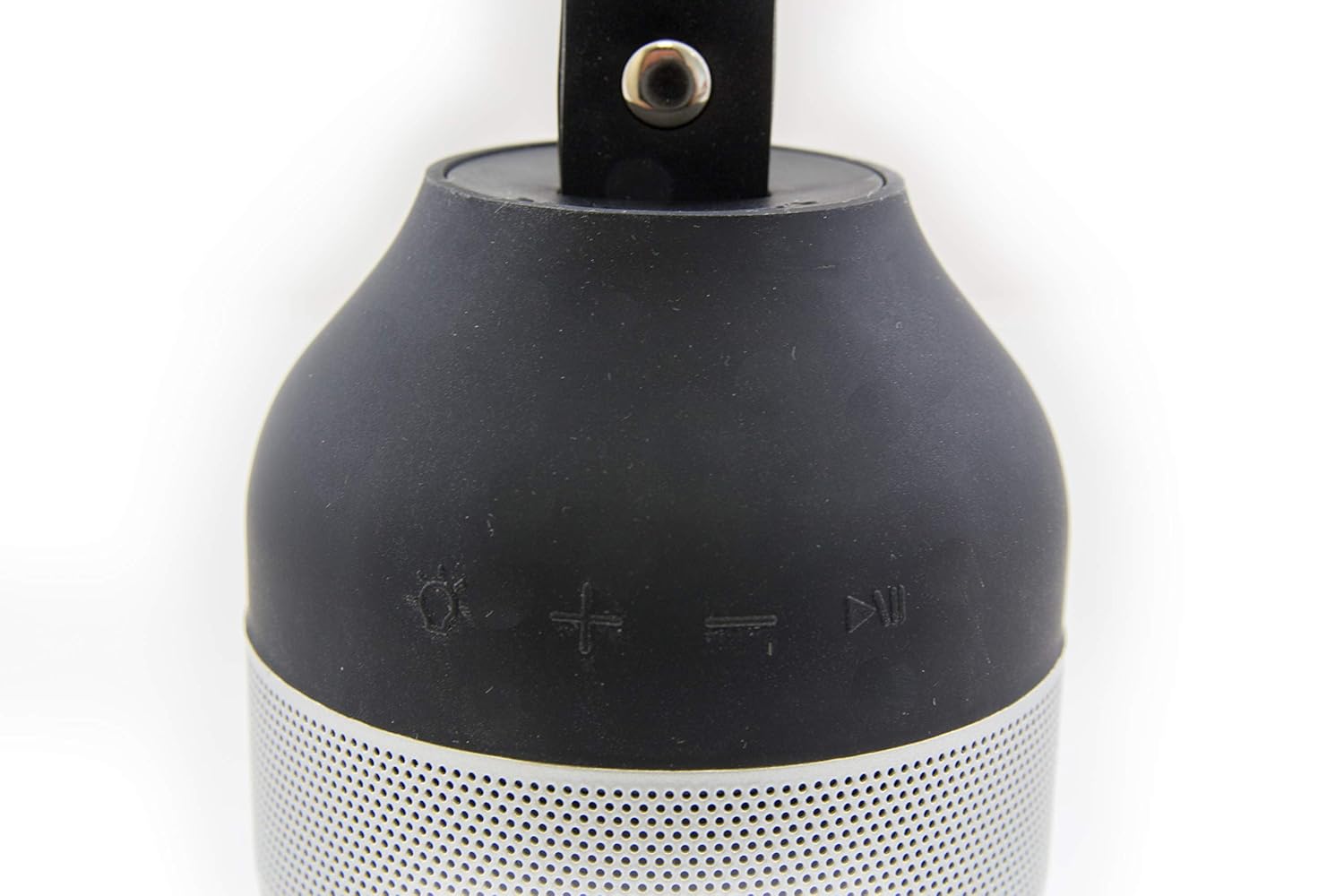
Image: Control buttons on the LunaX speaker.
- Light Button (Sun icon): Press to cycle through light brightness settings (Low, High, Off).
- Volume Up Button (+ icon): Press to increase volume.
- Volume Down Button (- icon): Press to decrease volume.
- Power/Pause Button (Play/Pause icon): Press and hold to power on/off. Press briefly to play or pause audio.
3.2 Audio Playback
Once paired with your device, you can stream audio wirelessly to the LunaX speaker. The speaker can play music at maximum volume for approximately 7 hours on a full charge.
3.3 LED Light Operation
The integrated LED light provides white illumination with two brightness settings. The light can operate continuously for 12-24 hours, depending on the selected brightness level.
- Press the Light button to turn the light on at the low brightness setting.
- Press the Light button again to switch to the high brightness setting.
- Press the Light button a third time to turn the light off.
3.4 Portability and Water Resistance
The LunaX speaker is designed to fit in most standard-sized car and boat cup holders. It features an IPX5 water resistance rating, meaning it can withstand splashes and light rain, making it suitable for outdoor use. It is not designed for submersion in water.

Image: RapidX LunaX speaker with handle for portability.
4. Maintenance
4.1 Cleaning
Wipe the speaker with a soft, damp cloth. Do not use harsh chemicals or abrasive cleaners. Ensure the charging port is dry before connecting the charging cable.
4.2 Battery Care
To prolong battery life, avoid fully discharging the battery frequently. Charge the speaker regularly, especially if it will not be used for an extended period.
5. Troubleshooting
- Speaker does not power on: Ensure the battery is charged. Connect the speaker to a power source using the micro USB cable and try again.
- Cannot pair with Bluetooth device:
- Ensure the speaker is in pairing mode (blinking blue LED).
- Make sure Bluetooth is enabled on your device.
- Move the speaker closer to your device.
- Turn off and on both the speaker and your device, then attempt pairing again.
- Audio quality is poor or distorted:
- Ensure the speaker is within Bluetooth range of your device.
- Reduce the volume on both the speaker and your device to prevent distortion.
- Check for any obstructions between the speaker and your device.
- Speaker disconnects frequently:
- Ensure the speaker is fully charged. Low battery can affect connection stability.
- Keep the speaker and your device within close proximity.
- Avoid environments with strong wireless interference.
- Buttons are difficult to see/locate: The control buttons are designed with raised icons on a black surface. Familiarize yourself with their positions by touch.
- LED indicator light is dim: The LED indicator is small. Observe it in lower light conditions if necessary to confirm its status.
6. Specifications
| Model Number | RX-LUNAXBLK |
| Brand | RapidX |
| Connectivity Technology | Bluetooth |
| Wireless Communication Technology | Bluetooth |
| Power Source | Battery Powered |
| Battery Type | Lithium (Product Specific) |
| Battery Average Life | 12 Hours (Speaker), 12-24 Hours (Light) |
| Water Resistance Level | IPX5 (Water Resistant) |
| Control Method | Touch Buttons |
| Speaker Maximum Output Power | 3 Watts |
| Item Weight | 245 g |
| Product Dimensions (LxWxH) | 7.62 x 7.62 x 14.92 cm |
| Material | Metal |
| UPC | 856690005807 |
7. Warranty and Support
For warranty information or technical support, please refer to the RapidX official website or contact their customer service directly. Keep your purchase receipt as proof of purchase.
Manufacturer: Rapidx


