
Epson HC LS100
Epson Home Cinema LS100 Projector User Manual
Epson Home Cinema LS100 3LCD Ultra Short-throw Projector
Model: HC LS100
1. Introduction
The Epson Home Cinema LS100 is an ultra short-throw digital laser display designed to provide a large, immersive Full HD picture from a very short distance. Its innovative laser technology delivers exceptional brightness and contrast, making it suitable for various viewing environments without the need for extensive setup or cable management.

Figure 1.1: Front view of the Epson Home Cinema LS100 Projector.
2. Product Features
The Home Cinema LS100 incorporates advanced technology to deliver a superior viewing experience:
- Transcendent Viewing Experience: Project sharp, life-size images up to 10 feet diagonal from just inches away from the wall, eliminating long cables, shadows, and glare.
- Ultra Bright Laser Technology: Features a powerful 4,000 lumens of equal color and white brightness for 100% Color Brightness, along with Instant ON/OFF capability.
- Deep Black Contrast Ratio: Achieves an extraordinary contrast ratio of up to 2,500,000:1, resulting in exceptionally deep blacks and brilliant, vivid colors.
- Advanced 3-Chip Design: Utilizes 3LCD technology to ensure no color wheels, no white segments, and no rainbow effect, providing consistent and vibrant color reproduction.
- Quiet Operation: Noise level is 39 dB in normal mode and 30 dB in economy mode.

Figure 2.1: Overview of key features including brightness, contrast, and connectivity.
3. What's in the Box
Upon opening the package, ensure all the following items are present:
- Epson Home Cinema LS100 Projector
- Remote control with batteries
- Power cable
- Quick Setup Guide
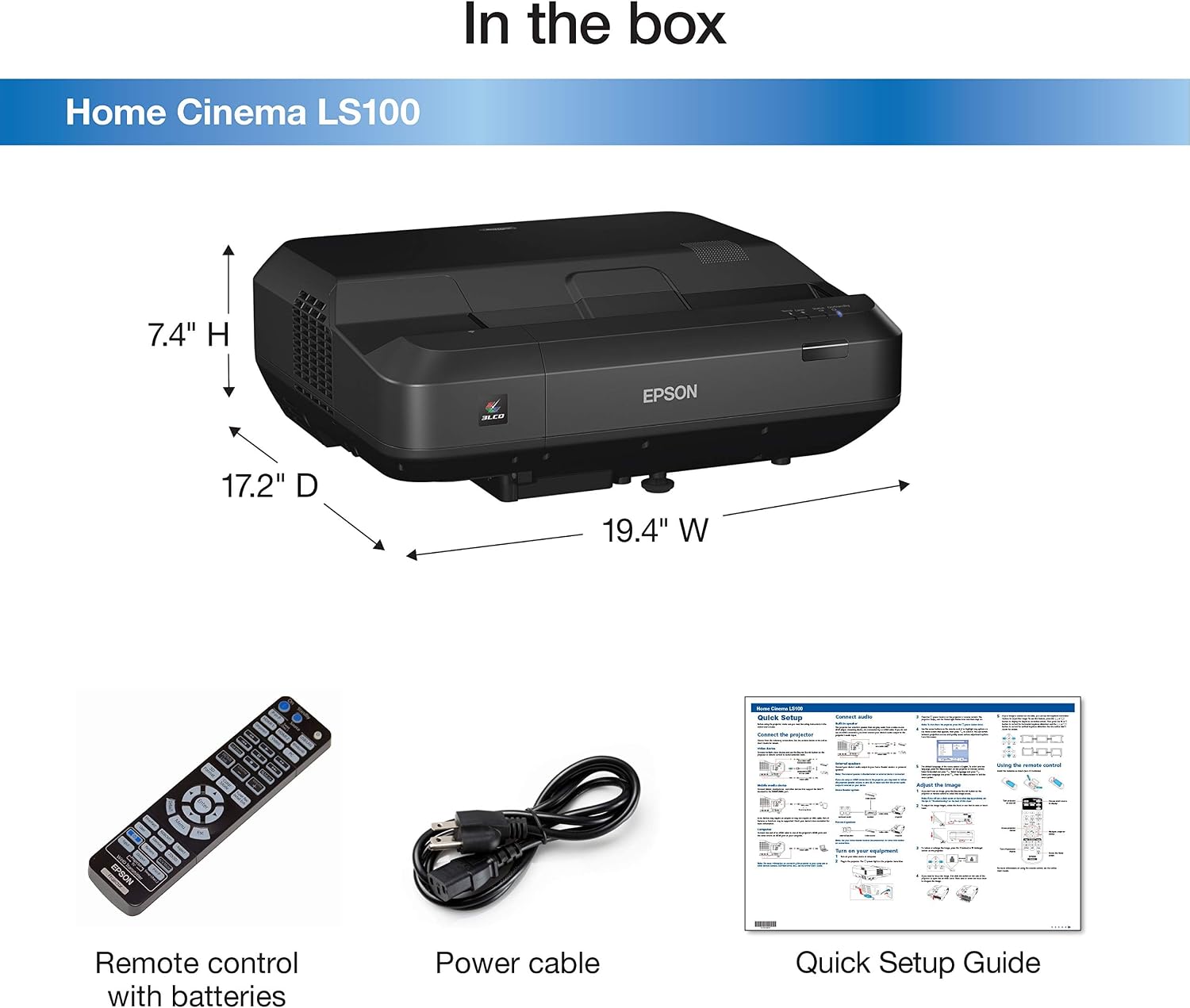
Figure 3.1: Contents included with the Epson Home Cinema LS100 Projector.
4. Setup
4.1. Placement
The Epson Home Cinema LS100 is an ultra short-throw projector, designed to be placed very close to the projection surface. For an 80-inch image, the projector can be placed approximately 4 inches from the wall. For a larger 120-inch image, it requires about 15 inches of distance. This allows for flexible installation in various room sizes without requiring ceiling mounts or long throw distances.

Figure 4.1: Examples of throw distances for different image sizes.
4.2. Connections
Connect your video sources and audio devices to the projector using the appropriate ports on the rear panel. The LS100 offers a variety of connectivity options:
- HDMI: 3 x HDMI (1x MHL compatible) for connecting Blu-ray players, game consoles, streaming devices, and computers.
- Audio In: 2 x Audio In (Stereo mini)
- Audio Out: 1 x Audio Out (Stereo mini)
- Video: 1 x Video input
- Monitor-out: 1 x Monitor-out
- Computer: 1 x Computer input
- RS-232C: 1 x RS-232C for control systems
- USB Type A: 2 x USB Type A
- USB Type B: 1 x USB Type B
- LAN: 1 x LAN (RJ-45) for network connectivity

Figure 4.2: Detailed view of the projector's input and output ports.
5. Operating
5.1. Power On/Off
The projector features Instant ON/OFF functionality. Press the power button on the projector or remote control to turn the unit on or off. There is no warm-up or cool-down period required due to the laser light source.
5.2. Image Adjustment
Use the remote control to access the projector's menu for image adjustments. Key adjustments include:
- Focus: Adjust for a sharp image.
- Keystone Correction: Correct trapezoidal distortion if the projector is not perfectly perpendicular to the screen.
- Picture Mode: Select from various preset picture modes (e.g., Cinema, Dynamic, Bright Cinema) to optimize image quality for different content and ambient light conditions.
- Aspect Ratio: The LS100 has a native 16:10 aspect ratio. If using a 16:9 screen, you may observe small black bars at the top and bottom of the projected image. Adjustments can be made in the menu to fit the image, or consider using black felt tape on the screen borders for a cleaner look.
6. Maintenance
6.1. Laser Light Source Life
The Epson Home Cinema LS100 utilizes a durable laser light source with an estimated life of up to 20,000 hours when used in Normal Mode. This significantly reduces the need for lamp replacements compared to traditional projectors.
6.2. Cleaning
To maintain optimal performance, periodically clean the projector's exterior and air vents. Use a soft, dry cloth for the exterior. For the lens, use a lens cleaning cloth specifically designed for optical surfaces. Avoid using abrasive cleaners or solvents.
7. Troubleshooting
If you encounter issues with your projector, refer to the following common troubleshooting tips:
- No Image: Ensure the power cable is securely connected and the projector is turned on. Verify that the correct input source is selected and that the video cable is properly connected to both the projector and the source device.
- Flickering Image: Check all cable connections. Ensure the resolution and refresh rate settings on your source device are compatible with the projector.
- Loud Fan Noise: The fan noise can increase at higher brightness settings. Ensure the projector has adequate ventilation and is not obstructed. If the noise is unusually loud or accompanied by warning lights, refer to the Quick Setup Guide or contact support.
- Image Not Sharp: Adjust the focus using the projector's controls. Ensure the projector is placed at the correct distance from the screen as per the throw distance guidelines.
For more detailed troubleshooting, consult the comprehensive user manual available on the Epson support website.
8. Specifications
| Specification | Detail |
|---|---|
| Brand Name | Epson |
| Item Weight | 24.3 pounds |
| Product Dimensions | 17.2 x 19.4 x 6.8 inches |
| Item Model Number | HC LS100 |
| Color Name | Black |
| Special Features | Portable |
| Item Display Height | 10 inches |
| Connectivity Technology | HDMI |
| Display Resolution | 1920 x 1200 |
9. Warranty and Support
The Epson Home Cinema LS100 Projector comes with a 2-year limited warranty. For warranty claims, technical support, or service inquiries, please refer to the contact information provided in your Quick Setup Guide or visit the official Epson support website. Ensure you have your model number (HC LS100) and serial number ready when contacting support.
Ask a question about this manual
Ask about setup, troubleshooting, compatibility, parts, safety, or missing instructions. Manuals+ will review the question and use this page’s manual context to help answer it.