
1. Important Safety Instructions
Please read all instructions carefully before using the Cadence Pop Mais Popcorn Maker. Retain this manual for future reference.
- Always ensure the appliance is unplugged from the power outlet before assembly, disassembly, or cleaning.
- Do not touch hot surfaces. Use handles or knobs.
- To protect against electrical hazards, do not immerse the cord, plugs, or the main unit in water or other liquids.
- Close supervision is necessary when any appliance is used by or near children.
- Do not operate any appliance with a damaged cord or plug, or after the appliance malfunctions or has been damaged in any manner.
- Use only accessories recommended by the manufacturer.
- Do not use outdoors.
- Do not place on or near a hot gas or electric burner, or in a heated oven.
- Extreme caution must be used when moving an appliance containing hot oil or other hot liquids.
- Do not use the appliance for anything other than its intended use.
- This appliance is for household use only.
2. Product Overview
The Cadence Pop Mais Popcorn Maker is designed for quick and easy preparation of delicious popcorn using hot air, eliminating the need for oil or butter in the popping chamber. It features a convenient measuring spoon, a directional spout, and a butter melting tray.
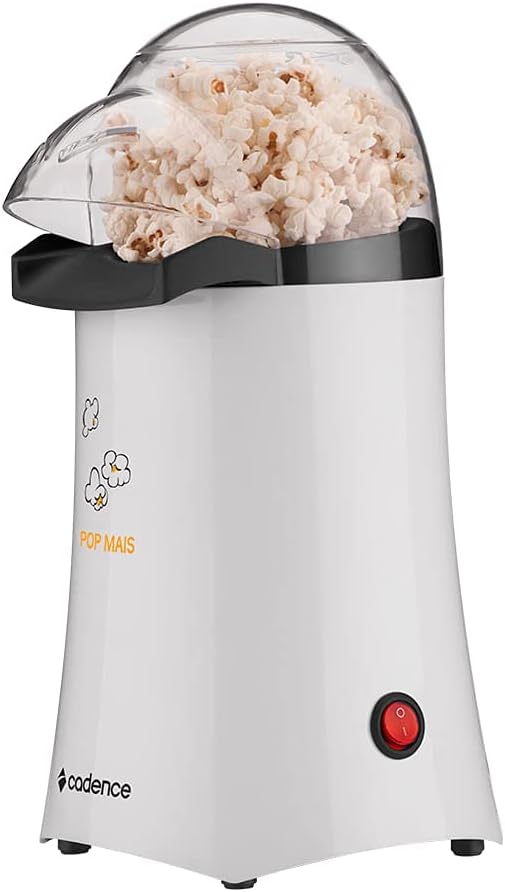
3. Setup
Before first use, ensure all packaging materials are removed. Wipe the exterior of the popcorn maker with a damp cloth. Wash the measuring spoon and clear lid in warm, soapy water, then rinse and dry thoroughly. Place the popcorn maker on a stable, flat, heat-resistant surface.

4. Operating Instructions
Follow these steps to prepare popcorn:
- Prepare Kernels: Use the provided measuring spoon to add popcorn kernels to the popping chamber. Do not overfill. The measuring spoon holds the exact amount for one serving.
- Secure Lid: Place the clear lid firmly on the popcorn maker. Ensure the directional spout is positioned over a large bowl to catch the popped corn.
- Optional Butter Melting: If desired, place a small amount of butter in the measuring spoon/butter melting tray on top of the lid. The heat from the popping process will melt the butter.
- Start Popping: Plug the appliance into a 110V power outlet and press the power button to turn it on. The popcorn will begin to pop within minutes using hot air.
- Collect Popcorn: The directional spout ensures the popped corn is directed straight into your bowl.
- Finish: Once popping stops, turn off the appliance and unplug it from the outlet. Carefully remove the butter melting tray (if used) and pour the melted butter over the popcorn in the bowl.
- Cool Down: Allow the popcorn maker to cool completely before handling or cleaning. The appliance has an efficient overheating protection system, allowing for multiple batches without interruption.


5. Cleaning and Maintenance
Proper cleaning ensures the longevity and optimal performance of your popcorn maker.
- Always unplug the appliance and allow it to cool completely before cleaning.
- Wipe the exterior of the main unit with a soft, damp cloth. Do not use abrasive cleaners or scouring pads.
- The clear lid and measuring spoon can be washed in warm, soapy water. Rinse thoroughly and dry completely before reassembling or storing.
- Never immerse the main unit of the popcorn maker in water or any other liquid.
- The popcorn maker features a cord storage area to help save space after use.
6. Troubleshooting
If you encounter any issues with your Cadence Pop Mais Popcorn Maker, refer to the following common problems and solutions:
- Problem: Popcorn not popping or too many unpopped kernels.
Solution: Ensure you are using fresh popcorn kernels. Old or dry kernels may not pop effectively. Verify that the correct amount of kernels is used as indicated by the measuring spoon. Check that the appliance is properly plugged into a working power outlet. - Problem: Popcorn burning.
Solution: Do not add oil, butter, or any other ingredients directly into the popping chamber. The machine is designed for hot air popping only. Ensure the lid is properly placed to allow steam to escape. - Problem: Unit not turning on.
Solution: Check the power cord connection to both the appliance and the wall outlet. Ensure the power outlet is functional. Press the power button firmly. - Problem: Popcorn flying out of the machine.
Solution: Ensure a large enough bowl is placed directly under the directional spout to catch all popped kernels.
7. Specifications
| Feature | Detail |
|---|---|
| Brand Name | Cadence |
| Manufacturer | Newell Brands |
| Model | POP201-127 |
| Color | White |
| Inmetro Registration | BRA 16/04025 |
| Part Number | POP201-127 |
| Special Features | Oil-free, Directional spout, Measuring spoon, Butter melting, Overheating protection system |
| Assembly Parts | Measuring spoon, butter melting capacity |
| Number of Units | 1 |
| Voltage | 110 Volts |
| Wattage | 1000W |
| Battery Operated | No |
| Material Type | Plastic |
| Product Dimensions | 16.5 x 16.5 x 30 cm; 0.9 g |
| ASIN | B076X788TD |
| EAN | 7898221456125 |
| Available Since | October 27, 2017 |

8. Warranty and Support
For warranty information or technical support, please refer to the warranty card included with your product or contact Cadence customer service. Keep your purchase receipt as proof of purchase for any warranty claims.