
Introduction
The JVC HA-FD01 in-Ear Headphones are engineered for precision audio, featuring interchangeable nozzles and Dual-Carbon Dynamic Drivers. This manual provides comprehensive instructions for setup, operation, maintenance, and troubleshooting to ensure optimal performance and longevity of your headphones.
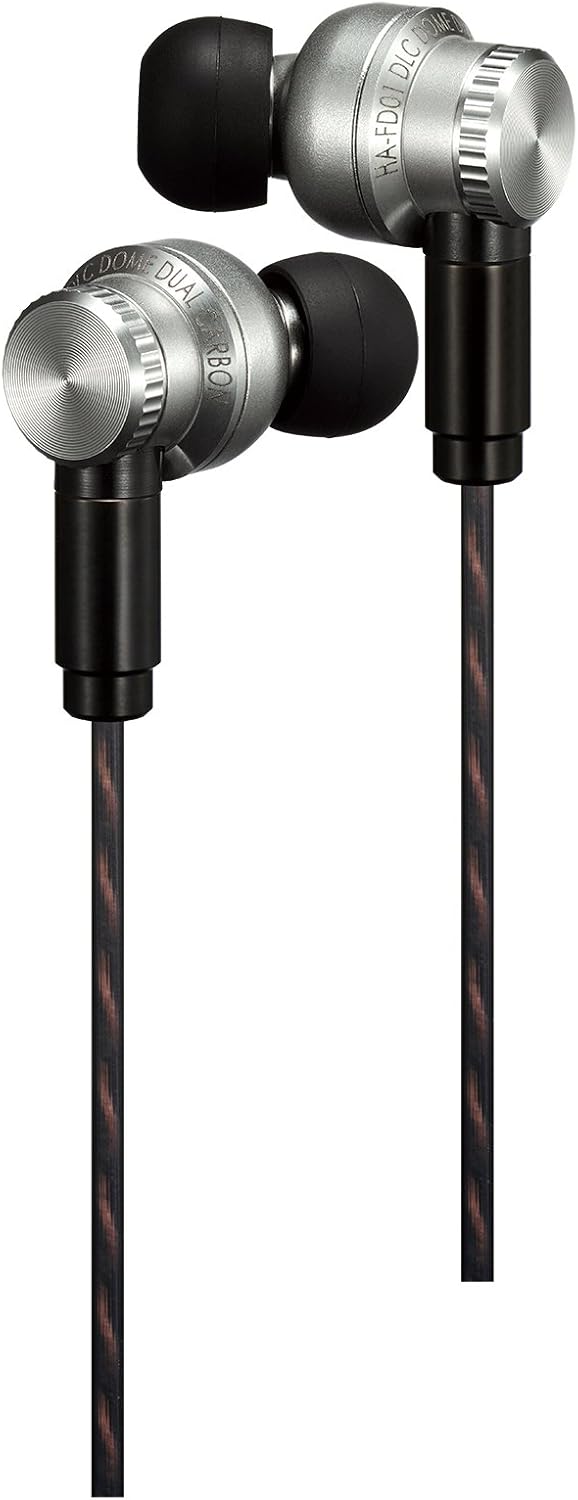
Image: The JVC HA-FD01 in-ear headphones, showcasing their sleek metallic design and detachable cables.
What's Included
Upon unboxing your JVC HA-FD01 headphones, please verify that all the following components are present:
- JVC HA-FD01 In-Ear Headphones
- Interchangeable Nozzles (Titanium, Brass, and Stainless Steel)
- 5 pairs of Spiral Dot+ Earpieces (Sizes: S, MS, M, ML, and L)
- Carrying case
- Manufacturer's 1-year parts and labor warranty (for USA purchases only)
Key Features
The JVC HA-FD01 headphones are designed with advanced audio technology and premium materials to deliver an exceptional listening experience.
D3 Driver Unit
Equipped with a newly developed 11mm D3 (Dignified / Distinct / Delightful) driver unit, these headphones provide tight, high-quality sound with solid bass and clear highs. The D3 driver incorporates a new diaphragm, air damper, and metal driver case for superior audio reproduction.

Image: Exploded view diagram illustrating the components of the D3 driver unit, including the DLC dome and dual-carbon diaphragm.
Interchangeable Nozzles
The J-mount nozzle replacement system allows you to customize the sound signature by choosing from three different material nozzles: Titanium, Brass, and Stainless Steel. Each material offers a distinct tonal characteristic, enabling you to fine-tune your audio experience.

Image: A visual representation of the three interchangeable nozzles (Titanium, Brass, Stainless Steel) and how they attach to the headphone body.
Optimal Fit and Comfort
The headphones feature a fine adjustment mechanism that allows the nozzle to rotate 360 degrees, ensuring an optimal fit for various ear shapes. Included Spiral Dot+ earpieces, made from SMP iFit material, provide a natural and comfortable fit, enhancing sound expression by minimizing unnecessary pressure.

Image: Diagrams showing the Spiral Dot+ earpiece and how the headphones can be worn in two styles: cable down or over-ear, demonstrating the rotating nozzle for optimal fit.
Durable and Detachable Cable
The HA-FD01 utilizes an MMCX terminal for its detachable, grooved OFC (Oxygen-Free Copper) cable. This design improves both strength and durability, while also reducing tangling. The 3.5mm 24k gold-plated stereo mini plug ensures optimal signal transfer.

Image: A close-up view of the MMCX terminal connection point on the JVC HA-FD01 headphone, highlighting the detachable grooved cable.
Product Overview Video
Video: An official product video providing an overview of the JVC HA-FD01 In-Ear Headphones, highlighting their key features and design.
Setup Guide
1. Attaching the Cable
Align the MMCX connector on the cable with the port on each earbud. Gently push until you hear a click, ensuring a secure connection. The cable is designed to be detachable for easy replacement or storage.
2. Selecting Earpieces
Choose the Spiral Dot+ earpiece size (S, MS, M, ML, L) that provides the most comfortable and secure fit for your ears. A proper seal is crucial for optimal sound quality and bass response. Gently push the earpiece onto the nozzle until it is firmly seated.
3. Customizing Sound with Nozzles
Experiment with the Titanium, Brass, and Stainless Steel interchangeable nozzles to find your preferred sound signature. To change a nozzle, gently twist and pull the current nozzle off the earbud. Then, align the desired nozzle and push it firmly onto the earbud until it clicks into place. Each material offers a unique acoustic profile:
- Titanium: Often associated with a bright and detailed sound.
- Brass: May provide a warmer sound with enhanced bass.
- Stainless Steel: Typically offers a balanced and neutral sound.
4. Adjusting for Fit
The nozzle of the HA-FD01 can rotate 360 degrees. Adjust the angle of the earbud to achieve the most comfortable and stable fit in your ear. This also allows for wearing the headphones with the cable hanging down or looped over the ear.
Operating Instructions
Connecting to Your Device
Insert the 3.5mm stereo mini plug into the headphone jack of your audio device (smartphone, tablet, computer, digital audio player, etc.). Ensure the plug is fully inserted for proper audio transmission.
Volume Control
Adjust the volume directly on your connected audio device. Start with a low volume level and gradually increase it to a comfortable listening level to prevent hearing damage.
Care and Maintenance
- Cleaning Earpieces: Regularly remove the earpieces and clean them with a soft, damp cloth. For deeper cleaning, they can be washed with mild soap and water, then thoroughly dried before reattaching.
- Cleaning Earbuds: Use a dry, soft cloth to wipe the exterior of the earbuds. Avoid using harsh chemicals or abrasive materials. Ensure no moisture enters the driver unit.
- Cable Care: While the grooved cable is designed to resist tangling, avoid excessive bending or pulling. Store the cable neatly when not in use.
- Storage: When not in use, store your headphones in the provided carrying case to protect them from dust, dirt, and physical damage.
- Avoid Moisture: These headphones are not water-resistant. Keep them away from water, humidity, and extreme temperatures.
Troubleshooting
If you encounter any issues with your JVC HA-FD01 headphones, please refer to the following common problems and solutions:
| Problem | Possible Cause | Solution |
|---|---|---|
| No sound or low volume |
|
|
| Distorted sound |
|
|
| Uncomfortable fit |
|
|
Technical Specifications
| Feature | Detail |
|---|---|
| Model Name | HA-FD01 |
| Driver Type | Dynamic |
| Driver Unit Size | 11 mm D3 driver |
| Frequency Response | 8 Hz to 52,000 Hz |
| Impedance | 16 Ω |
| Output Sound Pressure Level | 103 dB / 1 mW |
| Maximum Allowable Input | 200 mW |
| Connectivity Technology | Wired |
| Headphones Jack | 3.5 mm Stereo Mini Plug (24k gold plated, straight) |
| Cable Type | MMCX terminal type detachable (3.9 ft / 1.2 m Y-type) OFC groove cable |
| Material | Full Stainless Steel Body |
| Weight (without cord) | 0.7 oz (20 g) |
| Ear Placement | In Ear |
| Water Resistance Level | Not Water Resistant |
Warranty and Support
Warranty Information
The JVC HA-FD01 headphones come with a Manufacturer's 1-year parts and labor warranty for purchases made in the USA. Please retain your proof of purchase for warranty claims.
Customer Support
For further assistance, technical support, or warranty inquiries, please contact JVC customer service. Refer to the official JVC website or your product packaging for the most current contact information.
You can visit the official JVC Store for more product information and support: JVC Official Store


