
1. Introduction
This manual provides essential information for the safe and efficient operation of your Martin JEM ZR45 High Endurance Fog Machine. The JEM ZR45 is a high-performance, water-based fog machine designed for demanding applications in large venues and stages, offering exceptional output and reliable performance for professional use.
Please read this manual thoroughly before operating the device to ensure proper setup, usage, and maintenance.
2. Safety Information
WARNING: Failure to follow these safety instructions may result in fire, electric shock, injury, or damage to the product or property.
- Always connect the unit to a grounded power outlet.
- Ensure the power supply voltage matches the requirements specified on the unit.
- Do not operate the machine if the power cord is damaged.
- Use only Martin JEM fog fluid. Other fluids may cause damage or create a fire hazard.
- Do not block the fog output nozzle.
- Keep a safe distance from the fog output, as the nozzle can reach high temperatures (up to 554°F / 290°C).
- Ensure adequate ventilation around the machine.
- Do not immerse the unit in water or expose it to rain or moisture.
- Disconnect from power before cleaning or servicing.
- This product is for professional use only.
3. Product Overview and Components
The Martin JEM ZR45 is designed for robust performance and ease of use. Familiarize yourself with its key components.
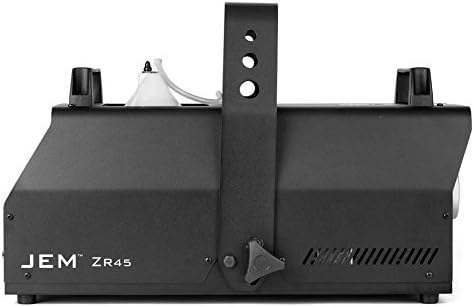
Figure 3.1: Front-side view of the JEM ZR45 fog machine. This image shows the main body of the unit with the JEM ZR45 branding visible on the side, and the output nozzle at the front. The integrated hanging bracket is also visible.

Figure 3.2: Angled view of the JEM ZR45, highlighting the fluid reservoir. The clear fluid bottle is visible within its compartment on top of the machine, connected to the internal system. The output nozzle is also visible.

Figure 3.3: Rear view of the JEM ZR45, showing the fluid reservoir from the back. The fluid bottle is clearly visible, positioned within the machine's top compartment. The rear panel with connections is not fully visible in this shot.

Figure 3.4: Rear control panel of the JEM ZR45. This image displays the digital display, control buttons (Menu, Fog, Enter, Value), power switch, fuse holder, mains input, and DMX input/output ports (3-pin and 5-pin XLR connectors).

Figure 3.5: The JEM ZR Series digital remote control. This external remote features a digital display and control buttons (Menu, Fog, Enter, Value) identical to the machine's built-in panel, connected via a long cable with an XLR connector.
Key Components:
- Fog Output Nozzle: Where the fog is emitted.
- Fluid Reservoir: Holds the fog fluid (5-liter capacity).
- Integrated Hanging Bracket: For truss mounting.
- Control Panel: Digital display and buttons for local control.
- Power Input: Mains power connection.
- DMX In/Out: For external control via DMX512.
- Remote Control Port: For connecting the included digital remote.
4. Setup
4.1 Unpacking and Inspection
- Carefully remove the JEM ZR45 from its packaging.
- Inspect the unit for any signs of damage during transit. If damage is found, contact your supplier immediately.
- Verify that all components are present: JEM ZR45 unit, power cable, and digital remote control.
4.2 Fluid Installation
- Ensure the machine is powered off and disconnected from the mains.
- Open the fluid reservoir compartment.
- Insert a 5-liter bottle of Martin JEM fog fluid into the compartment.
- Connect the quick-connect fitting from the machine to the fluid bottle. Ensure a secure connection.
- Close the fluid reservoir compartment.
Note: The fluid sensing system will monitor fluid levels to prevent dry running.
4.3 Placement and Mounting
- Place the machine on a stable, level surface, or mount it securely using the integrated hanging bracket.
- Ensure there is adequate clearance (at least 20 inches / 50 cm) around the unit for ventilation.
- The unit can be oriented up to +/-40° from horizontal. Ensure the fluid bottle remains upright enough for proper fluid flow.
- Always use a safety attachment point when truss mounting.
4.4 Power Connection
- Connect the power cable to the mains input on the rear of the unit.
- Plug the other end of the power cable into a grounded electrical outlet.
4.5 DMX Control (Optional)
- For DMX control, connect a DMX cable from your DMX controller to the DMX IN port on the JEM ZR45.
- If linking multiple units, connect a DMX cable from the DMX OUT of the first unit to the DMX IN of the next.
- Refer to the DMX address setting section in the full manual for configuring DMX channels.
5. Operating Instructions
5.1 Initial Power-Up
- Ensure the fluid reservoir is filled and connected.
- Flip the power switch on the rear of the unit to the 'ON' position.
- The machine will begin its warm-up cycle. The digital display will show the warm-up progress.
- Once warmed up (typically a few minutes), the unit is ready for operation.
5.2 Local Control
Use the control panel on the rear of the unit or the wired digital remote control (Figure 3.5) to operate the machine.
- MENU: Navigates through menu options.
- VALUE (Up/Down Arrows): Adjusts parameter values.
- ENTER: Confirms selections.
- FOG: Activates fog output (can be momentary or continuous depending on settings).
To produce fog, press the FOG button. The output intensity can be adjusted via the menu settings.
5.3 DMX Control
The JEM ZR45 is fully DMX compatible, including RDM. Once DMX is connected and addressed, the machine can be controlled via your DMX console.
- Set the DMX start address using the unit's control panel.
- Consult the full DMX protocol chart (available in the comprehensive manual) for specific channel assignments for fog output, fan speed, and other functions.
Tip: The variable output control allows for precise adjustment of fog intensity, from subtle haze to dense clouds.
6. Maintenance
Regular maintenance ensures the longevity and optimal performance of your JEM ZR45 fog machine.
6.1 Cleaning
- Exterior: Wipe the exterior with a soft, damp cloth. Do not use abrasive cleaners or solvents.
- Nozzle: Periodically check the fog output nozzle for any blockages. If blockages occur, consult a qualified technician. Do not attempt to clear blockages with sharp objects.
6.2 Fluid System
- Always use genuine Martin JEM fog fluid. Using unauthorized fluids can void the warranty and damage the machine.
- If the machine will be stored for an extended period (more than 30 days), it is recommended to run a cleaning cycle with Martin JEM Cleaner fluid to prevent clogs.
- The fluid sensing system will alert you when fluid levels are low. Replace the fluid bottle promptly to ensure continuous operation.
6.3 Storage
- Store the machine in a dry, dust-free environment.
- Ensure the fluid bottle is securely closed or removed if storing for very long periods.
7. Troubleshooting
This section addresses common issues you might encounter with your JEM ZR45.
| Problem | Possible Cause | Solution |
|---|---|---|
| No fog output |
|
|
| Weak fog output |
|
|
| Machine not responding to DMX |
|
|
If you encounter issues not listed here or if the suggested solutions do not resolve the problem, please contact Martin Professional support.
8. Specifications
| Feature | Detail |
|---|---|
| Model | JEM ZR45 |
| Heat Exchanger Power | 1,800 W (US) |
| Maximum Fog Output | 45,909 ft³ per minute |
| Fluid Reservoir Capacity | 5 liters |
| Maximum Operating Time (Full Output) | 1.18 hours |
| Control Options | Integrated Digital Remote, Full DMX (RDM compatible), Master/Client link mode |
| Nozzle Temperature (Max) | 554°F (290°C) |
| Ambient Operating Temperature | 41°F (5°C) to 104°F (40°C) |
| Housing Material | Steel and Aluminum |
| Mounting Options | Floor-standing, Truss mounting (integrated bracket, safety attachment point) |
| Orientation | Up to +/-40° from horizontal |
| Item Weight | 44.9 pounds |
| Package Dimensions | 26.85 x 16.46 x 16.06 inches |
9. Warranty and Support
Martin Professional products are designed for reliability and performance. For specific warranty terms and conditions, please refer to the warranty card included with your product or visit the official Martin Professional website.
For technical support, service, or spare parts, please contact your authorized Martin Professional dealer or distributor. You can find contact information on the official Martin Professional website: www.martin.com
When contacting support, please have your product model (JEM ZR45) and serial number ready.


