
1. Introduction
This manual provides comprehensive instructions for the MINELAB Earbud Headphones, Model 3011-0297. These earbuds are specifically designed for use with MINELAB GO-FIND Series Metal Detectors, enhancing your metal detecting experience by providing clear audio and effective noise isolation. Please read this manual thoroughly before using the product to ensure proper setup, operation, and maintenance.
2. Product Overview
The MINELAB Earbud Headphones are engineered to deliver high-quality sound directly to your ears, allowing you to discern faint or deep treasure signals with clarity. Their design incorporates rubber pads that effectively block external noise, such as wind, traffic, and interference from other detectors, ensuring an undisturbed listening experience.
Key Features:
- Compatibility: Exclusively designed for MINELAB GO-FIND Series Metal Detectors.
- Noise Isolation: Rubber pads provide effective blocking of external ambient noise.
- Clear Audio: High-quality sound reproduction for detecting subtle signals.
- Comfortable Fit: In-ear design with rounded tips for extended use.
What's in the Box:
- MINELAB Earbud Headphones (Model 3011-0297)
- Ear Cushions (pre-installed or as spares)
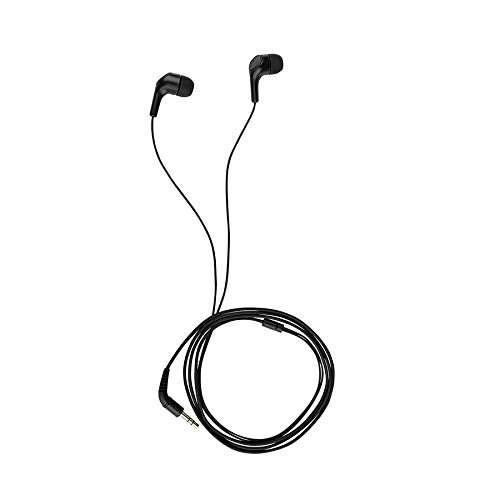
Figure 1: Front view of the MINELAB Earbud Headphones.
3. Setup
Follow these steps to connect your MINELAB Earbud Headphones to your GO-FIND Series Metal Detector:
- Locate the Headphone Jack: Identify the headphone jack on your MINELAB GO-FIND Series Metal Detector. This is typically a 6.35 mm (1/4 inch) jack.
- Connect the Earbuds: Insert the 3.5 mm audio plug of the MINELAB Earbud Headphones into the metal detector's headphone jack. Ensure the connection is firm and secure. Note: An adapter may be required if your detector's jack is 6.35mm and the earbud plug is 3.5mm, and such an adapter is not included with the earbuds. Please verify your detector's requirements.
- Position Earbuds: Gently place the earbuds into your ears. Adjust them for a comfortable and secure fit to maximize sound isolation and audio clarity.

Figure 2: Earbud headphones showing the cable and plug for connection.
4. Operating Instructions
Once connected, the MINELAB Earbud Headphones are ready for use. The primary function is to provide clear audio feedback from your metal detector while minimizing external distractions.
- Audio Monitoring: Listen carefully for the distinct audio signals generated by your GO-FIND metal detector. The high-quality audio drivers are designed to make even faint signals discernible.
- Noise Isolation: The rubber pads on the earbuds are crucial for blocking ambient noise. Ensure they are properly seated in your ears to achieve optimal sound isolation. This allows you to focus solely on the detector's audio cues without interference from wind, traffic, or other environmental sounds.
- Volume Adjustment: Adjust the volume directly on your MINELAB GO-FIND Series Metal Detector to a comfortable listening level. The earbuds do not feature independent volume controls.
5. Maintenance
Proper care and maintenance will extend the lifespan of your MINELAB Earbud Headphones.
- Cleaning: Regularly clean the rubber ear pads with a soft, damp cloth. Avoid using harsh chemicals or abrasive materials. Ensure the earbuds are completely dry before storage or next use.
- Storage: Store the earbuds in a clean, dry place away from extreme temperatures and direct sunlight. Avoid tangling the cable to prevent damage.
- Cable Care: Do not pull on the cable to disconnect the earbuds. Always grasp the plug firmly. Inspect the cable periodically for any signs of wear or damage.
6. Troubleshooting
If you encounter issues with your MINELAB Earbud Headphones, refer to the following common solutions:
| Problem | Possible Cause | Solution |
|---|---|---|
| No sound from earbuds. |
|
|
| Poor sound quality or intermittent audio. |
|
|
| External noise is not blocked effectively. |
|
|
7. Specifications
The following are the technical specifications for the MINELAB Earbud Headphones (Model 3011-0297):
| Feature | Detail |
|---|---|
| Brand | MINELAB |
| Model Number | 3011-0297 |
| Connectivity Technology | Wired |
| Hardware Interface | 3.5mm Audio (plug) |
| Compatible Devices | Minelab GO-FIND metal detectors |
| Ear Placement | In Ear |
| Form Factor | In Ear |
| Noise Control | Sound Isolation (via rubber pads) |
| Material | Rubber |
| Item Weight | 2.08 ounces (approximately 0.06 kg) |
| Product Dimensions | 3.5 x 7.5 x 0.5 inches (packaging dimensions) |
| Included Components | Ear Cushions |
| UPC | 009068003800 |
8. Warranty and Support
For detailed warranty information, product support, or to contact customer service, please visit the official MINELAB website or refer to the documentation provided with your MINELAB GO-FIND Series Metal Detector. Keep your purchase receipt as proof of purchase for warranty claims.
MINELAB Official Website: www.minelab.com