
1. Introduction
Thank you for choosing the Philco PME25 25L Microwave Oven. This manual provides essential information for the safe and efficient operation, maintenance, and troubleshooting of your appliance. Please read these instructions carefully before using the microwave oven and retain them for future reference.
The Philco PME25 is designed for convenient food preparation, offering various cooking functions, defrosting options, and pre-programmed settings to simplify your daily cooking tasks.
2. Important Safety Instructions
When using electrical appliances, basic safety precautions should always be followed to reduce the risk of fire, electric shock, burns, or injury to persons.
- Read all instructions before using the appliance.
- Do not operate the oven if the cord or plug is damaged, if it is not working properly, or if it has been damaged or dropped.
- Do not heat liquids or other foods in sealed containers as they are liable to explode.
- Only allow children to use the oven without supervision when adequate instructions have been given so that the child is able to use the oven in a safe way and understands the hazards of improper use.
- Use only utensils that are suitable for use in microwave ovens.
- When heating food in plastic or paper containers, keep an eye on the oven due to the possibility of ignition.
- If smoke is observed, switch off or unplug the appliance and keep the door closed in order to stifle any flames.
- Do not overcook food.
- Do not use the cavity for storage purposes. Do not store items such as bread, cookies, etc., inside the oven.
- Clean the oven regularly and remove any food deposits.
- Failure to maintain the oven in a clean condition could lead to deterioration of the surface that could adversely affect the life of the appliance and possibly result in a hazardous situation.
3. Product Overview
Familiarize yourself with the components of your Philco PME25 microwave oven.

Figure 1: Front view of the Philco PME25 25L Microwave Oven, showcasing its sleek silver finish and control panel on the right side.

Figure 2: Angled view of the Philco PME25 microwave, highlighting the door handle and the digital display on the control panel.
Control Panel
The control panel features a digital display and various buttons for setting cooking time, power levels, and accessing pre-programmed functions.

Figure 3: Close-up of the Philco PME25 control panel, showing the numeric keypad, function buttons (e.g., Power, Cook, Timer, Clock), and the digital display.
Interior Components
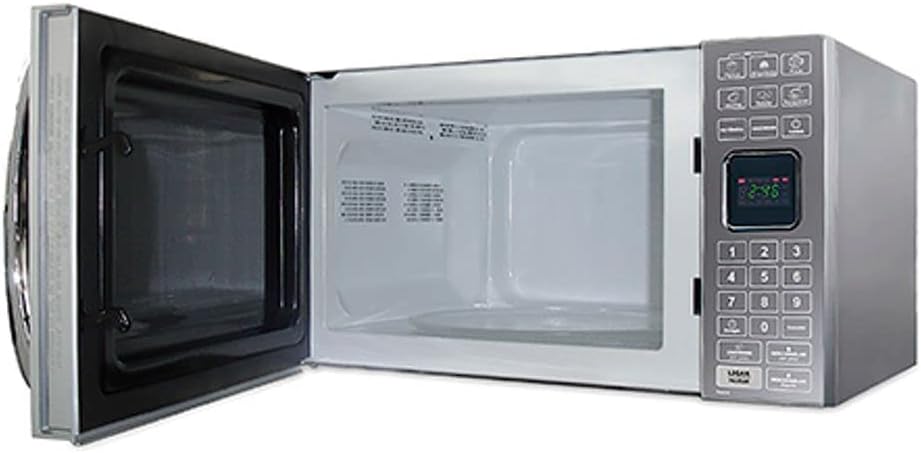
Figure 4: Interior view of the Philco PME25 microwave oven with the door open, revealing the cooking cavity and the glass turntable.
- Door: Equipped with a safety lock system.
- Viewing Window: Allows monitoring of food during cooking.
- Turntable: Rotates food for even cooking. Ensure it is properly seated before use.
- Oven Cavity: The interior space where food is placed for cooking.
4. Setup
- Unpacking: Carefully remove the microwave oven from its packaging. Remove all packing materials, including any protective film or tape.
- Placement: Place the microwave oven on a flat, stable surface that can support its weight. Ensure there is adequate ventilation around the appliance. Maintain a minimum of 10 cm (4 inches) clearance at the rear, 20 cm (8 inches) at the top, and 5 cm (2 inches) on the sides.
- Power Connection: Plug the power cord into a grounded 220V, 60Hz electrical outlet. Do not use extension cords or adapters.
- Turntable Installation: Place the turntable ring in the center of the oven cavity, then place the glass turntable plate on top of the ring, ensuring it sits securely.
5. Operating Instructions
5.1 Setting the Clock
- Press the "Relógio" (Clock) button.
- Use the numeric keypad to enter the current time (e.g., 12:30).
- Press the "Relógio" (Clock) button again to confirm.
5.2 Basic Microwave Cooking
- Place food in a microwave-safe container on the turntable. Close the door.
- Press the "Potência" (Power) button repeatedly to select the desired power level (e.g., P100 for 100%, P80 for 80%).
- Use the numeric keypad to enter the desired cooking time.
- Press the "Ligar" (Start) button to begin cooking.
5.3 Pre-programmed Recipes
The Philco PME25 includes convenient pre-programmed settings for common foods.
- Potato: Press the dedicated "Potato" button. Select the quantity if prompted. Press "Ligar" (Start).
- Lasanha (Lasagna): Press the dedicated "Lasanha" button. Select the quantity if prompted. Press "Ligar" (Start).
- Pizza: Press the dedicated "Pizza" button. Select the quantity if prompted. Press "Ligar" (Start).
- Reheat: For reheating various foods, press the "Reheat" button. The oven will automatically set an appropriate time and power level. Press "Ligar" (Start).

Figure 5: The Philco PME25 microwave oven shown alongside bowls of popcorn, illustrating its capability for quick and easy food preparation, including pre-programmed options.
5.4 Defrost Function
The defrost function allows you to thaw food quickly and efficiently.
- Defrost by Weight:
- Press the "Descongelar" (Defrost) button.
- Use the numeric keypad to enter the weight of the food in grams.
- Press "Ligar" (Start).
- Defrost by Time:
- Press the "Descongelar" (Defrost) button twice.
- Use the numeric keypad to enter the desired defrosting time.
- Press "Ligar" (Start).
5.5 Timer Function
The timer can be used as a kitchen timer, independent of cooking functions.
- Press the "Timer" button.
- Use the numeric keypad to enter the desired time.
- Press "Ligar" (Start). The timer will count down, and an audible signal will sound when it reaches zero.
6. Maintenance and Cleaning
Regular cleaning and maintenance will ensure the longevity and optimal performance of your microwave oven.
- Before Cleaning: Always unplug the microwave oven from the power outlet before cleaning.
- Interior Cleaning: Wipe the inside of the oven with a damp cloth after each use. For stubborn food splatters, place a bowl of water with lemon slices inside and microwave for 2-3 minutes to loosen residue, then wipe clean.
- Exterior Cleaning: Clean the exterior surfaces with a soft, damp cloth. Do not use abrasive cleaners or harsh chemicals.
- Door and Seal: Keep the door and door seal clean. Use a mild detergent and a soft cloth. Ensure no food particles accumulate in the seal area.
- Turntable: The glass turntable and turntable ring can be removed and washed in warm soapy water or in a dishwasher. Ensure they are completely dry before placing them back in the oven.
7. Troubleshooting
Refer to the following table for common issues and their solutions.
| Problem | Possible Cause | Solution |
|---|---|---|
| Oven does not start. | Power cord not plugged in; Door not closed properly; Fuse blown or circuit breaker tripped. | Ensure plug is securely in outlet; Close door firmly; Check household fuse/circuit breaker. |
| Food is not cooking. | Door not closed properly; Cooking time/power level not set; Incorrect utensil used. | Close door firmly; Set appropriate time and power; Use microwave-safe cookware. |
| Turntable is noisy or not rotating. | Turntable not correctly seated; Debris under turntable. | Ensure turntable and ring are correctly positioned; Clean under the turntable. |
| Light inside oven is not working. | Bulb needs replacement. | Contact qualified service personnel for bulb replacement. |
If the problem persists after attempting the above solutions, please contact customer support.
8. Specifications
| Feature | Detail |
|---|---|
| Brand | PHILCO |
| Model | PME25 |
| Capacity | 25 Liters |
| Voltage | 220 Volts |
| Frequency | 60 Hz |
| Material | Stainless Steel |
| Installation Type | Countertop |
| Special Features | Timer, Pre-programmed recipes (Potato, Lasagna, Pizza), Defrost by weight/time, Reheat function |
| Product Dimensions (H x W x D) | 33 x 55 x 43 cm |
| Weight | 14.73 kg |
| Part Number | 056052018 |
| EAN | 7891356033353, 7899466406128 |
9. Warranty and Support
This Philco PME25 Microwave Oven comes with a manufacturer's warranty. Please refer to the warranty card included with your purchase for specific terms and conditions, including the warranty period and coverage details.
For technical assistance, service, or to inquire about replacement parts, please contact Philco customer support. Contact information can typically be found on the Philco official website or on the warranty card.
When contacting support, please have your product model number (PME25) and serial number ready.