
Samlex America PST-300S-12E
Contents
Samlex PST-300S-12E 3000W Pure Sine Inverter User Manual
Model: PST-300S-12E
1. Introduction
This manual provides essential information for the safe and efficient operation of your Samlex PST-300S-12E 3000W Pure Sine Inverter. This high-efficiency inverter converts 12 Volts DC to 3000 Watts of AC power at 230 Volts, 50 Hz. Please read all instructions carefully before installation and use.
2. Safety Instructions
WARNING: Failure to follow these instructions may result in serious injury or property damage.
- Ensure proper ventilation around the inverter.
- Do not expose the inverter to rain, moisture, or excessive heat.
- Connect the inverter only to a 12V DC power source.
- Always disconnect the battery before performing any wiring or maintenance.
- Do not open the inverter casing; there are no user-serviceable parts inside.
- Keep children away from the inverter.
- This device generates high voltage AC power. Handle with extreme caution.
3. Product Overview
The Samlex PST-300S-12E is a robust pure sine wave inverter designed for reliable AC power conversion. Key features include temperature-controlled cooling, low interference, and comprehensive protection mechanisms.
3.1 Front Panel
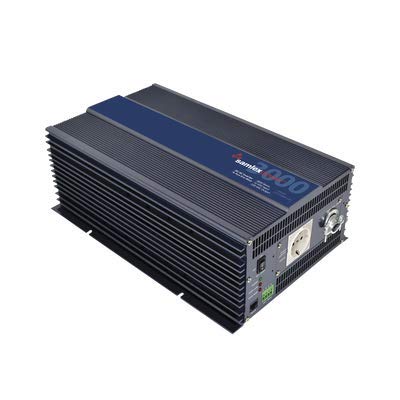
Image Description: This image displays the front panel of the Samlex PST-300S-12E inverter. Visible components include the Schuko AC outlet, power indicator lights, and the main power switch. The design is compact and functional, indicating ease of access for primary controls and power output.
- AC Output: Schuko outlet for 230 VAC, 50 Hz power.
- Indicators: Power, Fault, and Overload status lights.
- Power Switch: ON/OFF control for the inverter.
3.2 Rear Panel
The rear panel houses the DC input terminals, cooling fan, and remote control port.
- DC Input Terminals: Connect to 12V DC battery bank.
- Cooling Fan: Temperature-controlled for optimal performance.
- Remote Input: Port for optional remote control (RC-300, sold separately) or ignition switch connection.
4. Setup
4.1 Mounting the Inverter
Mount the inverter in a dry, well-ventilated area, away from direct sunlight and heat sources. Ensure sufficient clearance around the cooling fan for proper airflow. Use appropriate fasteners to secure the inverter to a stable surface.
4.2 DC Input Connection
- Ensure the inverter's power switch is in the OFF position.
- Connect the positive (+) terminal of the inverter to the positive (+) terminal of the 12V battery bank using appropriately sized cables.
- Connect the negative (-) terminal of the inverter to the negative (-) terminal of the 12V battery bank.
- Ensure all connections are tight and secure to prevent voltage drop and overheating.
- It is recommended to install a fuse or circuit breaker in the positive DC line, close to the battery, for protection.
4.3 AC Output Connection
Connect your AC appliances directly to the Schuko outlet on the front panel. For hard-wired applications, consult a qualified electrician.
4.4 Remote Control Connection (Optional)
The inverter features a remote input for an optional LCD remote control (Samlex RC-300, sold separately) or for connection to an ignition switch. Refer to the RC-300 manual for specific connection instructions.
5. Operating Instructions
5.1 Turning the Inverter ON/OFF
- To turn ON: Press the power switch on the front panel to the 'ON' position. The power indicator light should illuminate.
- To turn OFF: Press the power switch to the 'OFF' position. The power indicator light will turn off.
5.2 Connecting AC Loads
Plug your AC appliances into the Schuko outlet. Ensure the total wattage of all connected appliances does not exceed the inverter's continuous output rating of 3000 Watts. Some appliances, especially those with motors, may have a higher surge wattage requirement at startup. The inverter is designed to handle temporary surges.
5.3 Understanding Indicators
- Power Indicator: Illuminates when the inverter is ON and operating normally.
- Fault Indicator: Illuminates to indicate an internal fault or protection mode (e.g., over-temperature, short circuit).
- Overload Indicator: Illuminates when the connected load exceeds the inverter's capacity. The inverter may shut down to protect itself.
6. Maintenance
The Samlex PST-300S-12E inverter requires minimal maintenance. Regular checks ensure optimal performance and longevity.
- Cleaning: Periodically clean the exterior of the inverter with a dry cloth. Ensure ventilation openings are free from dust and debris. Do not use liquid cleaners.
- Connections: Annually check all DC input connections for tightness. Loose connections can cause overheating and poor performance.
- Environment: Ensure the operating environment remains within specified temperature and humidity ranges.
7. Troubleshooting
| Problem | Possible Cause | Solution |
|---|---|---|
| Inverter does not turn ON | No DC input power; Loose connections; Blown fuse/breaker; Low battery voltage. | Check battery connections and voltage; Verify fuse/breaker; Recharge battery. |
| No AC output | Overload; Over-temperature; Short circuit; Low battery voltage. | Reduce load; Allow inverter to cool; Check for short circuits in AC wiring; Recharge battery. |
| Fault indicator ON | Internal fault; Over-temperature; Short circuit. | Turn off inverter, disconnect loads, wait 15 minutes, restart. If fault persists, contact support. |
| Overload indicator ON | Connected load exceeds 3000W. | Reduce the total wattage of connected appliances. |
8. Specifications
| Feature | Detail |
|---|---|
| Model Name | 3000 WATT PS INVERTER |
| Input Voltage | 10.7 - 16.5Vdc (12 Volts) |
| Output Power (Continuous) | 3000 Watts |
| Output Voltage | 230 Volts AC |
| Frequency | 50 Hz |
| Waveform | Pure Sine Wave |
| Low Battery Alarm / Shut Down | Yes |
| Overload Protection | Yes |
| Over Temperature Protection | Yes |
| Short Circuit Protection | Yes |
| Idle Power Draw | Less than 2.5 Amp |
| Item Weight | 24.8 Pounds |
| Mfr Part Number | PST-300S-12E |
| UPC | 622988077654 |
9. Warranty and Support
For warranty information and technical support, please refer to the official Samlex America website or contact their customer service department. Keep your purchase receipt for warranty claims.
Samlex America Contact: www.samlexamerica.com
Documents and downloads
Ask a question about this manual
Ask about setup, troubleshooting, compatibility, parts, safety, or missing instructions. Manuals+ will review the question and use this page’s manual context to help answer it.