1. Important Safety Instructions
Please read all instructions carefully before using this appliance. Failure to follow these instructions may result in electric shock, fire, or serious injury.
- Ensure the voltage indicated on the appliance corresponds to your local mains voltage before connecting.
- Do not immerse the appliance, power cord, or plug in water or any other liquid.
- Unplug the appliance from the outlet when not in use and before cleaning. Allow it to cool before putting on or taking off parts, and before cleaning the appliance.
- Do not operate any appliance with a damaged cord or plug, or after the appliance malfunctions or has been damaged in any manner.
- The use of accessory attachments not recommended by the appliance manufacturer may result in fire, electric shock, or injury to persons.
- Do not use outdoors.
- Do not let the cord hang over the edge of a table or counter, or touch hot surfaces.
- Do not place the appliance on or near a hot gas or electric burner, or in a heated oven.
- Always fill the water reservoir first, then plug the cord into the wall outlet. To disconnect, turn any control to 'off', then remove the plug from the wall outlet.
- Do not use the appliance for other than intended use.
- Extreme caution must be used when moving an appliance containing hot water.
2. Product Overview
The KitchenChef KCP4266 is a semi-automatic filter coffee machine designed for convenient coffee preparation. It features an integrated grinder, allowing you to use either fresh coffee beans or pre-ground coffee. The machine includes a 1.2-liter water tank and can brew up to 12 cups of coffee. Its stainless steel construction ensures durability and a modern aesthetic.
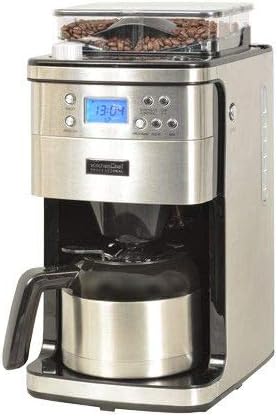
Image: Front view of the KitchenChef KCP4266 coffee machine, showing the control panel with an LED display, the coffee bean hopper, and the stainless steel thermal carafe.
Key Features:
- Integrated Grinder: For fresh coffee from whole beans.
- Dual Coffee Input: Compatible with both coffee beans and ground coffee.
- Large Capacity: 1.2L water tank, brews up to 12 cups.
- Stainless Steel Construction: Durable and easy to clean.
- Integrated LED Display: For time and settings.
- Programmable Timer: Set your brewing time in advance.
- Removable Filter Holder: For easy cleaning and maintenance.
- Aroma Jug: Designed to preserve coffee aroma and keep it warm.
3. Setup
3.1 Unpacking and Initial Cleaning
- Carefully remove all packaging materials from the coffee machine.
- Wipe the exterior of the machine with a damp cloth.
- Wash the thermal carafe, lid, and removable filter holder in warm, soapy water. Rinse thoroughly and dry.
- Ensure all parts are completely dry before assembly.
3.2 First Use (Cleaning Cycle)
Before brewing coffee for the first time, run a cleaning cycle to remove any manufacturing residues.
- Fill the water reservoir with fresh, cold water up to the 'MAX' level (1.2L).
- Place the empty thermal carafe with its lid on the warming plate.
- Insert the empty removable filter holder into its position. Do not add coffee.
- Plug the appliance into a grounded electrical outlet.
- Press the 'ON/OFF' button to start a brewing cycle. Allow the machine to complete the cycle.
- Discard the water from the carafe. The machine is now ready for use.
4. Operating Instructions
4.1 Setting the Clock
When plugged in, the LED display will show '12:00'.
- Press the 'PROG' button once. The hour digits will flash.
- Use the 'HOUR' and 'MINUTE' buttons to set the current time.
- Press 'PROG' again or wait a few seconds for the setting to be saved.
4.2 Brewing Coffee with Whole Beans
- Fill Water Reservoir: Open the water reservoir lid and fill with fresh, cold water to the desired level (indicated by cup markings). Do not exceed the 'MAX' line.
- Add Coffee Beans: Open the coffee bean hopper lid and add whole coffee beans. The capacity is approximately 250g. Close the lid securely.
- Insert Filter: Place a paper filter (size 4) into the removable filter holder, or ensure the permanent filter is clean and in place. Insert the filter holder into the machine.
- Place Carafe: Ensure the thermal carafe with its lid is correctly positioned on the warming plate.
- Select Grind Setting (if applicable): Use the rotary control or dedicated buttons to select your desired grind fineness.
- Select Number of Cups: Use the 'CUPS' button to select the desired number of cups. This adjusts the grinding time.
- Start Brewing: Press the 'ON/OFF' button. The machine will start grinding the beans and then begin the brewing process. The LED display may show the brewing progress.
- Serve: Once brewing is complete, the machine will beep. Carefully remove the carafe and serve. The thermal carafe will keep coffee warm for an extended period.
4.3 Brewing Coffee with Ground Coffee
- Fill Water Reservoir: Open the water reservoir lid and fill with fresh, cold water to the desired level.
- Add Ground Coffee: Insert a paper filter (size 4) or the permanent filter into the removable filter holder. Add the desired amount of ground coffee (approximately 1 scoop per cup, adjust to taste).
- Place Carafe: Ensure the thermal carafe with its lid is correctly positioned on the warming plate.
- Select Ground Coffee Mode: Press the 'GROUND' button (or equivalent) to bypass the grinder. The machine will indicate it is in ground coffee mode.
- Start Brewing: Press the 'ON/OFF' button. The machine will immediately begin the brewing process.
- Serve: Once brewing is complete, carefully remove the carafe and serve.
4.4 Using the Programmable Timer
The timer allows you to set a delayed start time for brewing.
- Prepare the coffee machine as described in section 4.2 or 4.3 (water, coffee beans/ground coffee, filter, carafe).
- Press the 'PROG' button twice. The 'TIMER' indicator will flash, and the hour digits will flash.
- Use the 'HOUR' and 'MINUTE' buttons to set your desired start time.
- Press 'PROG' again or wait a few seconds for the setting to be saved. The 'TIMER' indicator will remain lit, indicating the timer is active.
- The machine will automatically start brewing at the set time.
- To cancel the timer, press the 'ON/OFF' button once.
5. Maintenance and Cleaning
Regular cleaning ensures optimal performance and extends the lifespan of your coffee machine. Always unplug the appliance and allow it to cool completely before cleaning.
5.1 Daily Cleaning
- Carafe and Lid: Wash the thermal carafe and its lid in warm, soapy water after each use. Rinse thoroughly and dry. Do not use abrasive cleaners or scouring pads.
- Filter Holder: Remove the filter holder and discard any used coffee grounds or paper filter. Wash the filter holder in warm, soapy water, rinse, and dry.
- Exterior: Wipe the exterior surfaces of the machine with a soft, damp cloth. Do not use harsh chemicals or abrasive materials.
5.2 Cleaning the Grinder (for bean users)
Periodically clean the grinder to prevent build-up of coffee oils and ensure consistent grinding.
- Ensure the machine is unplugged and cool.
- Remove any remaining coffee beans from the hopper.
- Refer to the specific instructions in your full manual for removing and cleaning the grinder components. Typically, a small brush is provided to clean the burrs.
- Ensure all grinder parts are dry before reassembling.
5.3 Descaling
Mineral deposits (limescale) can build up in your coffee machine over time, affecting performance and coffee taste. Descale your machine every 2-3 months, or more frequently if you have hard water.
- Prepare a descaling solution according to the descaler manufacturer's instructions, or use a mixture of white vinegar and water (e.g., 1 part vinegar to 2 parts water).
- Fill the water reservoir with the descaling solution.
- Place the empty carafe on the warming plate.
- Start a brewing cycle without coffee. Allow half of the solution to brew through, then turn off the machine and let it stand for 15-20 minutes to allow the solution to work.
- Turn the machine back on and let the remaining solution brew through.
- Discard the solution and rinse the carafe.
- Run at least two full cycles with fresh, cold water to rinse out any remaining descaling solution.
6. Troubleshooting
If you encounter issues with your coffee machine, refer to the following common problems and solutions:
| Problem | Possible Cause | Solution |
|---|---|---|
| Coffee does not brew. | No water in reservoir; Machine not plugged in; Timer set; ON/OFF button not pressed. | Fill water reservoir; Plug in machine; Check timer setting; Press ON/OFF button. |
| Coffee is too weak. | Not enough coffee grounds/beans; Coarse grind setting; Water reservoir overfilled. | Add more coffee; Adjust grind setting to finer; Ensure water level matches desired cups. |
| Coffee overflows from filter. | Too much coffee grounds; Filter clogged; Carafe not properly placed. | Reduce coffee amount; Clean filter holder/use new paper filter; Ensure carafe is correctly seated. |
| Grinder not working. | No coffee beans; Grinder clogged; Machine in ground coffee mode. | Add coffee beans; Clean grinder components; Ensure machine is in bean mode. |
| Machine leaks. | Water reservoir lid not closed properly; Carafe not correctly placed; Overfilled water reservoir. | Ensure lid is secure; Reposition carafe; Do not exceed MAX fill line. |
If the problem persists after attempting these solutions, please contact customer support.
7. Specifications
| Feature | Specification |
|---|---|
| Model Number | KCP4266 |
| Brand | KitchenChef |
| Type | Semi-automatic Filter Coffee Machine |
| Color | Stainless Steel |
| Material | Stainless Steel |
| Capacity | 1.2 Liters (12 cups) |
| Power | 1000 Watts |
| Dimensions (L x W x H) | 20.5 x 26 x 42.5 cm |
| Weight | 4.6 Kilograms |
| Input Voltage | 220 - 240V AC |
| AC Input Frequency | 50 Hz |
| Coffee Input Type | Coffee beans, Ground coffee |
| Coffee Bean Capacity | 250 g |
| Control Type | Buttons, Rotary |
| Display Type | LED |
| Special Features | Integrated grinder, Aroma jug, Integrated display, Timer, Removable filter holder |
8. Warranty and Support
This KitchenChef KCP4266 coffee machine is covered by a manufacturer's warranty. Please refer to the warranty card included with your purchase for specific terms and conditions, including the warranty period and coverage details.
For technical support, service, or to inquire about spare parts, please contact your retailer or the official KitchenChef customer service. Contact information can typically be found on the product packaging or the manufacturer's website.
Please have your model number (KCP4266) and proof of purchase ready when contacting support.
