
AUNA AV2-CD509
AUNA AV2-CD509 HiFi CD Player User Manual
Model: AV2-CD509 | Brand: AUNA
Introduction
Thank you for choosing the AUNA AV2-CD509 HiFi CD Player. This high-performance audio device is designed to provide exceptional sound quality and versatile playback options for your home audio system. It supports various formats including CD, CD-R, CD-RW, and MP3, and features multiple connectivity options such as USB, optical, coaxial, and RCA outputs. This manual provides essential information for setting up, operating, and maintaining your new CD player. Please read it thoroughly before use to ensure proper functionality and longevity of the device.
Safety Instructions
To ensure safe operation and prevent damage, please observe the following safety precautions:
- Do not expose the device to rain or moisture.
- Do not open the casing. There are no user-serviceable parts inside. Refer all servicing to qualified service personnel.
- Ensure proper ventilation around the unit to prevent overheating.
- Disconnect the power plug from the wall outlet if the unit will not be used for a long period.
- Do not place heavy objects on top of the unit.
- Avoid placing the unit near heat sources or in direct sunlight.
- Clean the unit only with a dry, soft cloth. Do not use liquid cleaners.
Product Overview
Front Panel
The front panel of the AUNA AV2-CD509 features essential controls and indicators for easy operation.

Figure 1: Front view of the AUNA AV2-CD509 HiFi CD Player. This image displays the sleek black brushed stainless steel finish, the central disc loading tray, the digital display, and the various control buttons for playback and source selection. A USB port is visible on the right side of the front panel.
- Standby Button: Powers the unit on or off.
- Disc Tray: For inserting and removing CDs.
- Display: Shows track information, playback status, and other operational details.
- Control Buttons: Include Open/Close, Play/Pause, Stop, Next, Previous, and Source selection.
- USB Input: For connecting USB storage devices to play MP3 files.
Rear Panel
The rear panel provides all the necessary audio output connections for integrating the CD player into your existing audio system.
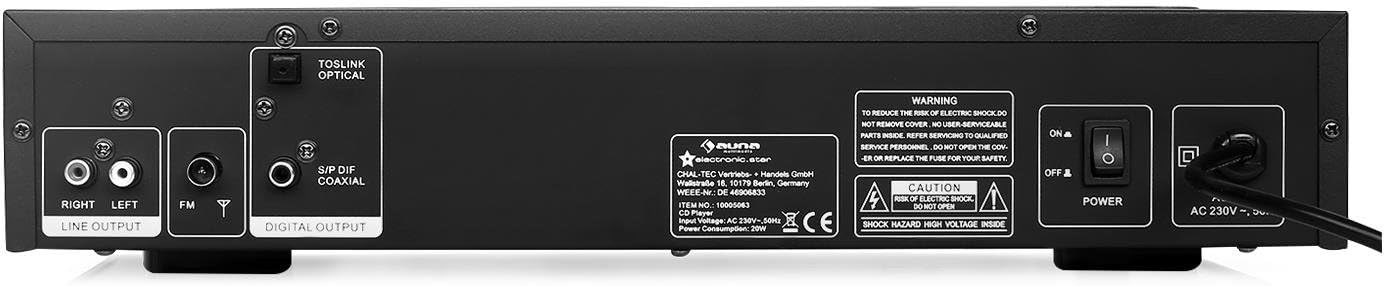
Figure 2: Rear view of the AUNA AV2-CD509 HiFi CD Player. This image highlights the connectivity options, including RCA stereo line outputs (Right/Left), an FM antenna input, a TOSLINK optical digital output, and a S/PDIF coaxial digital output. The main power switch and AC power input are also visible.
- RCA Line Output (L/R): Standard analog audio output for connecting to an amplifier or receiver.
- Optical Audio Output (TOSLINK): Digital audio output for high-quality connection to compatible audio equipment.
- Coaxial Audio Output (S/PDIF): Digital audio output, an alternative to optical for digital connections.
- FM Antenna Input: For connecting an FM antenna.
- Power Switch: Main power on/off switch.
- AC Power Input: For connecting the power cord.
Remote Control
The included remote control provides convenient access to all functions of the CD player from a distance.

Figure 3: Remote control for the AUNA AV2-CD509 HiFi CD Player. The remote features buttons for power (Standby), source selection, disc tray open/close, playback controls (Play/Pause, Stop, Next, Previous), repeat function, numeric keypad for track selection, USB mode, volume control, and mute.
- STANDBY: Power on/off.
- SOURCE: Selects input source (e.g., CD, USB).
- OPEN/CLOSE: Opens and closes the disc tray.
- PLAY/PAUSE: Starts or pauses playback.
- STOP: Stops playback.
- PREV/NEXT: Skips to the previous or next track.
- REPEAT: Repeats current track or all tracks.
- USB: Switches to USB playback mode.
- VOL+/VOL-: Adjusts volume of compatible connected AUNA amplifiers or receivers.
- MUTE: Mutes the audio output.
- Numeric Keypad (0-9, 10+): Direct track selection.
- A-B: Repeats a specific section of a track.
Setup
Follow these steps to set up your AUNA AV2-CD509 CD Player:
- Placement: Place the CD player on a stable, flat surface away from direct sunlight, heat sources, and excessive dust or moisture. Ensure adequate ventilation around the unit.
- Audio Connection:
- Analog Connection (RCA): Connect the RCA Line Output (L/R) on the rear panel of the CD player to the corresponding analog audio input (e.g., "CD IN" or "AUX IN") on your amplifier or receiver using RCA cables.
- Digital Connection (Optical or Coaxial): For higher fidelity, connect either the Optical Audio Output or the Coaxial Audio Output from the CD player to a compatible digital audio input on your amplifier, AV receiver, or DAC. Use a high-quality optical (TOSLINK) or coaxial cable.
- Power Connection: Ensure the main power switch on the rear panel is in the "OFF" position. Connect the supplied power cord to the AC Power Input on the rear panel and then plug the other end into a suitable wall outlet (230V, 50Hz).
- Initial Power On: Flip the main power switch on the rear panel to the "ON" position. The unit will enter standby mode. Press the "STANDBY" button on the front panel or remote control to turn the unit on.
Operating Instructions
Playing a CD
- Turn on the CD player and your amplifier/receiver.
- Press the "OPEN/CLOSE" button on the front panel or remote control to open the disc tray.
- Place a CD (CD, CD-R, or CD-RW) gently into the disc tray with the label side facing up.
- Press "OPEN/CLOSE" again to close the disc tray. The player will read the disc, and the display will show the total number of tracks and total playing time.
- Press the "PLAY/PAUSE" button to start playback.
- Use the "PREV" and "NEXT" buttons to skip between tracks.
- To pause playback, press "PLAY/PAUSE". Press again to resume.
- To stop playback, press the "STOP" button.
- To repeat a track or the entire disc, press the "REPEAT" button.
- For direct track selection, use the numeric keypad on the remote control.
Playing MP3 Files via USB
- Insert a USB storage device (e.g., USB flash drive) containing MP3 files into the USB input port on the front panel.
- Press the "SOURCE" button on the front panel or the "USB" button on the remote control to switch to USB mode.
- The player will automatically scan and begin playing MP3 files.
- Use the "PREV" and "NEXT" buttons to navigate through the MP3 files.
- Playback controls (PLAY/PAUSE, STOP, REPEAT) function similarly to CD playback.
- Note: The player supports MP3 files. Ensure your USB device is formatted to FAT32 for optimal compatibility.
Using the Remote Control
Point the remote control directly at the front panel of the CD player. Ensure there are no obstructions between the remote and the unit. Insert 2 x AAA batteries (not included) into the remote control, observing correct polarity.
Maintenance
Proper care and maintenance will ensure the longevity of your AUNA AV2-CD509 CD Player.
- Cleaning the Unit: Wipe the exterior of the unit with a soft, dry cloth. Do not use abrasive cleaners, waxes, or solvents as they may damage the finish.
- Cleaning the Disc Tray: Keep the disc tray clean and free of dust. Avoid touching the laser lens inside the disc tray.
- Disc Handling: Always handle CDs by their edges. Avoid touching the playing surface. Store discs in their cases when not in use to prevent scratches and dust accumulation.
- Ventilation: Ensure the ventilation openings on the unit are not blocked.
Troubleshooting
If you encounter any issues with your CD player, refer to the following table for common problems and solutions.
| Problem | Possible Cause | Solution |
|---|---|---|
| No power | Power cord not connected; Main power switch off; Wall outlet not active. | Ensure power cord is securely connected. Turn main power switch ON. Check wall outlet with another device. |
| No sound | Incorrect audio cable connection; Wrong input selected on amplifier; Amplifier volume too low or muted. | Check all audio cable connections. Select the correct input source on your amplifier/receiver. Increase volume or unmute amplifier. |
| Disc not playing / "NO DISC" error | Disc inserted incorrectly; Disc is dirty or scratched; Disc format not supported. | Insert disc with label side up. Clean disc with a soft, lint-free cloth. Try a different disc. Ensure disc is CD, CD-R, CD-RW, or MP3 CD. |
| USB playback not working | USB device not inserted correctly; USB device not formatted to FAT32; Files not MP3; USB device corrupted. | Ensure USB device is fully inserted. Format USB device to FAT32. Check if files are MP3. Try a different USB device. |
| Remote control not working | Batteries are dead or inserted incorrectly; Obstruction between remote and unit; Remote sensor blocked. | Replace batteries, ensuring correct polarity. Remove any obstructions. Clean the remote sensor on the unit. |
Specifications
| Feature | Detail |
|---|---|
| Model | AV2-CD509 |
| Supported Formats | CD, CD-R, CD-RW, MP3 |
| Connectivity | 1 x USB input, 1 x Optical audio output, 1 x Coaxial audio output, 1 x RCA audio line output (L/R) |
| Power Supply | 230V, 50Hz |
| Power Consumption | 80 Watts |
| Dimensions (W x H x D) | 42.5 x 8.5 x 22.5 cm |
| Weight | 4.3 kg |
| Material | Brushed Stainless Steel |
| Included Components | 1 x Device, 1 x Remote control with button batteries |
Warranty and Support
For warranty information and technical support, please refer to the documentation provided with your purchase or visit the official AUNA website. Keep your proof of purchase for any warranty claims.
You can also visit the AUNA brand store for more information: AUNA Brand Store.
Related documentsAV2-CD509


Ask a question about this manual
Ask about setup, troubleshooting, compatibility, parts, safety, or missing instructions. Manuals+ will review the question and use this page’s manual context to help answer it.