
1. Introduction
The SKYSONIC T-902 is a magnetic microphone designed for musical instruments, offering clear mid and treble frequencies without the typical characteristics of a piezo pickup. Engineered with advanced technology, it minimizes noise in various environments. This microphone provides a high output signal, often eliminating the need for an external preamplifier. Its design allows for versatile sound shaping by adjusting the microphone's direction.
2. Package Contents
Please verify that all the following items are included in your package:
- Pick-up body (SKYSONIC T-902 Magnetic Microphone)
- End pin jack
- End pin strap
- Sponge cover for condenser microphone
- 3V button battery (CR2032)
- Mounting hardware
- User Manual
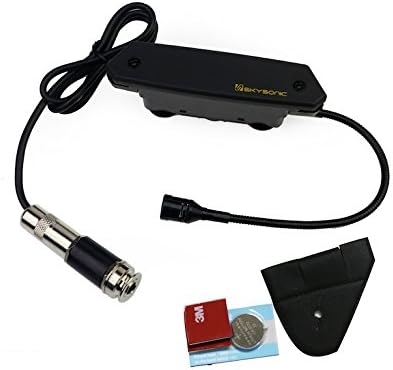
Figure 2.1: Included components of the SKYSONIC T-902 Magnetic Microphone system.
3. Setup and Installation
3.1 Installation Requirements
- Sound Hole Diameter: The recommended installation range for the sound hole is 3.5 to 4.1 inches (90 to 105 mm).
- Tools: Installation may require specific tools for drilling the end pin jack hole. Consult a professional if you are unsure about the installation process.
3.2 Mounting the Pickup
- Carefully position the pick-up body within the instrument's sound hole.
- Secure the pick-up body using the provided mounting hardware. Ensure it is firmly attached to prevent movement during use.
- Install the end pin jack at the designated location on your instrument. This typically involves drilling a hole for the jack.
- Connect the pick-up body to the end pin jack using the integrated cable.
- Attach the end pin strap to the end pin jack for additional security.
- Place the sponge cover over the condenser microphone element to reduce unwanted noise and protect the microphone.

Figure 3.1: The SKYSONIC T-902 pickup unit, showing the magnetic pickup and flexible microphone arm.
4. Operation
4.1 Connecting to an Amplifier/Mixer
Connect a standard instrument cable (with a 1/4-inch jack) from the installed end pin jack on your instrument to your amplifier, mixer, or audio interface. The T-902's high output allows it to be used directly with many systems without an additional preamplifier.
4.2 Sound Adjustment and Microphone Direction
The T-902 allows for sound customization through the direction of its condenser microphone. Experiment with different microphone positions to achieve your desired tone:
- Deep Sound: Pointing the microphone towards the backboard of the instrument, for example, to the right of the guitarist's elbow, can produce a deeper sound.
- Natural Sound for Recording: For a more natural sound during recording, consider using an equalizer (EQ) to slightly reduce frequencies around 1 KHz.
5. Maintenance
5.1 Battery Replacement
The SKYSONIC T-902 is powered by a 3V button battery (CR2032). The estimated continuous usage time is approximately 105 hours. Replace the battery when the sound quality degrades or the unit ceases to function.
- Locate the battery compartment on the pick-up body.
- Open the compartment and carefully remove the old CR2032 battery.
- Insert a new 3V CR2032 button battery, ensuring correct polarity.
- Close the battery compartment securely.
5.2 Cleaning and Care
Wipe the pick-up body with a soft, dry cloth. Avoid using harsh chemicals or abrasive materials, as these can damage the finish or electronic components.
6. Troubleshooting
If you experience issues with your SKYSONIC T-902, consider the following:
- No Sound Output:
- Check the battery: Ensure the CR2032 battery is correctly installed and has sufficient charge. Replace if necessary.
- Check connections: Verify that all cables are securely connected between the pickup, end pin jack, and your amplifier/mixer.
- Test with another cable: A faulty instrument cable can prevent sound transmission.
- Unwanted Noise/Hum:
- Ensure the sponge cover is properly placed over the condenser microphone.
- Check for proper grounding in your audio setup.
- Move away from sources of electromagnetic interference (e.g., power supplies, fluorescent lights).
- Weak Output:
- Replace the battery with a fresh one.
- Ensure the volume on your amplifier/mixer is appropriately set.
If problems persist, contact your authorized dealer or a qualified technician.
7. Specifications
| Feature | Specification |
|---|---|
| Model Name | T-902 |
| Microphone Form Factor | Mini |
| Power Source | Battery Powered |
| Battery Type | 1 x CR2032 (3V button battery) |
| Estimated Continuous Usage Time | 105 hours |
| Material | Metal |
| Number of Channels | 1 |
| Frequency Response | 1 KHz (nominal) |
| Item Weight | 12.3 ounces (0.77 Pounds) |
| Package Dimensions | 7.8 x 5.28 x 2.68 inches |
| Recommended Uses | Live Vocal Performances, Studio Recordings |
| Connectivity Technology | Auxiliary |
| Connector Type | 3.5 mm Jack (for internal connection to end pin jack) |
| Special Feature | 3.5mm jack |
| Compatible Devices | Amplifier, Gaming Console, Laptop, Personal Computer |
| Polar Pattern | Unidirectional |
8. Warranty and Support
8.1 Warranty Information
The SKYSONIC T-902 Magnetic Microphone comes with an authorized dealer 3-year warranty. Please retain your proof of purchase for warranty claims.
8.2 Customer Support
For technical assistance, troubleshooting, or warranty service, please contact your original point of purchase or an authorized SKYSONIC dealer.


