Introduction
Thank you for choosing the Fakir RS 701 Robert L Robot Vacuum Cleaner. This manual provides essential information for the safe and efficient use of your new appliance. Please read these instructions carefully before operating the device and retain them for future reference. The Fakir RS 701 Robert L is designed to automate floor cleaning, offering features such as stair detection, virtual wall functionality, and suitability for various floor types.
Safety Instructions
To reduce the risk of fire, electric shock, or injury, always observe basic safety precautions when using electrical appliances.
- Ensure the power adapter and charging station are placed in a dry area, away from water or moisture.
- Do not operate the robot vacuum if it has been dropped, damaged, left outdoors, or dropped into water.
- Keep hair, loose clothing, fingers, and all parts of the body away from openings and moving parts.
- Do not pick up large or sharp objects, liquids, or burning/smoking materials.
- Supervise children and pets when the robot vacuum is operating.
- Use only the manufacturer-specified charging station and power adapter.
- Before cleaning or maintenance, ensure the robot is turned off and disconnected from the power source.
- Do not use the appliance in areas with flammable or combustible liquids.
Package Contents
Carefully unpack the box and ensure all items listed below are present and in good condition.
- Fakir RS 701 Robert L Robot Vacuum Cleaner
- Charging Station
- Power Adapter
- Remote Control
- Mop Attachment
- Motor Protection Filter
- Brush Roll
- Rubber Roll
- Side Brushes (set)
- Dust Filter
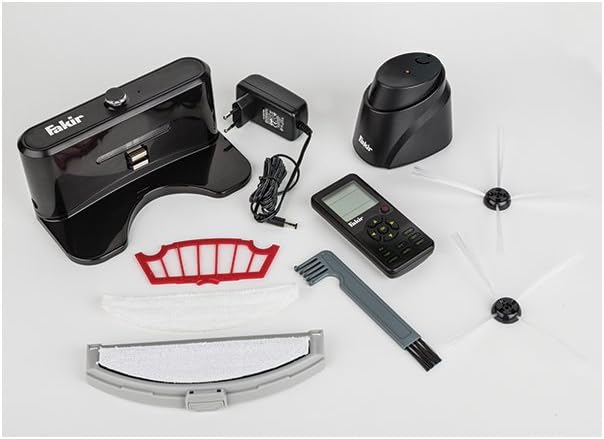
Image: All components included with the Fakir RS 701 Robot Vacuum Cleaner, showing the robot, charging station, remote, brushes, filters, and mop attachment.
Product Overview
The Fakir RS 701 Robert L is a circular robot vacuum cleaner designed for automated floor cleaning. It features a main body with a dustbin, cleaning brushes, sensors, and a control panel. A remote control is provided for convenient operation.
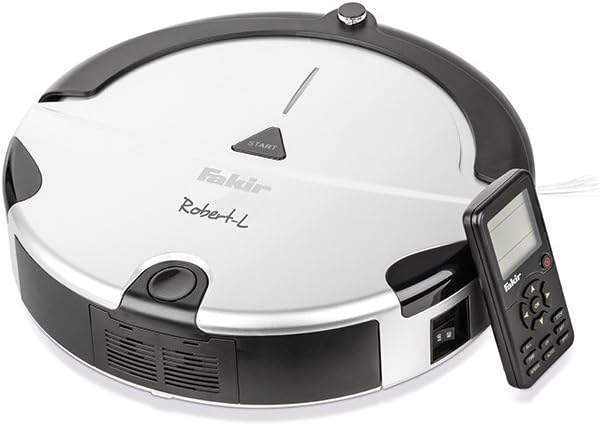
Image: The Fakir RS 701 Robert L Robot Vacuum Cleaner, showing its top panel with 'START' button and the included remote control.

Image: The Fakir RS 701 Robert L Robot Vacuum Cleaner positioned next to its charging station.
Main Components:
- Main Unit: Houses the motor, dustbin, battery, and control electronics.
- Side Brushes: Two rotating brushes that sweep debris into the vacuum's path.
- Main Brush/Rubber Roll: Collects dirt from the floor.
- Dustbin: Collects vacuumed debris.
- Sensors: Detect obstacles, stairs, and the charging station.
- Charging Contacts: Located on the underside of the robot and on the charging station.
- Remote Control: For manual control and programming.
Setup
- Charging Station Placement: Place the charging station against a wall in an open area, ensuring there are no obstacles for at least 1 meter (3 feet) to the sides and 2 meters (6 feet) in front. Connect the power adapter to the charging station and plug it into a wall outlet.
- Initial Charging: Place the robot vacuum onto the charging station. Ensure the charging contacts on the robot align with those on the station. The robot should begin charging automatically. For first use, charge the robot for at least 4-6 hours or until the charging indicator shows a full charge.
- Install Side Brushes: Gently push the side brushes onto their respective posts on the underside of the robot until they click into place.
- Prepare Cleaning Area: Before operation, remove any loose cables, small objects, or fragile items from the floor to prevent entanglement or damage.
Operating Instructions
Starting a Cleaning Cycle:
- Manual Start: Press the 'START' button on the top of the robot or the corresponding button on the remote control. The robot will begin cleaning in its default mode.
- Scheduled Cleaning: Use the remote control to set a cleaning schedule. Refer to the remote control section for detailed programming instructions.
Cleaning Modes:
The Fakir RS 701 Robert L offers various cleaning modes to suit different needs. These can typically be selected via the remote control.
- Auto Cleaning: The robot navigates and cleans automatically.
- Edge Cleaning: The robot cleans along walls and furniture edges.
- Spot Cleaning: The robot cleans a specific area in a spiral pattern.
- Mop Function: Attach the mop attachment for light dust wiping on hard floors. Ensure the mop is damp, not soaking wet.
Special Features:
- Stair Detection: Integrated sensors prevent the robot from falling down stairs or off ledges.
- Virtual Wall (Room Separator): Use the virtual wall accessory (if included or purchased separately) to create invisible barriers, preventing the robot from entering specific areas.
- Automatic Recharging: When the battery is low or a cleaning cycle is complete, the robot will automatically return to its charging station.
Using the Remote Control:
The remote control allows for full command over the robot's functions.
- Directional Buttons: Manually steer the robot.
- Start/Pause Button: Begin or pause a cleaning cycle.
- Home Button: Send the robot back to its charging station.
- Mode Selection: Choose between different cleaning modes (Auto, Edge, Spot).
- Schedule Button: Set daily cleaning times. Consult the remote control's specific instructions for programming details.
Maintenance
Regular maintenance ensures optimal performance and extends the lifespan of your robot vacuum. Always turn off the robot and disconnect it from the charging station before performing any maintenance.
1. Emptying the Dustbin:
- Press the dustbin release button and remove the dustbin.
- Open the dustbin lid and empty its contents into a trash receptacle.
- Rinse the dustbin with water if necessary, ensuring it is completely dry before reinserting.
2. Cleaning Filters:
- Remove the dust filter and motor protection filter from the dustbin.
- Tap the filters to remove loose dirt. For thorough cleaning, rinse them under running water.
- Allow filters to air dry completely for at least 24 hours before reinstallation. Do not use a dryer.
3. Cleaning Brushes:
- Side Brushes: Pull the side brushes off their posts. Remove any hair or debris wrapped around them. If damaged, replace them.
- Main Brush/Rubber Roll: Remove the brush cover and lift out the main brush and rubber roll. Use the cleaning tool (if provided) to cut and remove tangled hair or fibers.
4. Cleaning Sensors and Charging Contacts:
- Wipe the cliff sensors (located on the underside) and charging contacts (on the robot and charging station) with a clean, dry cloth.
- Ensure the drive wheels are free of debris.
5. Mop Attachment:
- Remove the mop attachment after each use.
- Wash the mop cloth by hand or machine. Allow it to air dry completely.
Troubleshooting
If your Fakir RS 701 Robert L encounters issues, refer to the following common problems and solutions.
| Problem | Possible Cause | Solution |
|---|---|---|
| Robot does not start or respond. | Low battery; Power switch off; Remote control batteries dead. | Charge the robot; Ensure the main power switch is on; Replace remote control batteries. |
| Robot does not return to charging station. | Charging station obstructed; Robot too far from station; Charging contacts dirty. | Ensure clear path to station; Manually place robot on station; Clean charging contacts on both robot and station. |
| Poor cleaning performance. | Full dustbin; Clogged filters; Tangled brushes; Worn side brushes. | Empty dustbin; Clean or replace filters; Clean main and side brushes; Replace worn side brushes. |
| Robot gets stuck frequently. | Obstacles (cables, rugs); Dirty cliff sensors. | Clear the cleaning area of obstacles; Clean all sensors. |
| Remote control programming is difficult. | Unfamiliarity with interface; Incorrect button sequence. | Refer to the specific remote control section in this manual or the quick start guide for detailed programming steps. Practice the sequence. |
Specifications
| Brand | Fakir |
| Model Number | RS 701 Robert L |
| Power | 45 Watts |
| Voltage | 7 Volts |
| Battery Type | Lithium-ion |
| Battery Autonomy | Up to 2 hours (120 minutes) |
| Product Dimensions (L x W x H) | 32 x 32 x 9 cm |
| Item Weight | 3.2 Kilograms |
| Features | Cordless, Stair Detection, Room Separator Function, Automatic Charging |
Warranty and Support
For warranty information and customer support, please refer to the warranty card included with your product or visit the official Fakir website. Keep your purchase receipt as proof of purchase.
If you encounter issues not covered in this manual, please contact Fakir customer service for assistance.


