
Introduction
This user manual provides comprehensive instructions for the safe and effective operation of your BaoFeng BF-88A Walkie Talkies. The BF-88A is a reliable and versatile two-way radio system designed for clear communication over long distances, suitable for various applications including business, camping, and family use. Please read this manual thoroughly before using the device.
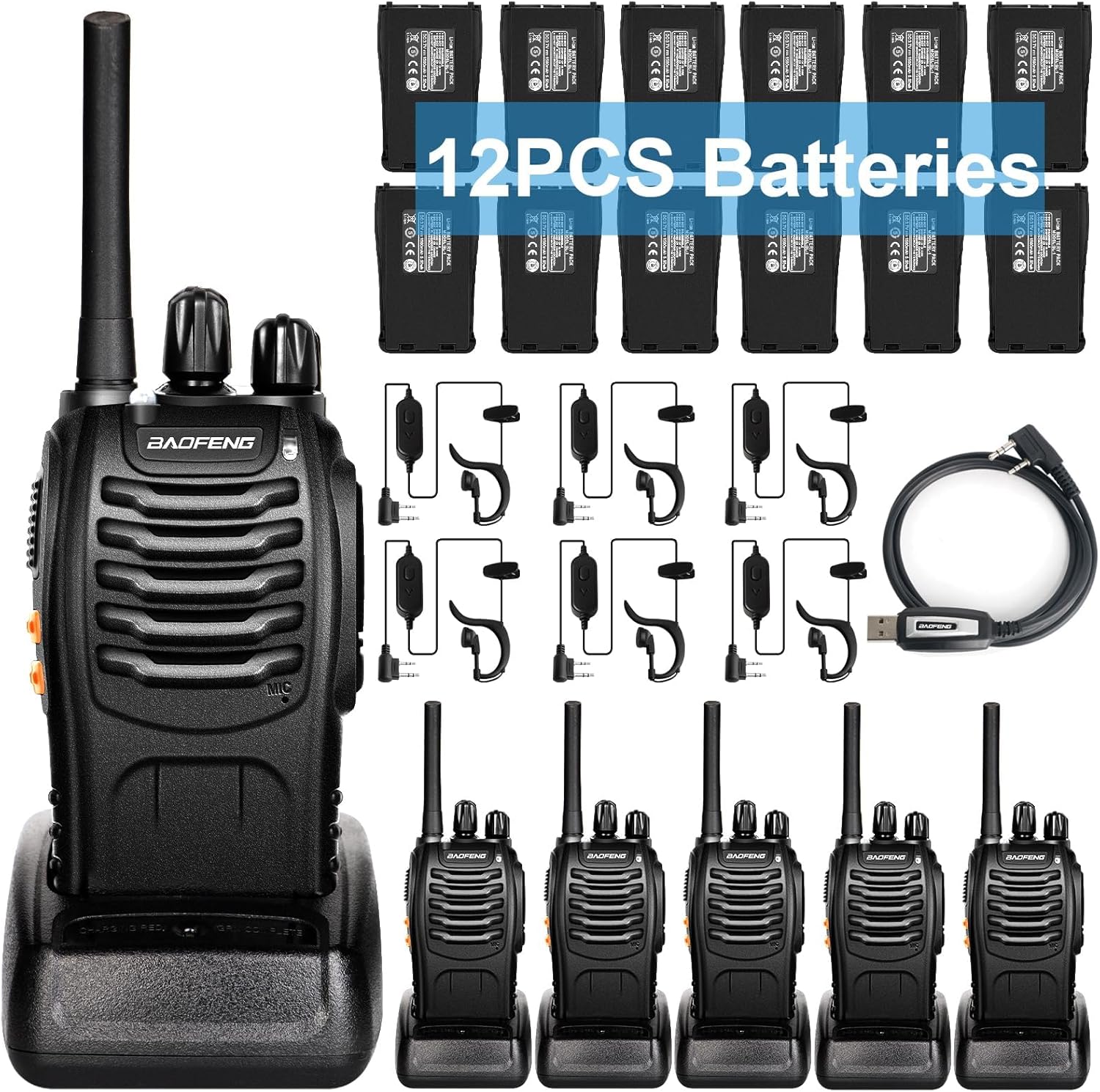
Image: A complete set of BaoFeng BF-88A walkie talkies, including six radios, twelve batteries, six earpieces, six antennas, six belt clips, six manuals, six desktop chargers, and six wrist straps.
What's in the Box
Your BaoFeng BF-88A package includes the following components:
- BaoFeng BF-888S (6 units)
- Earpieces with Mic (6 units)
- 3.7v 1500mAh Li-ion Battery (6 units)
- SMA-Female Antenna (6 units)
- Belt Clip (6 units)
- Manual (6 units)
- Desktop Charger (6 units)
- Wrist Strap (6 units)

Image: An organized display of all items included in the BaoFeng BF-88A package, showing the walkie-talkies, batteries, earpieces, antennas, and charging bases.
Product Overview
Familiarize yourself with the main components of your BaoFeng BF-88A walkie talkie:
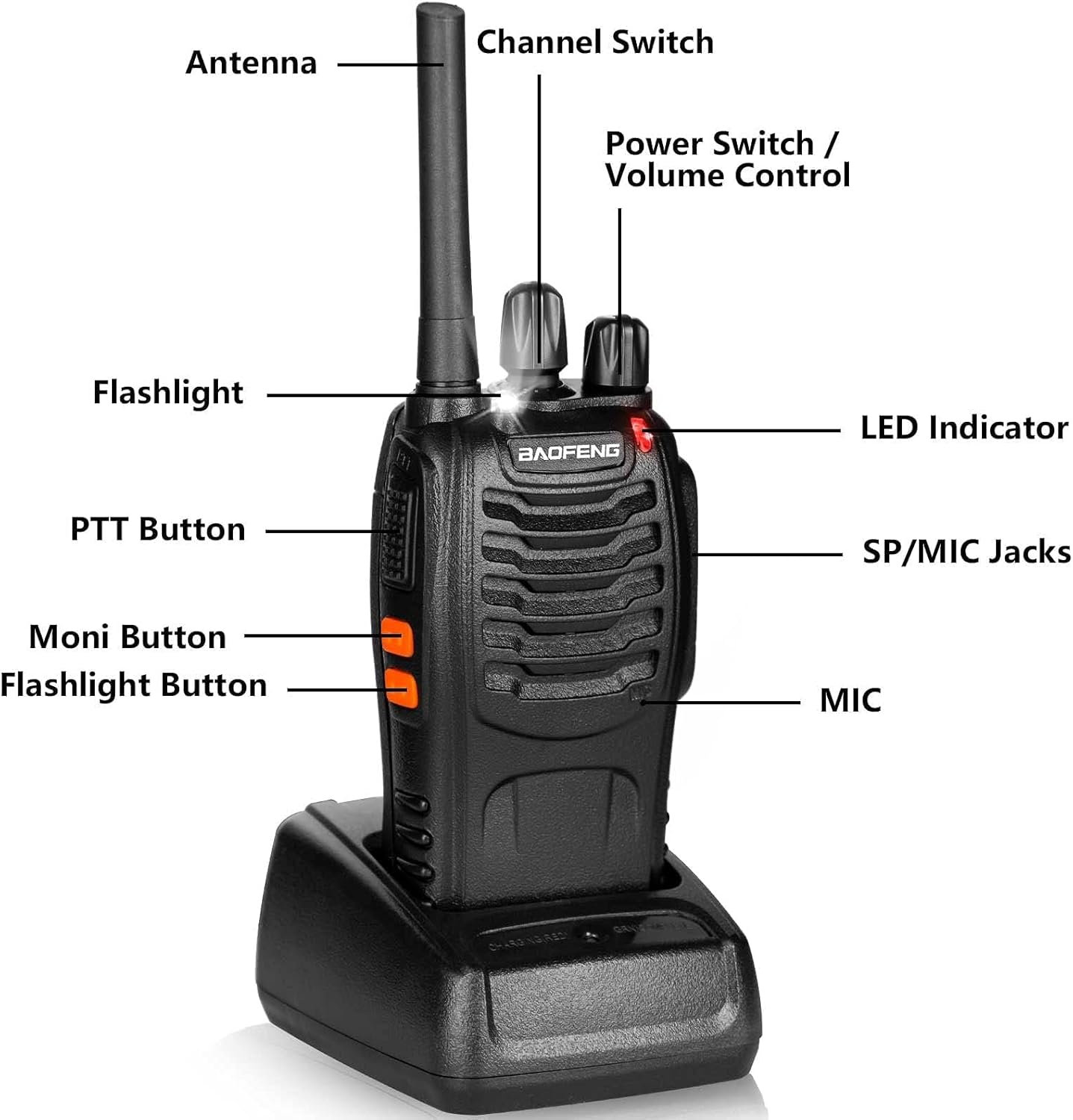
Image: A detailed diagram of the BaoFeng BF-88A walkie talkie, labeling its key parts including the Antenna, Channel Switch, Power Switch/Volume Control, LED Indicator, SP/MIC Jacks, MIC, Flashlight Button, Moni Button, and PTT Button.
- Antenna: For transmitting and receiving signals.
- Channel Switch: Rotary knob to select one of the 16 available channels.
- Power Switch / Volume Control: Rotary knob to turn the radio on/off and adjust volume.
- LED Indicator: Illuminates red during transmission and green during reception.
- SP/MIC Jacks: Ports for connecting the earpiece with microphone.
- MIC: Built-in microphone for voice input.
- Flashlight Button: Activates the built-in LED flashlight.
- Moni Button: Momentarily opens the squelch to listen for weak signals.
- PTT Button (Push-to-Talk): Press and hold to transmit, release to receive.

Image: A size comparison showing the compact dimensions of the BaoFeng BF-88A walkie talkie next to a modern smartphone, highlighting its portability.
Setup
1. Battery Installation and Charging
Each BF-88A walkie talkie requires one 3.7V 1500mAh Li-ion battery. Two batteries are provided per device for extended use.
- Ensure the walkie talkie is turned off.
- Align the battery with the battery compartment on the back of the radio.
- Slide the battery into place until it clicks securely.
- Place the walkie talkie (with battery installed) or a spare battery into the desktop charger.
- Connect the charger to a power outlet. The charging indicator will show charging status. A full charge typically takes 3 hours.

Image: A visual representation of the dual battery concept for the BaoFeng BF-88A, showing the walkie talkie and a separate battery being charged in its dedicated charging base.
2. Antenna Attachment
Screw the SMA-Female antenna clockwise onto the antenna connector at the top of the radio until it is finger-tight.
3. Earpiece Connection
Insert the Kenwood 2-pin connector of the earpiece into the SP/MIC jacks on the side of the walkie talkie. Ensure it is fully inserted for proper function.
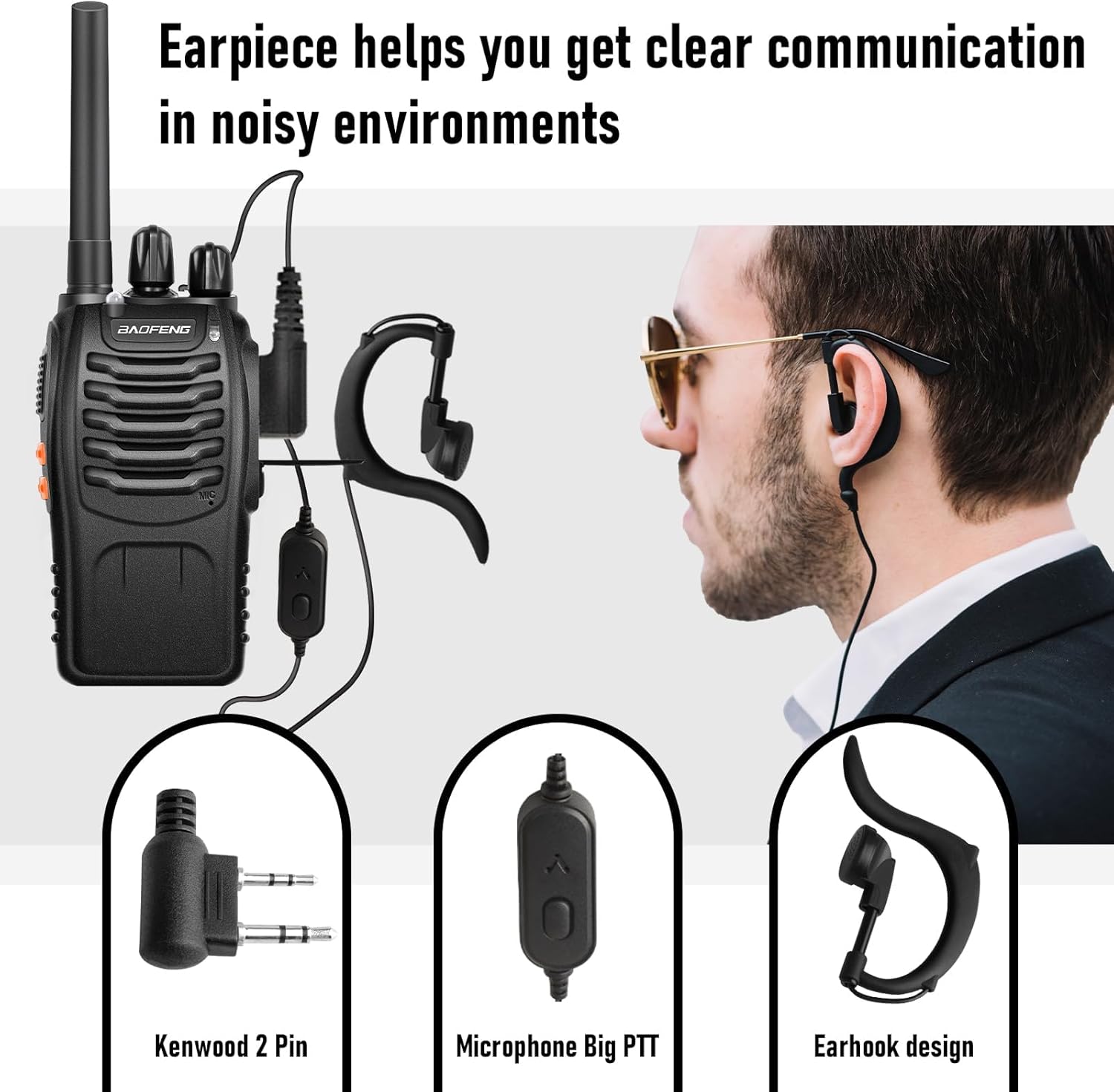
Image: A close-up showing the Kenwood 2-pin connector for the earpiece, the microphone with a large PTT button, and the earhook design, illustrating how the earpiece connects to the walkie talkie for clear communication in noisy environments.
Operating Instructions
Power On/Off and Volume Control
Rotate the Power Switch/Volume Control knob clockwise to turn the radio on. Continue rotating clockwise to increase the volume. Rotate counter-clockwise to decrease volume and turn off the radio.
Channel Selection
Rotate the Channel Switch knob to select one of the 16 available channels. Ensure all radios in your group are set to the same channel for communication.
Transmitting and Receiving (PTT)
To transmit, press and hold the PTT (Push-to-Talk) button on the side of the radio. Speak clearly into the microphone. Release the PTT button to receive messages.
VOX Function (Hands-Free Operation)
The BF-88A supports VOX (Voice Operated Exchange) for hands-free transmission. When VOX is enabled, the radio will automatically transmit when it detects your voice. This feature can be programmed via software.

Image: A graphic depicting the VOX function, showing sound waves emanating from a person's silhouette towards a walkie talkie, indicating voice-activated transmission.
Flashlight
Press the Flashlight Button to turn the built-in LED flashlight on or off. Some models may support a flashing mode, which can be activated by pressing the button again.
Scanning
The scanning feature allows the radio to automatically scan through all programmed channels to find active conversations. This function can be enabled and configured through programming.
Emergency Alarm
The BF-88A includes an emergency alarm function. When activated, the radio will emit a loud alarm sound to alert others. This feature is typically programmed to a specific button.

Image: A graphic showing a bell icon over a walkie talkie, representing the emergency alarm feature.
Privacy Codes (CTCSS & DCS)
The BF-88A supports 155 CTCSS (Continuous Tone-Coded Squelch System) and DCS (Digital-Coded Squelch) codes. These codes help filter out unwanted conversations on the same channel, ensuring more private communication within your group. Both your radio and the receiving radio must be set to the same channel and privacy code to communicate.

Image: A graphic showing a shield icon with binary code over a walkie talkie, symbolizing the privacy code feature for secure communication.
Programming and Customization
While the BF-88A is ready to use out of the box, its functions can be customized for specific needs. You can program the radios using:
- BaoFeng Programming Cable: Connects the radio to a computer for programming via software like Chirp.
- TIDRADIO Bluetooth Programmer: Allows quick customization via a mobile phone application (Odmaster).

Image: A visual showing the BaoFeng BF-88A connected to a programming cable, with a display of channel names and private codes (e.g., Ch. 3: 77.0, Ch. 4: 79.7, Ch. 5: 82.5), indicating customization options like VOX, Alarm, Squelch, and Scan.
Maintenance
Battery Care
- Always use the provided charger for optimal battery life.
- Avoid overcharging or completely draining the batteries.
- If the radio indicates low battery, recharge promptly to maintain performance and range.
- Store batteries in a cool, dry place when not in use.
Cleaning
Wipe the radio's exterior with a soft, damp cloth. Do not use harsh chemicals or abrasive cleaners. Ensure the SP/MIC jacks cover is securely closed to protect against dust and moisture.
Storage
When storing the walkie talkies for extended periods, remove the batteries and store them separately. Keep the radios in a dry, dust-free environment away from direct sunlight and extreme temperatures.
Troubleshooting
If you encounter issues with your BaoFeng BF-88A walkie talkie, refer to the following common problems and solutions:
| Problem | Possible Cause | Solution |
|---|---|---|
| No Power | Battery not installed correctly or discharged. | Ensure battery is securely installed. Recharge the battery. |
| No Sound / Cannot Transmit or Receive | Incorrect channel, low volume, squelch too high, privacy code mismatch. | Verify all radios are on the same channel. Increase volume. Check privacy code settings. Adjust squelch level. |
| Short Communication Range | Obstructions, low battery, antenna not properly attached. | Move to an open area. Recharge battery. Ensure antenna is securely attached. |
| Earpiece Not Working | Earpiece not fully plugged in, damaged earpiece. | Ensure earpiece connector is fully inserted. Try a different earpiece if available. |
For more detailed troubleshooting or complex issues, please refer to the official User Guide (PDF) or contact customer support.
Specifications
| Feature | Detail |
|---|---|
| Model Number | BF-88A |
| Frequency Range | 400 - 470 MHz |
| Number of Channels | 16 |
| Talking Range Maximum | Up to 5.5 Miles (open spaces) |
| Battery Type | Lithium Polymer (Li-ion) |
| Battery Capacity | 1500mAh (per battery) |
| Voltage | 3.7 Volts |
| Product Dimensions | 4.72 x 4.72 x 5.91 inches |
| Item Weight | 4.95 pounds (total package) |
| Special Features | Long Range, VOX, Emergency Alarm, Scanning, Power Save Mode, Built-in LED Flashlight, 155 CTCSS&DCS |
| Water Resistance Level | Waterproof |
Safety Information
- Do not operate the radio in explosive atmospheres (e.g., flammable gases, dust particles, metallic powders).
- Do not disassemble or modify the radio. Repairs should only be performed by qualified technicians.
- Keep the radio and its accessories out of reach of small children.
- Use only original or approved batteries and chargers to prevent damage and ensure safety.
- Avoid exposing the radio to extreme temperatures, direct sunlight, or excessive moisture.
- Do not transmit without an antenna attached.
- Be aware of local regulations regarding radio use, especially concerning FRS/GMRS frequencies.
Warranty and Support
For detailed warranty information, please refer to the documentation included with your purchase or contact BAOFENG customer support. Protection plans are available for extended coverage.
For additional support and a comprehensive user guide, you can download the official PDF manual:
For further assistance, please visit the BAOFENG Store on Amazon.