
1. Introduction
The ThermoPro TP65B is a digital hygrometer and thermometer designed to monitor indoor and outdoor temperature and humidity. This wireless device features a large touchscreen display with a backlight, providing clear readings and historical data. The outdoor sensor transmits data wirelessly to the main unit, offering a range of up to 500 feet (150 meters) in open areas. This manual provides detailed instructions for the proper setup, operation, and maintenance of your TP65B unit.
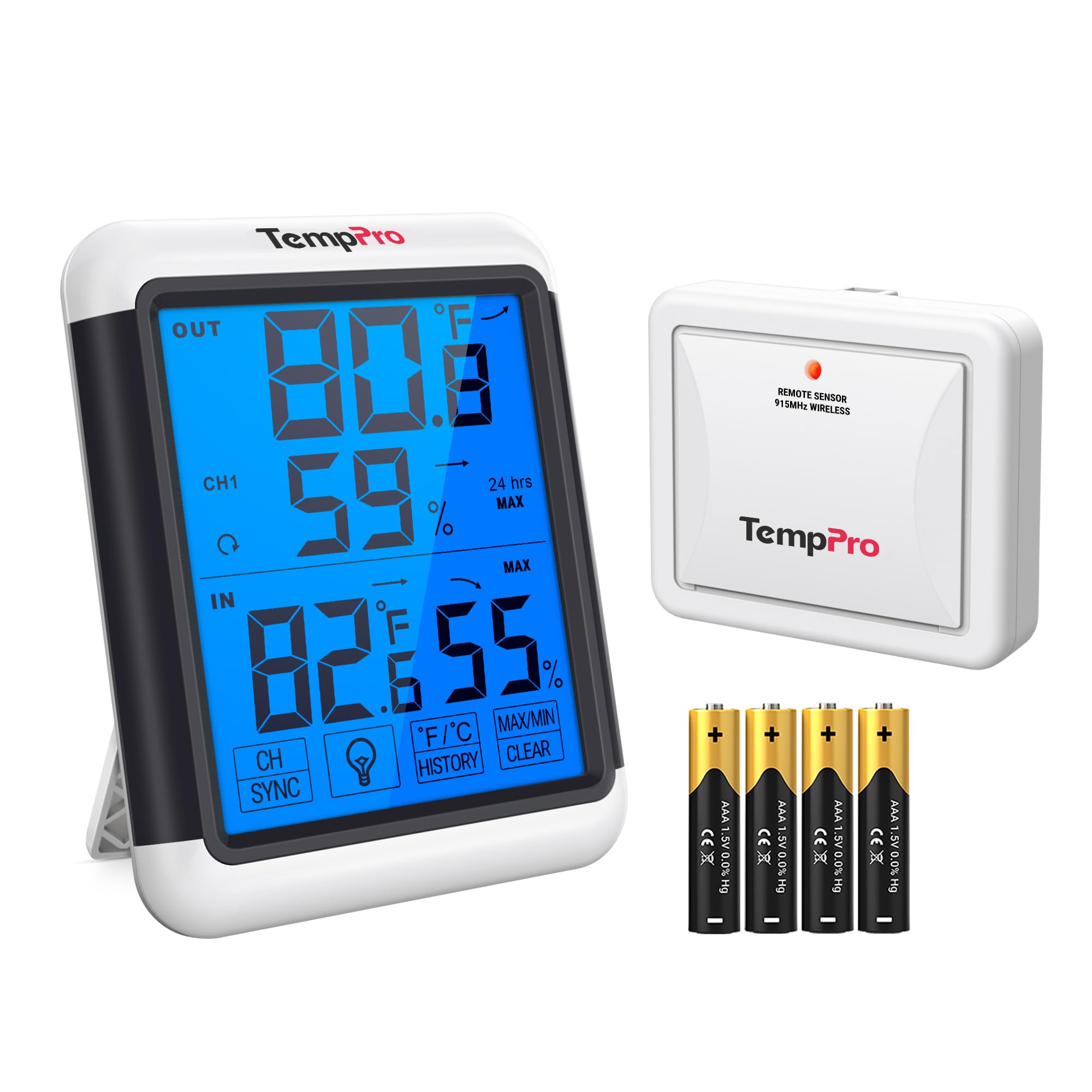
Image: The ThermoPro TP65B main display unit and its remote outdoor sensor, showcasing the product's design and functionality.
2. Safety Information
- Do not expose the main unit or sensor to excessive force, shock, dust, temperature, or humidity.
- Do not immerse the main unit or sensor in water.
- Do not remove any screws or attempt to disassemble the unit.
- Do not dispose of batteries in fire. Batteries may explode or leak.
- Remove batteries if the unit is not to be used for a long period.
- Keep the unit away from children.
3. Package Contents
- 1 x Main Unit (Receiver)
- 1 x Outdoor Remote Sensor (Transmitter)
- 4 x AAA Batteries (included)
- 1 x User Manual
4. Product Components
4.1 Main Unit (Receiver)
The main unit features a large LCD display and touch-sensitive buttons for various functions. It displays indoor temperature and humidity, as well as outdoor temperature and humidity received from the remote sensor.

Image: The main unit's large 4-inch LCD display, showing temperature and humidity readings, and its dimensions.
4.2 Outdoor Remote Sensor (Transmitter)
The remote sensor measures outdoor temperature and humidity and transmits this data wirelessly to the main unit. It is designed for outdoor use and should be placed in a location protected from direct sunlight and precipitation for accurate readings.

Image: The remote sensor mounted on an exterior wall, illustrating its wireless range of up to 500 feet.
5. Setup
5.1 Battery Installation
- Open the battery compartment on the back of the remote sensor.
- Insert 2 AAA batteries, observing the correct polarity (+/-).
- Close the battery compartment.
- Open the battery compartment on the back of the main unit.
- Insert 2 AAA batteries, observing the correct polarity (+/-).
- Close the battery compartment.
The main unit will immediately display indoor temperature and humidity. The outdoor temperature and humidity will be displayed after the sensor connects.
5.2 Pairing the Remote Sensor
The remote sensor should automatically connect to the main unit within a few minutes of battery installation. If the connection is not established, or if you are adding additional sensors (up to 3 total, sold separately):
- Ensure both the main unit and sensor have fresh batteries.
- Press and hold the "CH/SYNC" button on the main unit for 3 seconds to enter synchronization mode. The channel number will flash.
- Press the "TX" button inside the battery compartment of the remote sensor.
- The main unit should display the outdoor temperature and humidity, indicating successful pairing.
- If pairing multiple sensors, use the "CH/SYNC" button to switch between channels (CH1, CH2, CH3) and repeat the pairing process for each sensor.

Image: Illustration of the ThermoPro TP65B main unit monitoring temperature and humidity from multiple remote sensors in different rooms.
5.3 Placement Guidelines
Main Unit: Place the main unit in a dry location, away from direct sunlight, heat sources, or vents. It can be placed on a tabletop using its integrated stand or mounted on a wall using the hanging hole.
Remote Sensor: For accurate outdoor readings, place the remote sensor in a shaded, dry location, protected from direct sunlight and rain. Avoid placing it near metal objects, large bodies of water, or strong electromagnetic interference, which can affect wireless transmission. The sensor can be mounted on a wall or fence using the integrated hanging hole.

Image: The main unit demonstrating its multiple mounting options: strong magnet, hanging hole, and durable stand.
6. Operation
6.1 Display Overview
The large LCD display shows indoor and outdoor temperature and humidity, along with trend indicators and MAX/MIN records.

Image: Close-up of the main unit's display showing outdoor temperature and humidity (OUT), and indoor temperature and humidity (IN), along with trend arrows.
6.2 Button Functions
The TP65B features touch-sensitive buttons on the front of the main unit for easy operation.

Image: Comparison showing the easy-to-operate front touch buttons of the TP65B versus a device with back-positioned control buttons.
- CH/SYNC: Press to switch between outdoor channels (if multiple sensors are used). Press and hold for 3 seconds to enter synchronization mode for pairing new sensors.
- °F/°C: Press to switch between Fahrenheit and Celsius temperature display.
- LIGHT/HISTORY: Press to activate the backlight for 15 seconds. Press and hold for 3 seconds to view 24-hour MAX/MIN temperature and humidity records.
- MAX/MIN/CLEAR: Press to view the MAX/MIN temperature and humidity records for the current day. Press and hold for 3 seconds to clear the MAX/MIN records.
6.3 Understanding Readings
- Temperature & Humidity: Displays current indoor and outdoor temperature and humidity.
- Trend Arrows: Indicates whether temperature and humidity are rising, falling, or remaining constant.
- ↑: Rising
- ↓: Falling
- →: No change
- MAX/MIN Records: The highest and lowest temperature/humidity recorded since the last reset. These records automatically reset every 24 hours or can be manually cleared.
7. Maintenance
- Cleaning: Wipe the unit and sensor with a soft, damp cloth. Do not use abrasive cleaners or solvents.
- Battery Replacement: Replace batteries when the low battery indicator appears on the display. Ensure correct polarity.
- Storage: If storing the unit for an extended period, remove the batteries from both the main unit and the sensor to prevent leakage. Store in a dry, cool place.
8. Troubleshooting
| Problem | Solution |
|---|---|
| No outdoor temperature/humidity display or "---" shown. |
|
| Inaccurate readings. |
|
| Display is dim or blank. |
|
9. Specifications
- Temperature Range (Indoor): -4°F to 158°F (-20°C to 70°C)
- Temperature Range (Outdoor): -4°F to 158°F (-20°C to 70°C)
- Humidity Range: 10% to 99% RH
- Temperature Accuracy: ±2.0°F (±1.1°C)
- Humidity Accuracy: ±2-3% RH
- Wireless Range: Up to 500 ft (150m) in open areas
- Data Refresh Interval: 10 seconds
- Power: 2 x AAA batteries for main unit, 2 x AAA batteries for remote sensor (included)
- Display: Large 4-inch LCD with backlight
- Material: Metal (Outer Material)
- Model: TP65B

Image: Detailed specifications of the high-precision sensor, including temperature and humidity accuracy, data refresh interval, and temperature/humidity ranges.
10. Warranty & Support
ThermoPro provides a warranty for this product against defects in materials and workmanship. For detailed warranty information, product registration, or technical support, please visit the official ThermoPro website or contact their customer service. Please retain your purchase receipt as proof of purchase.
Contact Information: Refer to the official ThermoPro website or the packaging for the most current contact details.


