
Introduction
This manual provides detailed instructions for the safe and effective use of your Paipaitek PD520S-1 Dog Training Collar. This device is designed to assist in dog behavior control through various training modes. Please read this entire guide before using the product to ensure proper operation and the well-being of your pet.
Package Contents
Verify that all items listed below are included in your package:
- 1 x Remote Control Transmitter
- 1 x Receiver Collar
- 1 x Adjustable Nylon Collar
- 1 x USB Charging Cable (2-in-1)
- 1 x Test Light
- 1 x Lanyard
- 2 x Anti-abrasion Buckles
- 4 x Contact Points
- 4 x Conductive Silicone Covers
- 1 x User Manual (this document)

Image: All components included in the Paipaitek PD520S-1 Dog Training Collar package, including the remote, receiver, collar, charging cable, and accessories.
Product Features
- Adjustable Vibration Levels: Offers 1 to 100 vibration levels for customized training.
- Extended Control Range: Provides up to 1640 feet (546 yards) wireless control, effective through walls and obstacles.
- Intuitive Operation: Features separate command buttons on the remote for ease of use.
- Long Battery Life: Approximately 10 days of continuous use after a 2-hour charge.
- Lightweight Receiver: The 1.4 oz receiver ensures comfort for your pet.
- Compact Remote: The remote transmitter is small, flexible, and easy to handle.
- Multiple Training Modes: Includes Beep, Vibration, and Static Shock modes.
- Memory Function: Retains vibration level settings, eliminating the need for frequent resets.
- Waterproof Design: The IP67 rated receiver collar allows for use in wet conditions.
- Adjustable Collar Length: Fits neck sizes from 8 to 27 inches, suitable for small, medium, and large dogs.
Setup Guide
1. Initial Charging
Before first use, charge both the remote control and the receiver collar for at least 6 hours. Subsequent charges typically take 2 hours for approximately 10 days of use.
Use the provided 2-in-1 USB charging cable to charge both devices simultaneously. A standard mobile phone charger or USB computer interface can be used.

Image: The remote control and receiver collar connected to the 2-in-1 USB charging cable for simultaneous charging.
2. Attaching the Collar
Thread the adjustable nylon collar through the receiver unit. Ensure the contact points are facing inwards towards the dog's neck.

Image: The orange nylon collar attached to the black receiver unit, showing the contact points correctly positioned.
3. Fitting the Collar
Proper collar fit is crucial for effectiveness and comfort. The collar should be snug, allowing one finger to fit comfortably between the strap and your dog's neck. If the collar is too loose, the stimulation may not be consistent, and if too tight, it can cause discomfort.
If the nylon belt is excessively long, you may trim it. After cutting, use a lighter to carefully blanch the cut edge to prevent fraying.
4. Turning On/Off the Receiver
To turn on the receiver, press and hold the power button until the indicator light illuminates. To turn off, press and hold the power button again until the light extinguishes.

Image: A hand demonstrating how to press the power button on the receiver collar to turn it on or off.
5. Pairing Remote and Receiver
The remote and receiver are typically pre-paired. If re-pairing is necessary:
- Ensure both devices are fully charged and turned off.
- Turn on the remote control.
- Press and hold the power button on the receiver until the indicator light flashes rapidly.
- Within 10 seconds, press any training mode button (Beep, Vibration, or Static Shock) on the remote.
- The receiver's indicator light will stop flashing and remain solid, indicating successful pairing.
- Remember the signal channel used on the remote (e.g., "1/2" button) and avoid pressing it inadvertently during training.
Operating Instructions
The Paipaitek PD520S-1 offers three training modes: Beep, Vibration, and Static Shock. These modes are activated via separate buttons on the remote control.
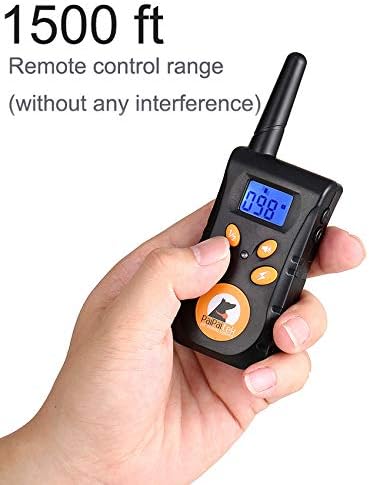
Image: A hand holding the remote control, showing the LCD display and various buttons for different training modes and intensity adjustments.
1. Training Modes
- Beep Mode: Delivers an audible tone to your dog. This is often used as an initial warning or for positive reinforcement.
- Vibration Mode: Provides a non-harmful vibration. This can be adjusted from level 0-100.
- Static Shock Mode: Delivers a static pulse. This can be adjusted from level 0-100. Use this mode responsibly and only after other modes have been attempted.
2. Adjusting Levels
Both Vibration and Static Shock modes have 100 adjustable levels (0-100). Use the up/down buttons on the remote to select the appropriate intensity. Start with the lowest effective level and increase only if necessary.
The remote control features a clear LCD display screen that shows the selected intensity level and battery status.
3. Remote Control Functions
- Beep Button: Activates the audible tone.
- Vibration Button: Activates the vibration mode at the selected intensity.
- Static Shock Button: Activates the static shock mode at the selected intensity.
- Level Adjustment Buttons: Used to increase or decrease the intensity of vibration or static shock.
- Channel Button (1/2): Selects between two receiver channels if you are training two dogs with one remote. Ensure you are on the correct channel for your dog.
Important Safety Information and Usage Tips
- Collar Wearing Duration: Do not leave the collar on your dog for more than 18 hours per day to prevent skin irritation. If professional training requires longer use, check the collar position every 1-2 hours.
- Water Protection: While the receiver is IP67 waterproof, ensure it is dry before charging.
- Signal Channel: Always remember the signal channel you are using for your dog and avoid accidentally switching channels.
- Proper Fit: A snug but not overly tight fit is essential for the collar to function correctly and comfortably.
- Initial Training: Begin training with the lowest effective stimulation level.
- Supervision: Always supervise your dog during training sessions.
Maintenance
1. Cleaning
Regularly clean the receiver collar and contact points with a damp cloth to remove dirt and debris. Ensure the contact points are free from buildup to maintain proper function.
2. Storage
When not in use, store the training collar system in a dry, cool place, away from direct sunlight and extreme temperatures. Ensure both the remote and receiver are turned off to preserve battery life.
Troubleshooting
- Collar Not Responding:
- Check if both the remote and receiver are sufficiently charged.
- Ensure both devices are turned on.
- Verify that the remote and receiver are properly paired. If not, follow the re-pairing instructions in the Setup Guide.
- Confirm the collar is fitted correctly and the contact points are making proper contact with the dog's skin.
- Weak or Inconsistent Stimulation:
- Adjust the intensity level on the remote.
- Clean the contact points and ensure they are free of dirt or fur.
- Check the collar fit; it may be too loose.
- Battery Drains Quickly:
- Ensure both devices are fully charged for the recommended duration.
- Turn off the receiver and remote when not in use.
- Water Damage (despite being waterproof):
- While rated IP67, prolonged submersion or exposure to high-pressure water jets may affect performance. Ensure all charging ports are sealed when not charging.
Specifications
| Feature | Detail |
|---|---|
| Model Number | PD520S-1 (520s) |
| Brand | Paipaitek |
| Control Range | Up to 1640 ft (546 yd) |
| Training Modes | Beep, Vibration (0-100 levels), Static Shock (0-100 levels) |
| Receiver Waterproof Rating | IP67 |
| Battery Type | Lithium Polymer (included) |
| Charging Time | Approx. 2 hours |
| Usage Time (per charge) | Approx. 10 days |
| Receiver Weight | 1.4 oz (40g approx.) |
| Adjustable Collar Length | 8 to 27 inches |
| Material | Nylon, Silicone, Wool |
| UPC | 702383202063 |

Image: The receiver collar submerged in a glass of water, demonstrating its IP67 waterproof capability.
Official Product Video
Video: A detailed guide on how to use the Paipaitek PD520S-1 Dog Training Collar, demonstrating its features and operation.
Warranty and Support
For warranty information and customer support, please refer to the contact details provided with your purchase documentation or visit the official Paipaitek website. Product care instructions include protecting the receiver from water during charging and re-pairing the receiver and remote if the collar stops working.


