1. Introduction
The Godox Xpro-C TTL Wireless Flash Trigger is a sophisticated device designed for Canon EOS cameras, offering comprehensive control over Godox wireless X system flashes and original Canon speedlites when used with compatible receivers. This trigger supports advanced functions such as 1/8000s High-Speed Sync (HSS), TTL autoflash, multi-flash, and manual flash. Its user-friendly interface, featuring a large dot-matrix LCD display and dedicated group buttons, ensures efficient and precise flash management for professional photography.

Figure 1: Godox Xpro-C TTL Wireless Flash Trigger, showing its large LCD display and control buttons.
2. Setup
2.1 Battery Installation
The Xpro-C requires two AA batteries for operation. Ensure correct polarity when inserting the batteries.
- Locate the battery compartment on the underside of the trigger.
- Slide the battery compartment cover open.
- Insert two AA batteries, matching the positive (+) and negative (-) terminals as indicated inside the compartment.
- Close the battery compartment cover securely.

Figure 2: Side view of the Xpro-C, highlighting the Type-C USB port and the battery compartment for two AA batteries.
2.2 Mounting to Camera
Attach the Xpro-C to your Canon EOS camera's hot shoe.
- Slide the Xpro-C's mounting foot into the camera's hot shoe.
- Tighten the locking ring or lever (if present) on the trigger to secure it to the hot shoe.
2.3 Powering On/Off
To power on the Xpro-C, slide the ON/OFF switch to the "ON" position. To power off, slide it to the "OFF" position.
2.4 Initial Settings: Groups, Channels, and Wireless ID
For proper communication, ensure the trigger and slave units (flashes) are set to the same group, channel, and wireless ID.
- The Xpro-C supports 16 groups and 32 channels.
- Wireless ID settings range from 01-99 to avoid signal interference.
- Use the group buttons and dial to navigate and adjust these settings on the LCD display.
3. Operating Instructions
3.1 Basic Flash Modes
The Xpro-C supports various flash modes:
- TTL Autoflash: Automatically adjusts flash output for correct exposure.
- Manual Flash: Allows manual control over flash power output.
- Multi Flash (Stroboscopic): Fires a series of rapid flashes during a single exposure.
- High-Speed Sync (HSS): Enables flash synchronization at shutter speeds faster than the camera's native sync speed, up to 1/8000s.

Figure 3: Display examples of TTL and Manual modes, demonstrating the TCM transform function.
3.2 TCM Transform Function
The TCM (TTL Convert Manual) function allows you to convert a TTL flash value into a manual power output. This is useful for quickly setting a baseline manual power after a TTL shot.
- Long Press TCM Button: Transforms the TTL shooting value into the output value in M mode.
- Short Press TCM Button: Switches between one-group and multi-group display modes.
3.3 Group Control and Zooming
The Xpro-C features 5 dedicated group buttons (A, B, C, D, E) for easy control of individual flash groups. You can adjust each group's output value simultaneously.
- Group Modeling Lamp Control: Control the modeling lamp of your flashes directly from the trigger.
- Group Zooming: Adjust the zoom value of compatible flashes via the transmitter.
3.4 Other Functions
- Flash Exposure Compensation (FEC): Adjust flash output in ±3 stops in 1/3 stop increments.
- Flash Exposure Lock (FEL): Lock the flash exposure value.
- Focus Assist: The trigger can emit an assist beam to help the camera focus in low light.
- Memory Function: Settings are stored 2 seconds after the last operation and recovered after a restart.
- One-Shoot & Multi-Shoot Setting: Configure the trigger for single or multiple shots.
- Wireless Shutter Release Trigger: Can function as a wireless shutter release when connected via the 2.5mm sync cord jack.

Figure 4: Examples of the Xpro-C's versatile usage methods, including triggering camera flashes, speedlites, and acting as a shutter release.
4. Maintenance
- Keep the device dry. Do not handle with wet hands or immerse in water.
- Avoid sudden temperature changes, which can cause condensation.
- Clean the device regularly with a soft, dry cloth. Do not use solvents or harsh chemicals.
- Remove batteries if the device will not be used for an extended period to prevent leakage.
- Store in a cool, dry place away from direct sunlight and extreme temperatures.
5. Troubleshooting
| Problem | Possible Cause | Solution |
|---|---|---|
| Trigger does not power on. | Batteries are dead or incorrectly inserted. | Replace batteries or check polarity. |
| Flash units do not fire. | Incorrect group, channel, or wireless ID settings. Flash unit not powered on or in receiver mode. | Ensure trigger and flash units have matching group, channel, and wireless ID. Power on flash units and set to receiver mode. |
| Inconsistent flash firing. | Interference from other wireless devices. Low battery on trigger or flash. | Change wireless ID or channel. Replace batteries. Ensure clear line of sight. |
| HSS not working. | Camera or flash unit does not support HSS, or HSS is not enabled. | Verify HSS compatibility and settings on both camera and flash. |
6. Specifications

Figure 5: Detailed technical specifications for the Godox Xpro-C flash trigger.
| Feature | Detail |
|---|---|
| Model | Xpro-C |
| Compatible Cameras | Canon EOS cameras (E-TTL II autoflash), supports cameras with PC sync socket. |
| Power Supply | 2*AA batteries |
| Flash Exposure Control | TTL autoflash, Manual flash, Stroboscopic flash |
| Sync Functions | High-speed sync (HSS), Second-curtain sync |
| Flash Exposure Compensation | Yes, ±3 stops in 1/3 stop increments |
| Flash Exposure Lock | Yes |
| Focus Assist | Yes |
| Modeling Lamp Control | Control by flash trigger |
| Beeper | Control by flash trigger |
| Wireless Setting | Receiver end can control camera shooting through 2.5mm sync cord jack |
| ZOOM Setting | Adjust zoom value by transmitter |
| TCM Function | Transform TTL shooting value into output value in M mode |
| Firmware Upgrade | Through Type-C USB port |
| Memory Function | Settings stored 2 seconds after last operation and recover after restart |
| Transmission Range (approx.) | 0-100m |
| Built-in Wireless | 2.4G |
| Modulation Mode | MSK |
| Channel | 32 |
| Wireless ID | 01-99 |
| Group | 16 |
| Display | Large LCD panel, backlighting ON or OFF |
| Dimension/Weight | 90x58x50mm / 80g |
Compatible Flash and Camera Models:
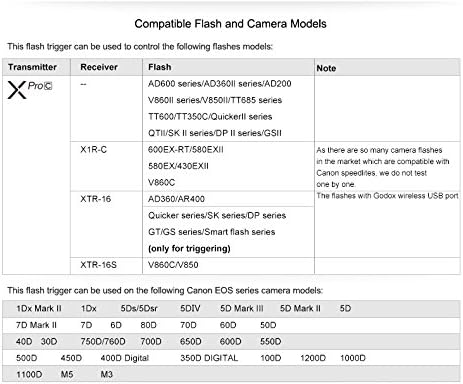
Figure 6: Compatibility chart for Godox Xpro-C with various flash units and Canon EOS camera models.
7. Warranty and Support
The Godox Xpro-C TTL Wireless Flash Trigger comes with a manufacturer's warranty. Please refer to the warranty card included in your product packaging for specific terms and conditions, including warranty period and coverage details.
For technical support, firmware updates, or additional product information, please visit the official Godox website:


