1. Product Overview
The KEMOT PROsinus-700 URZ3406 is a versatile pure sine wave inverter designed to provide reliable emergency power. It functions as an uninterruptible power supply (UPS) for various electrical appliances, ensuring continuous operation during mains power outages. This device is particularly useful for sensitive electronics and essential household systems like central heating furnaces, refrigerators, televisions, and office equipment, which require a stable and clean power source.
The inverter features a wide input voltage range, high output voltage precision, and automatic voltage regulation. It also incorporates multiple protection mechanisms against overloads, short circuits, overvoltages, undervoltages, and overheating, enhancing safety and device longevity. An integrated LED display provides real-time status information.
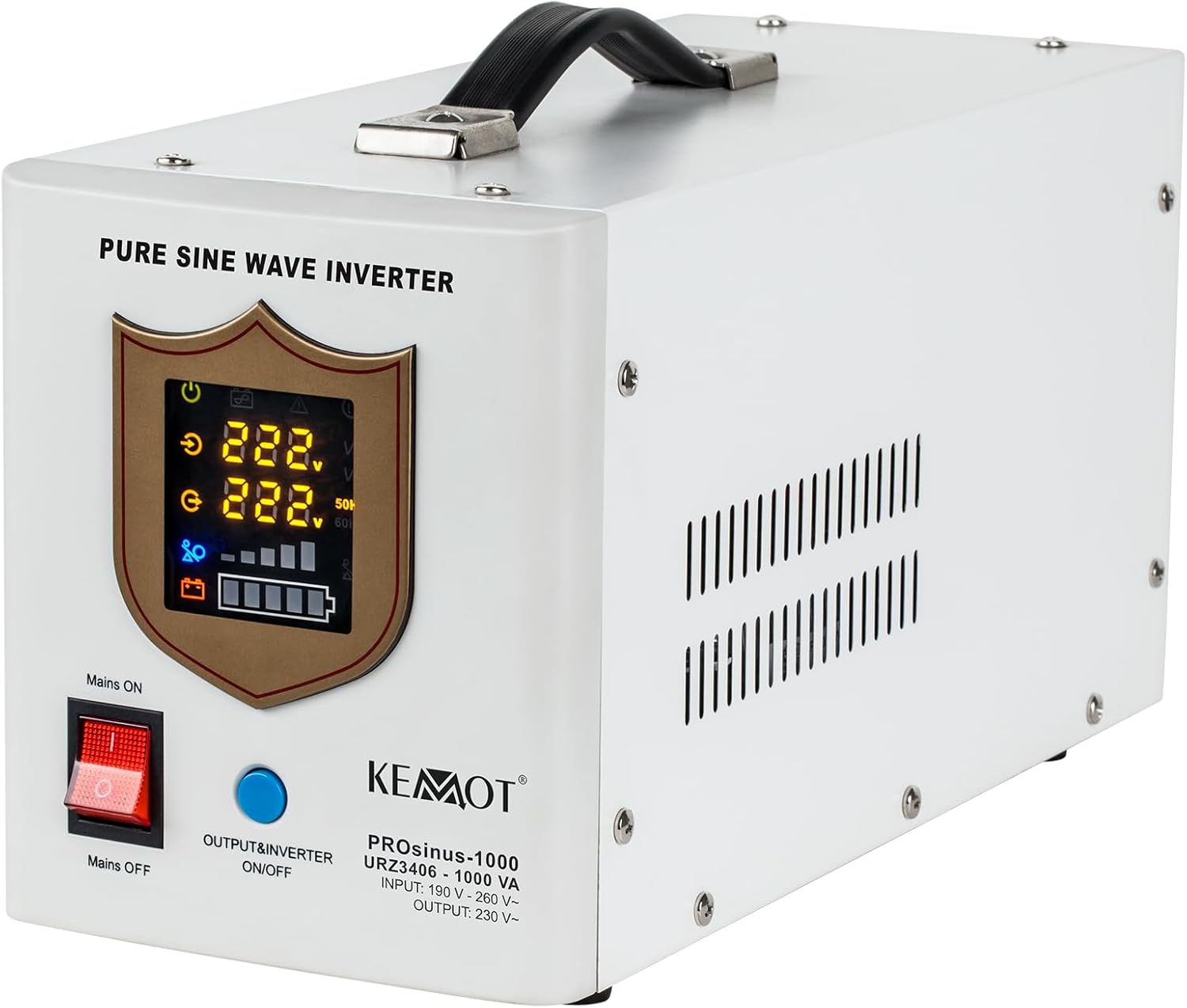
Figure 1.1: Front view of the KEMOT PROsinus-700 URZ3406 Pure Sine Wave Inverter. This image displays the device's front panel, featuring the LED screen that indicates operational status, input/output voltage, and battery charge level. Below the screen are the 'Mains ON/OFF' switch and the 'Output & Inverter ON/OFF' button. The unit is white with a black handle on top.
This inverter is ideal for maintaining power to critical systems during unexpected power interruptions. Examples of applications include:

Figure 1.2: Application example showing a central heating system. The KEMOT PROsinus-700 can provide backup power to essential home heating systems, preventing discomfort and potential damage during power outages.

Figure 1.3: Diverse appliance compatibility. This image demonstrates the inverter's capability to power a range of household and office equipment, from televisions and refrigerators to electric fans and office computers, ensuring continuity for daily activities.
2. Key Features
- Pure Sine Wave Output: Ensures compatibility and safe operation for all types of electronic devices, including sensitive equipment, by converting 12V DC battery power into stable 230V AC pure sine wave output.
- Multi-functional Operation: Can be utilized in three primary modes:
- Emergency Power Supply with Charging Function: Converts 12V DC from an external battery to 230V AC pure sine wave and simultaneously charges the connected external battery.
- Rectifier: Charges the external battery when mains power is available.
- Inverter: Converts 12V DC from an external battery to 230V AC for connected loads.
- Comprehensive Protection: Integrated safeguards against overload, short circuit, overvoltage, undervoltage, and overheating to protect both the inverter and connected appliances.
- LED Display: Provides clear, real-time information on the current operational status, including input/output voltage and battery charge level.
3. Setup and Installation
Proper installation is crucial for the safe and efficient operation of your KEMOT PROsinus-700 inverter. Ensure the installation area is well-ventilated, dry, and free from direct sunlight or excessive heat sources. The unit requires an external 12V DC battery (not included) for emergency power functionality.
3.1 Connecting the Battery
Connect the positive (+) terminal of a 12V external battery to the red (+) battery terminal on the rear of the inverter. Connect the negative (-) terminal of the battery to the black (-) battery terminal on the inverter. Ensure connections are secure and tight to prevent arcing and ensure optimal performance. Use appropriate gauge cables for the battery connection.

Figure 3.1: Rear view of the KEMOT PROsinus-700 URZ3406. This image highlights the rear panel of the inverter, showing the battery terminals (red for positive, black for negative), two 230V AC output sockets, the 230V AC input power cable, a circuit breaker, and a cooling fan. The CE marking is also visible.
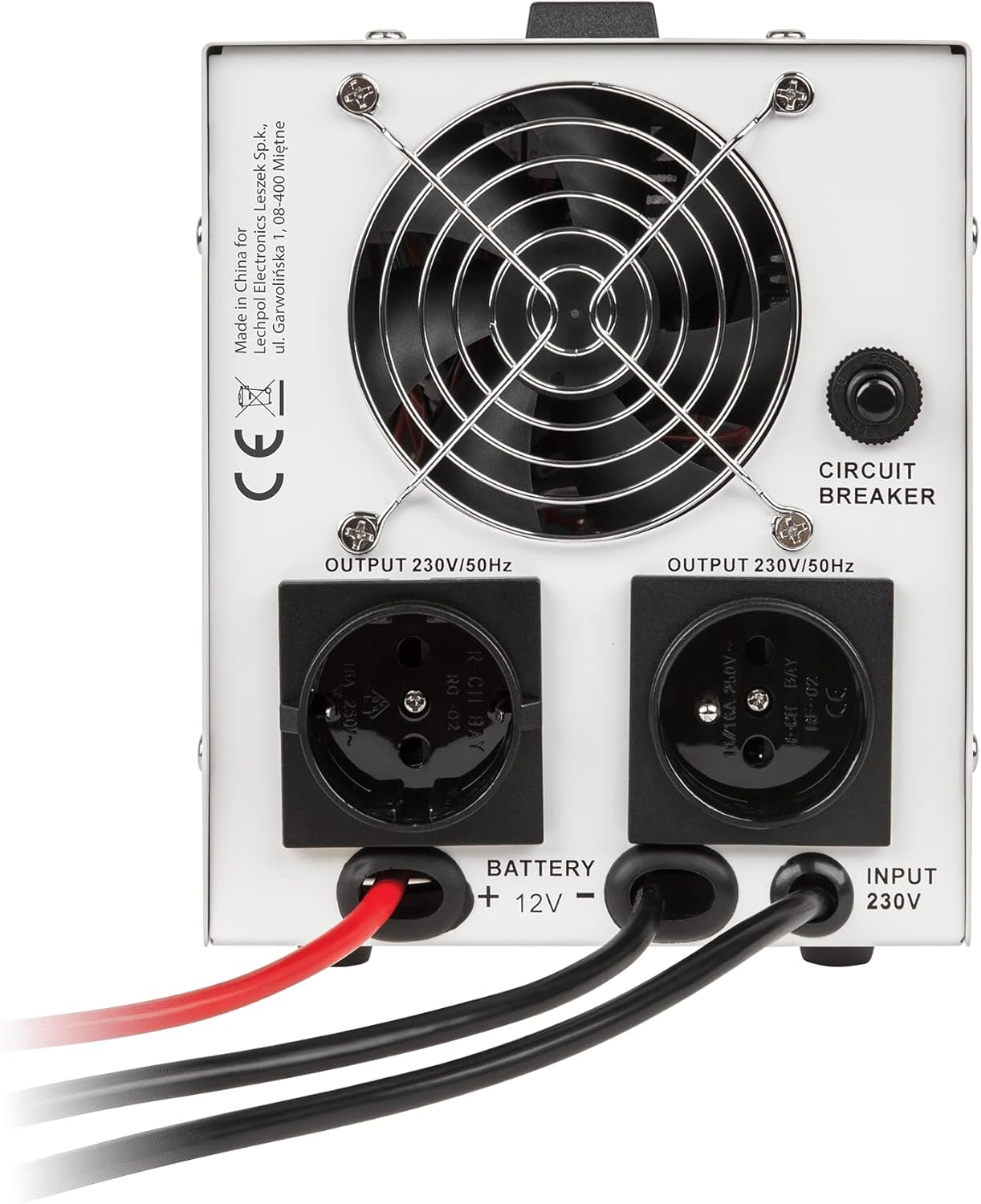
Figure 3.2: Detailed view of the KEMOT PROsinus-700 URZ3406 rear connections. This close-up shows the battery terminals, the two 230V AC output sockets labeled "OUTPUT 230V/50Hz", the "INPUT 230V" power cable entry, and the manual circuit breaker. The cooling fan is prominently featured at the top center.
3.2 Connecting to Mains Power
Plug the inverter's integrated power cable into a standard 230V AC wall outlet. This connection allows the inverter to charge the external battery and to pass through mains power to connected loads when available.
3.3 Connecting Loads
Connect your appliances (loads) to the 230V AC output sockets on the rear of the inverter. Ensure that the total power consumption of all connected devices does not exceed the inverter's rated output power of 700W.

Figure 3.3: Connection diagram for the KEMOT PROsinus-700 URZ3406. This graphic illustrates how the inverter connects to an external 12V battery and a 230V mains power source. It also shows various appliances such as a central heating system, an angle grinder, a television, and a refrigerator connected to the inverter's output, demonstrating its role in providing power to diverse loads.
4. Operating Instructions
4.1 Powering On and Off
- To Power On:
- Ensure the battery and mains power connections are secure.
- Press the 'Mains ON/OFF' switch to the 'ON' position. The inverter will begin charging the battery and passing mains power to the outputs.
- Press the 'Output & Inverter ON/OFF' button to activate the inverter output. The LED display will illuminate, showing the current status.
- To Power Off:
- Press the 'Output & Inverter ON/OFF' button to deactivate the inverter output.
- Press the 'Mains ON/OFF' switch to the 'OFF' position.
- Disconnect the inverter from the mains power outlet and the battery if the unit will not be used for an extended period.
4.2 Understanding the LED Display
The LED display provides critical information about the inverter's operation. Refer to the icons and numerical values to understand the current status:
- Input Voltage: Displays the incoming mains voltage.
- Output Voltage: Shows the voltage supplied to connected loads.
- Battery Level: Indicates the charge status of the connected external battery.
- Load Level: Shows the approximate power consumption of connected devices.
- Operational Mode: Icons may indicate whether the unit is operating on mains power, battery power (inverter mode), or charging the battery.
4.3 Automatic Operation (UPS Function)
When the inverter is connected to both mains power and a charged battery, it will automatically switch to battery power (inverter mode) in the event of a mains power failure. This transfer typically occurs within 4 milliseconds, ensuring minimal interruption to connected devices. Once mains power is restored, the unit will automatically switch back to mains operation and resume charging the battery.
5. Maintenance
Regular maintenance ensures the longevity and optimal performance of your KEMOT PROsinus-700 inverter.
- Battery Care: Regularly check the external battery's charge level and condition. Ensure battery terminals are clean and free from corrosion. If using a lead-acid battery, check electrolyte levels periodically as per battery manufacturer guidelines.
- Cleaning: Keep the inverter's exterior clean using a dry, soft cloth. Do not use liquid cleaners or solvents. Ensure ventilation openings are free from dust and debris to prevent overheating.
- Connections: Periodically inspect all power and battery connections to ensure they remain tight and secure. Loose connections can lead to poor performance or safety hazards.
- Storage: If storing the inverter for an extended period, disconnect it from both mains power and the battery. Store in a cool, dry place. Ensure the external battery is fully charged before storage and recharged every 3-6 months to prevent deep discharge.
6. Troubleshooting
This section addresses common issues you might encounter with your KEMOT PROsinus-700 inverter. For problems not listed here, contact customer support.
| Problem | Possible Cause | Solution |
|---|---|---|
| No power output / Inverter not turning on. |
|
|
| Overload warning on LED display. |
|
|
| Battery not charging. |
|
|
| Unit overheats. |
|
|
7. Technical Specifications
| Parameter | Value |
|---|---|
| Rated Power | 700 W |
| Battery Voltage | 12 V DC |
| Maximum Battery Voltage | 15 V DC |
| Input Voltage Range | 180-275 V AC |
| Input Frequency | 45-60 Hz |
| Output Voltage Range | 230 V AC +/-8% |
| Output Frequency | 50/60 Hz +/-0.5 Hz |
| Output Waveform | Pure Sine Wave |
| Efficiency (DC to AC) | ≥ 85% |
| Battery Charge Current | Max 10 A |
| Transfer Time | ≤ 4 ms |
| Protections | Overload, Short Circuit, Overvoltage, Undervoltage, Overheating |
| Operating Temperature | 0 to 40 °C |
| Operating Humidity | 10-90% (non-condensing) |
| Dimensions (L x W x H) | 34 x 18 x 14.5 cm (approx.) |
| Product Weight | 6.95 kg |
8. Safety Information
Please read and follow all safety instructions to prevent injury or damage to the device and connected equipment.
- Do not open the inverter casing. There are no user-serviceable parts inside. Refer all servicing to qualified personnel.
- Ensure proper ventilation to prevent overheating. Do not block the ventilation openings.
- Keep the inverter away from water, moisture, flammable liquids, and direct sunlight.
- Connect the inverter only to a 12V DC battery. Connecting to a different voltage battery may cause damage.
- Ensure correct polarity when connecting the battery (red to positive, black to negative). Incorrect polarity can cause severe damage.
- Do not exceed the maximum rated power of 700W for connected loads.
- In case of smoke, unusual odors, or abnormal operation, immediately disconnect the inverter from both mains power and the battery.
9. Warranty and Support
The KEMOT PROsinus-700 URZ3406 inverter comes with a 2-year warranty from the date of purchase. This warranty covers manufacturing defects and malfunctions under normal use conditions.
For warranty claims, technical support, or service inquiries, please contact your retailer or the authorized KEMOT service center. Please retain your proof of purchase for warranty validation.
Note: The warranty does not cover damage caused by improper installation, misuse, unauthorized modifications, natural disasters, or exceeding the product's specifications.


