1. Introduction
The KEMOT PROsinus 500VA/800W Pure Sine Wave Inverter is designed to provide emergency power for various household and office installations. It functions as an uninterruptible power supply (UPS), a pure sine wave inverter, and an external battery charger. This device ensures a stable power supply for sensitive equipment such as central heating pumps, furnaces, televisions, refrigerators, induction cooktops, electric fans, and office equipment during power outages.
Key features include a wide input voltage range, high output voltage precision, automatic voltage regulation, and integrated protection against overload, short-circuit, overvoltage, undervoltage, and overheating. The LED display provides real-time status information.
2. Safety Information
- Read all instructions before operating the device.
- Ensure proper ventilation around the inverter to prevent overheating.
- Do not expose the device to rain, moisture, or extreme temperatures.
- Connect the inverter only to a 12V DC battery.
- Ensure all connections are secure and correctly polarized to avoid damage to the unit or connected appliances.
- Do not open the inverter casing; there are no user-serviceable parts inside. Refer servicing to qualified personnel.
- Keep out of reach of children.
3. Product Overview
3.1 Front Panel
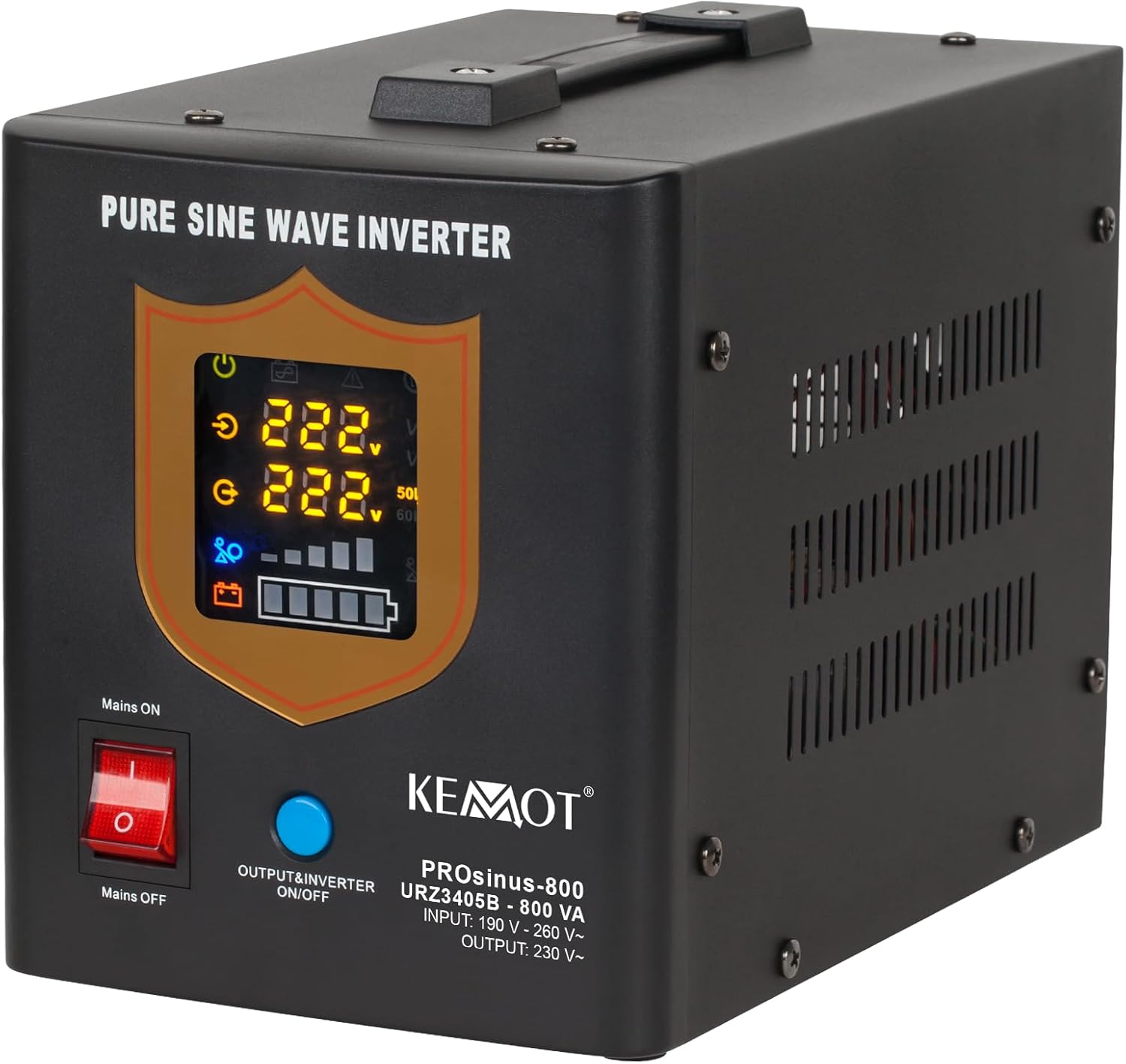
Image 3.1.1: Front view of the KEMOT PROsinus inverter, showing the LED display, power switch, and output/inverter switch. The display indicates input/output voltage and battery status.
- LED Display: Shows current status, including input voltage, output voltage, and battery charge level.
- Mains ON/OFF Switch: Controls the main power input from the grid.
- Output/Inverter ON/OFF Button: Activates or deactivates the inverter function and AC output.
3.2 Rear Panel

Image 3.2.1: Rear view of the KEMOT PROsinus inverter, highlighting the cooling fan, circuit breaker, two AC output sockets, 12V battery terminals (red for positive, black for negative), and the 230V AC input socket.
- Cooling Fan: Automatically activates to dissipate heat during operation.
- Circuit Breaker: Provides protection against overcurrent.
- Output Sockets (230V/50Hz): Two AC output sockets for connecting appliances.
- Battery Terminals (+12V): Connections for an external 12V DC battery (red for positive, black for negative).
- Input Socket (230V): Connection for the mains AC power supply.
4. Setup
4.1 Connecting the Battery

Image 4.1.1: Connection diagram illustrating the inverter's role in providing power from the mains or a battery to connected devices, and charging the battery when mains power is available.
- Ensure the inverter is turned off and disconnected from the mains power.
- Connect the red cable from the inverter's battery terminal to the positive (+) terminal of a 12V external battery.
- Connect the black cable from the inverter's battery terminal to the negative (-) terminal of the 12V external battery.
- Ensure connections are tight and secure.
4.2 Connecting to Mains Power
- Plug the inverter's power cord into a standard 230V AC wall outlet.
- Turn on the "Mains ON/OFF" switch on the front panel. The inverter will begin charging the connected battery and pass through mains power to the output sockets.
4.3 Connecting Appliances
- Plug your appliances into the 230V AC output sockets on the rear panel of the inverter.
- Ensure the total power consumption of connected appliances does not exceed the inverter's rated power (500W).
5. Operating Instructions
5.1 Normal Operation (Mains Power Available)
- With the inverter connected to mains power and the "Mains ON/OFF" switch on, the unit will operate in UPS mode.
- Mains power will be supplied directly to the connected appliances, and the internal charger will charge the external battery.
- The LED display will show the input voltage and battery charge status.
5.2 Inverter Mode (Power Outage)
- If mains power fails, the inverter will automatically switch to battery power within approximately 4 milliseconds.
- The inverter will convert 12V DC from the battery to 230V AC pure sine wave power for your connected appliances.
- The LED display will show the output voltage and the decreasing battery charge level.
- To manually activate inverter mode when mains power is available (e.g., for testing), press the "Output/Inverter ON/OFF" button.
5.3 Battery Charging Function
- When connected to mains power and the "Mains ON/OFF" switch is on, the inverter will automatically charge the external 12V battery.
- The charging current is a maximum of 10A.
- The LED display indicates the battery's charging status.
6. Maintenance
- Keep the inverter clean and free from dust. Use a dry, soft cloth for cleaning.
- Ensure the cooling fan and ventilation openings are not obstructed.
- Regularly check battery connections for tightness and corrosion.
- Store the inverter in a cool, dry place when not in use for extended periods.
7. Troubleshooting
The KEMOT PROsinus inverter features built-in protection mechanisms. If an issue occurs, the device may emit an audible alarm or display an error code on the LED screen. Common issues and their potential causes/solutions are listed below:
| Problem | Possible Cause | Solution |
|---|---|---|
| No output power / Inverter not turning on |
|
|
| Overload alarm / Device shuts down |
|
|
| Overheating alarm |
|
|
| Short-circuit protection activated |
|
|
If the problem persists after attempting these solutions, contact customer support.
8. Specifications
| Feature | Detail |
|---|---|
| Model | URZ3405B |
| Rated Power | 500 W / 800 VA |
| Battery Voltage | 12 V DC |
| Max. Battery Voltage | 15 V DC |
| AC Input Voltage Range | 180 – 250 V AC |
| AC Input Frequency | 45 – 60 Hz |
| AC Output Voltage Range | 230 V AC +/- 8% |
| Output Frequency | 50/60 Hz +/- 0.5 Hz |
| Output Waveform | Pure Sine Wave |
| Efficiency (DC to AC) | >= 85% |
| Charging Current | Max. 10 A |
| Transfer Time | <= 4 ms |
| Protection | Overload, Short-circuit, Overvoltage, Undervoltage, Overheating |
| Operating Temperature | 0 – 40 °C |
| Operating Humidity | 10 – 90% (non-condensing) |
| Dimensions (L x W x H) | 14.5 x 24 x 18 cm |
| Weight | 4.6 kg |
9. Warranty and Support
This KEMOT PROsinus inverter comes with a standard manufacturer's warranty. Please refer to your purchase documentation for specific warranty terms and conditions. For technical support, troubleshooting assistance beyond this manual, or warranty claims, please contact your retailer or the manufacturer's customer service department.
Manufacturer: Kemot
Model Number: URZ3405B


