
Introduction
This manual provides essential information for the assembly, operation, and maintenance of your RESPAWN 110 Ergonomic Gaming Chair. Designed for comfort and support during long gaming sessions or workdays, this chair features a racing-style design, adjustable recline, extendable footrest, and ergonomic support pillows.

Figure 1: RESPAWN 110 Gaming Chair in a typical setup.
Safety Information
- Always follow all steps provided in the installation manual for proper assembly. Incorrect assembly can lead to instability and injury.
- Do not exceed the maximum weight capacity of 275 pounds (125 kg). Exceeding this limit may damage the chair and cause injury.
- Ensure the chair is used on a hard, level floor for optimal stability and to prevent damage to the casters.
- Keep hands and fingers clear of moving parts during adjustment to prevent pinching.
- Do not stand on the chair or use it as a step stool.
Setup and Assembly
The RESPAWN 110 Gaming Chair requires assembly. Please ensure all components are present before beginning. Refer to the detailed assembly video for visual guidance.
Video 1: How to Assemble RESPAWN 110 Gaming Chair. This video provides a step-by-step guide for the complete assembly process of your gaming chair.
Key assembly steps typically include attaching the chair back to the seat, mounting the armrests, installing the gas lift and base, and attaching the casters. Ensure all screws are tightened securely after assembly.
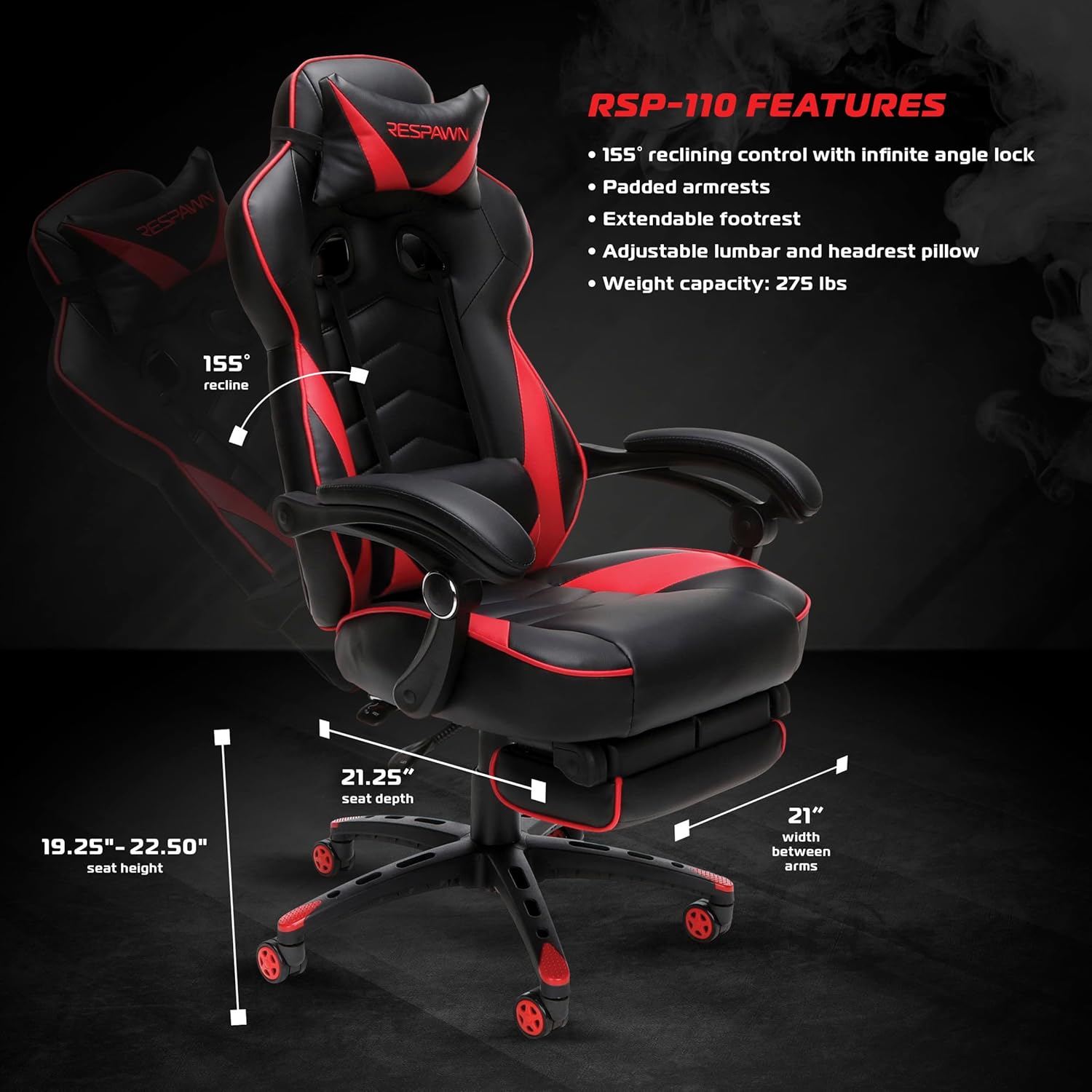
Figure 2: Key features and dimensions of the RSP-110 chair.
Operating Instructions
Your RESPAWN 110 chair offers multiple adjustment options for personalized comfort:
- Height Adjustment: Use the lever located on the right side, beneath the seat, to raise or lower the chair to your desired height.
- Recline Function: The chair reclines between 90 and 155 degrees. Use the recline lever on the right side to adjust the backrest angle. The infinite angle lock allows you to secure the backrest in any position within this range.
- Extendable Footrest: Pull the footrest out from under the seat when you wish to recline and elevate your legs. Push it back in when not in use.
- Lumbar and Headrest Support: The adjustable lumbar and headrest pillows can be positioned to provide targeted support for your lower back and neck.
- Padded Armrests: The armrests are padded for comfort and pivot with the chair as it reclines.
- 360-Degree Swivel: The chair base allows for full 360-degree rotation, enabling dynamic movement.
Video 2: RESPAWN RSP-110 Reclining Gaming Chair Features. This video demonstrates the reclining and other adjustable features of the chair.

Figure 3: Chair in a reclined position with the footrest extended.

Figure 4: Detail of the extendable footrest.
Maintenance
To ensure the longevity and appearance of your RESPAWN 110 Gaming Chair, follow these maintenance guidelines:
- Cleaning: Wipe clean with a damp cloth. Avoid harsh chemicals or abrasive cleaners, as these can damage the bonded leather material.
- Inspection: Periodically check all bolts and screws to ensure they remain tight. Re-tighten if necessary to maintain stability.
- Caster Care: Keep casters free of hair and debris to ensure smooth rolling.
- Leather Care: For bonded leather, avoid prolonged exposure to direct sunlight or extreme temperatures, which can cause drying and cracking.
Troubleshooting
If you encounter issues with your RESPAWN 110 Gaming Chair, refer to the following common problems and solutions:
| Problem | Possible Cause | Solution |
|---|---|---|
| Chair is wobbly or unstable | Loose screws or bolts; uneven floor surface. | Check and tighten all assembly screws. Ensure the chair is on a flat, even surface. |
| Chair makes squeaking noises | Loose connections; friction between parts. | Tighten all screws. Apply a small amount of silicone lubricant to moving parts or connection points if necessary. |
| Gas lift not adjusting height | Gas cylinder malfunction; lever mechanism issue. | Ensure the height adjustment lever is fully engaged. If the issue persists, contact customer support for a replacement gas lift. |
| Footrest does not extend or retract smoothly | Obstruction in the mechanism; bent components. | Check for any obstructions. Do not force the footrest. If bent, contact customer support. |
| Casters not rolling smoothly | Debris caught in casters; damaged casters. | Remove any hair or debris from the caster wheels. If casters are damaged, replacements may be needed. |
Specifications
| Feature | Detail |
|---|---|
| Brand | RESPAWN |
| Model Name | RSP-110 |
| Color | Red and Black |
| Material | Bonded Leather, Foam Fill |
| Frame Material | Aluminum or Steel |
| Product Dimensions (D x W x H) | 28.5"D x 28"W x 51.5"H |
| Item Weight | 46.5 Pounds |
| Weight Capacity | 275 Pounds |
| Reclining Angle | 90 - 155 degrees with infinite locking positions |
| Swivel | 360 degrees |
| Included Components | Gaming Chair, Headrest Pillow, Lumbar Support Pillow |
| Recommended Uses | Gaming, Office |
| Surface Recommendation | Hard Floor |
| UPC | 845123095768 |
Warranty Information
The RESPAWN 110 Ergonomic Gaming Chair is covered by the RESPAWN 5-Year Limited Warranty. This warranty covers defects in materials and workmanship under normal use. For specific terms and conditions, please refer to the official RESPAWN website or contact customer support.
Customer Support
For any questions, assistance with assembly, troubleshooting, or warranty claims, please contact RESPAWN customer support. You can find contact information on the official RESPAWN website or through your retailer's customer service portal.