
1. Introduction
Thank you for purchasing the Philco PH80 Boombox MP3/USB/CD Radio. This versatile audio system features a CD player, MP3/USB playback capabilities, and an FM radio tuner. Please read this manual carefully before operating the unit to ensure proper use and to maximize its performance.
The Philco PH80 is a portable audio system designed for ease of use and quality sound. It operates on a Bivolt power supply, making it suitable for various electrical environments.
2. Safety Information
To ensure safe operation and prevent damage, please observe the following precautions:
- Do not expose the unit to rain or moisture to prevent fire or electric shock.
- Do not block ventilation openings. Ensure adequate space around the unit for proper airflow.
- Avoid placing the unit near heat sources such as radiators, heat registers, stoves, or other apparatus (including amplifiers) that produce heat.
- Use only attachments/accessories specified by the manufacturer.
- Unplug the unit during lightning storms or when unused for long periods.
- Refer all servicing to qualified service personnel. Servicing is required when the apparatus has been damaged in any way, such as power-supply cord or plug is damaged, liquid has been spilled or objects have fallen into the apparatus, the apparatus has been exposed to rain or moisture, does not operate normally, or has been dropped.
3. Product Overview
Familiarize yourself with the components and controls of your Philco PH80 Boombox.
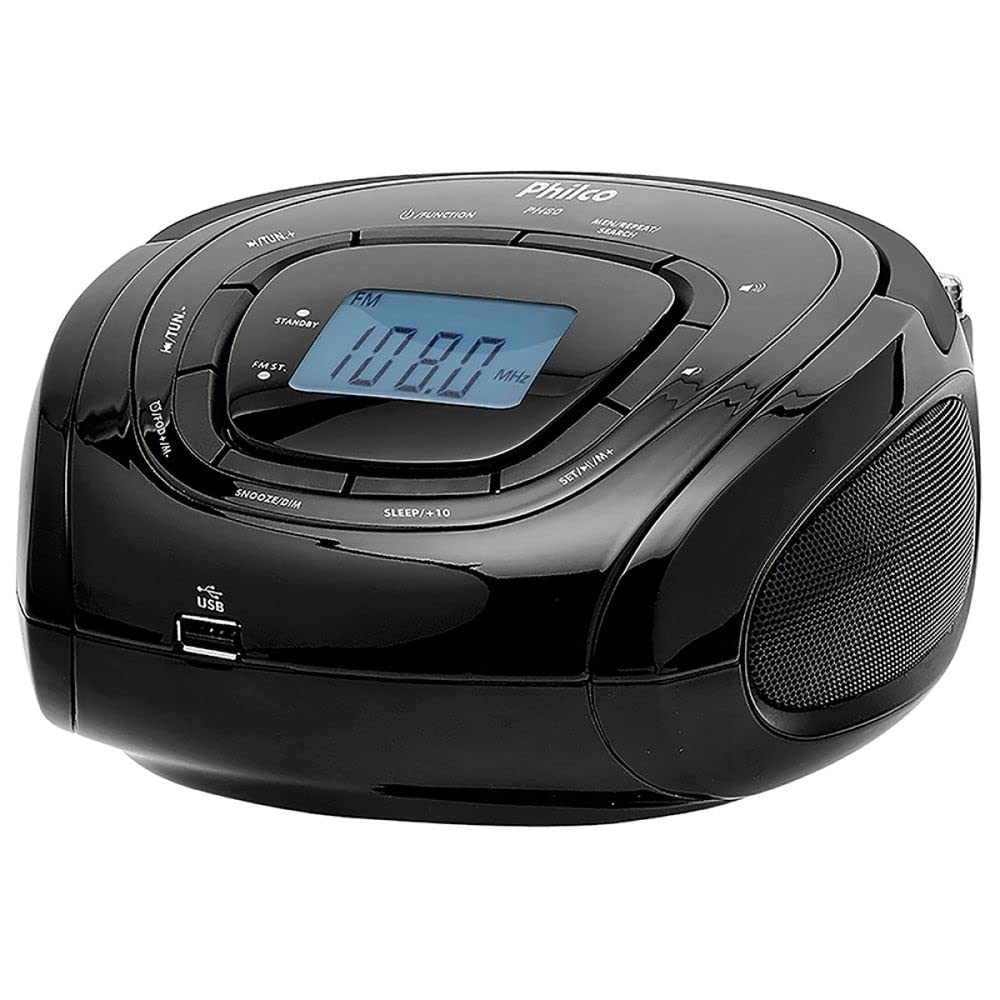
Figure 1: Front and Top View of the Philco PH80 Boombox.
Key Components:
- CD Compartment: For playing audio CDs (located on top, under the lid).
- LCD Display: Shows current mode, frequency, time, and track information.
- Control Buttons:
- FUNCTION: Selects operating mode (e.g., CD, FM, USB).
- STANDBY: Power on/off button.
- FM: Direct access to FM radio mode.
- MIN/REPEAT/SEARCH: Used for minute setting, track repeat, and radio search.
- SET/H/M: Used for setting hour and minute for clock/alarm.
- SLEEP/+10: Activates sleep timer or skips 10 tracks/minutes.
- SNOOZE/DIM: Snooze function for alarm or display dimmer.
- FAST: Fast forward/rewind or quick tuning.
- Volume Control: Adjusts audio output level (indicated by speaker icon).
- USB Port: For connecting USB flash drives for MP3 playback.
- Speakers: Integrated stereo speakers for audio output.
- Telescopic Antenna: For improving FM radio reception.
- Power Input: For connecting the AC power cord.
4. Setup
4.1 Power Connection
- Ensure the unit is placed on a stable, flat surface.
- Connect the AC power cord to the power input on the back of the unit.
- Plug the other end of the power cord into a standard electrical outlet. The Philco PH80 supports Bivolt (110V/200V) operation.
4.2 Antenna Adjustment
For optimal FM radio reception, fully extend the telescopic antenna. Adjust its position and direction to achieve the clearest signal.
5. Operating Instructions
5.1 Power On/Off
Press the STANDBY button to turn the unit on or off.
5.2 Mode Selection
Press the FUNCTION button repeatedly to cycle through available modes: CD, FM Radio, USB.
5.3 FM Radio Operation
- Press the FUNCTION button until "FM" appears on the display, or press the dedicated FM button.
- To automatically search for stations, press and hold the MIN/REPEAT/SEARCH button. The radio will scan and stop at the next strong station.
- To manually tune, use the FAST buttons (left/right arrows) to adjust the frequency incrementally.
- Adjust the volume using the volume control knob/buttons.
5.4 CD Playback
- Open the CD compartment (usually a lid on top) and place an audio CD with the label side facing up. Close the compartment securely.
- Press the FUNCTION button until "CD" mode is selected.
- Playback should begin automatically. Use the navigation buttons (e.g., FAST) to skip tracks.
- Press MIN/REPEAT/SEARCH to toggle repeat modes (e.g., repeat one, repeat all).
5.5 USB Playback
- Insert a USB flash drive containing MP3 audio files into the USB port.
- Press the FUNCTION button until "USB" mode is selected.
- Playback should begin automatically. If not, use the navigation buttons (e.g., FAST) to select a track.
- Press MIN/REPEAT/SEARCH to toggle repeat modes (e.g., repeat one, repeat all).
5.6 Clock and Alarm Settings
The unit features a digital clock and alarm functions.
- Setting the Clock: In standby mode, press and hold SET/H/M. The hour will flash. Use the FAST buttons to adjust the hour, then press SET/H/M again to set minutes. Repeat for minutes.
- Setting the Alarm: (Specific steps not detailed in provided data, general guidance) Refer to the full manual for detailed alarm setting instructions. Typically involves pressing an alarm button, then using SET/H/M and FAST buttons to set the alarm time and source.
- Sleep Timer: Press SLEEP/+10 repeatedly to set a sleep timer (e.g., 10, 20, 30 minutes). The unit will turn off automatically after the set time.
- Snooze/Dimmer: When the alarm sounds, press SNOOZE/DIM to temporarily silence it. Pressing this button in normal operation may adjust the display brightness.
5.7 Remote Control
The Philco PH80 comes with a remote control for convenient operation. Point the remote control directly at the unit's sensor. Ensure there are no obstructions between the remote and the unit.
6. Maintenance
6.1 Cleaning the Unit
Wipe the exterior of the unit with a soft, dry cloth. Do not use abrasive cleaners, waxes, or solvents as they may damage the finish. Avoid spraying liquids directly onto the unit.
6.2 Storage
If the unit will not be used for an extended period, unplug it from the power outlet and store it in a cool, dry place, away from direct sunlight and extreme temperatures.
7. Troubleshooting
If you encounter issues with your Philco PH80, refer to the following common problems and solutions:
| Problem | Possible Cause / Solution |
|---|---|
| No power |
|
| No sound |
|
| Poor FM reception |
|
| CD playback issues |
|
| USB playback issues |
|
If the problem persists after trying these solutions, please contact Philco customer support for assistance.
8. Specifications
| Feature | Specification |
|---|---|
| Model | PH80 |
| Manufacturer | Philco |
| Part Number | 56603117 |
| Voltage | 110 Volts, 200 Volts (Bivolt) |
| Compatible Standards | MP3 |
| Weight | 2500 Grams (2.5 kg) |
| Dimensions (L x W x H) | 17 x 37 x 27 cm |
| ASIN | B076HZRWTR |
| EAN | 7891356003202 |
9. Warranty and Support
For warranty information and customer support, please refer to the documentation included with your product or visit the official Philco website. Keep your purchase receipt as proof of purchase for warranty claims.
You can visit the official Philco store on Amazon for more information: Philco Official Store


