
1. Introduction
The KEMOT PROsinus-500 URZ3408 is a versatile pure sine wave inverter designed to provide reliable backup power for various electrical appliances. It functions as an inverter, a battery charger, and a rectifier, ensuring continuous power supply during outages and maintaining battery health. This device is ideal for applications requiring stable and clean power, such as central heating pumps, refrigerators, televisions, and office equipment.
This manual provides essential information for the safe installation, operation, and maintenance of your KEMOT PROsinus-500 URZ3408. Please read it thoroughly before using the device.
2. Safety Instructions
Always observe the following safety precautions to prevent injury or damage to the device:
- Read all instructions before operating the device.
- Ensure adequate ventilation around the inverter to prevent overheating.
- Do not expose the device to moisture, rain, or extreme temperatures.
- Connect the battery with correct polarity (red to positive, black to negative) to avoid damage.
- Do not overload the inverter beyond its rated capacity (300W).
- Keep children and unauthorized personnel away from the device during operation.
- In case of malfunction, disconnect the device from all power sources and consult a qualified technician. Do not attempt to repair it yourself.
- Risk of electric shock. Do not open the casing.
3. Product Overview
The KEMOT PROsinus-500 URZ3408 integrates multiple functions into a compact unit. It features a clear LED display for status monitoring and robust connections for reliable operation.
3.1. Key Features
- Pure Sine Wave Output: Ensures compatibility with sensitive electronics.
- Multi-functional: Operates as an inverter, battery charger, and rectifier.
- Wide Input Voltage Range: 180-275V AC for stable operation.
- Automatic Voltage Regulation (AVR): Maintains stable output voltage.
- Comprehensive Protections: Overload, short-circuit, over-voltage, under-voltage, and over-temperature.
- LED Display: Provides real-time status information.
3.2. Device Components
Familiarize yourself with the main components of your inverter:

Figure 1: Front View of the KEMOT PROsinus-500 URZ3408 Inverter. This image shows the front panel of the inverter, featuring the LED display, power button, and the KEMOT branding. The display indicates input/output voltage, frequency, and battery status.

Figure 2: Rear View of the KEMOT PROsinus-500 URZ3408 Inverter. This image displays the rear panel, highlighting the AC output sockets, AC input cable, circuit breaker, and battery connection terminals.

Figure 3: Close-up of the LED Display. This image provides a detailed view of the inverter's LED display, showing indicators for power, battery status, AC input/output voltage, frequency, and various warning/error icons.

Figure 4: Application Diagram. This diagram illustrates how the KEMOT PROsinus-500 URZ3408 connects to a battery and AC mains, providing power to various household appliances such as a furnace, television, and refrigerator.
4. Setup
Follow these steps to set up your KEMOT PROsinus-500 URZ3408 inverter:
- Unpack the Device: Carefully remove the inverter from its packaging and inspect it for any signs of damage. Ensure all components are present.
- Connect the Battery:
- Ensure the inverter is turned OFF.
- Connect the red battery cable to the positive (+) terminal of a 12V DC external battery.
- Connect the black battery cable to the negative (-) terminal of the 12V DC external battery.
- Tighten all connections securely. A small spark may occur during the initial connection; this is normal as internal capacitors charge.
- Connect to AC Input: Plug the inverter's AC input cable into a standard 230V AC wall outlet.
- Connect Loads: Plug your appliances (e.g., central heating pump, TV, refrigerator) into the AC output sockets on the rear of the inverter. Ensure the total power consumption does not exceed 300W.
5. Operating Instructions
5.1. Powering On/Off
- To Power On: Press the ON/OFF button on the front panel. The LED display will illuminate, indicating the device is active.
- To Power Off: Press the ON/OFF button again. The display will turn off.
5.2. Understanding the LED Display
The LED display provides critical information about the inverter's status:
- Input Voltage (V): Shows the incoming AC voltage from the mains.
- Output Voltage (V): Displays the 230V AC output voltage supplied to your appliances.
- Frequency (Hz): Indicates the output frequency, typically 50Hz or 60Hz.
- Battery Level: A bar graph shows the current charge level of the connected external battery.
- Status Indicators: Icons for AC input, battery charging, AC output, and various warning/error conditions (e.g., overload, overheat, low battery).
5.3. Modes of Operation
The KEMOT PROsinus-500 URZ3408 operates in three primary modes:
- Backup Power Supply with Charging Function: When connected to both AC mains and a battery, the device charges the battery. In case of a power outage, it automatically switches to inverter mode, converting 12V DC from the battery to 230V AC for connected appliances. The transfer time is typically less than 4 milliseconds.
- Rectifier (Charger): If only connected to AC mains and a battery, the device will charge the external battery.
- Inverter: If only connected to a battery (no AC mains input), the device will convert 12V DC from the battery to 230V AC to power connected appliances.
6. Maintenance
Regular maintenance ensures the longevity and optimal performance of your inverter:
- Cleaning: Keep the inverter clean and free from dust. Use a dry, soft cloth for cleaning. Do not use liquid cleaners.
- Ventilation: Ensure that the ventilation openings are not blocked to allow proper airflow and prevent overheating.
- Battery Check: Periodically inspect battery connections for tightness and corrosion. Clean terminals if necessary.
- Storage: If storing the inverter for an extended period, disconnect it from all power sources and store it in a dry, cool place. Ensure the battery is fully charged before storage and recharged periodically to prevent deep discharge.
7. Troubleshooting
Refer to this section for common issues and their solutions:
| Problem | Possible Cause | Solution |
|---|---|---|
| Inverter continuously beeps |
|
|
| No power output |
|
|
| Battery not charging |
|
|
If the problem persists after attempting these solutions, please contact customer support.
8. Specifications
Technical specifications for the KEMOT PROsinus-500 URZ3408:
| Parameter | Value |
|---|---|
| Nominal Power | 300 W |
| Battery Voltage | 12 V DC |
| Max. Battery Voltage | 15 V DC |
| Input Voltage Range | 180-275 V AC |
| Input Frequency | 45 - 60 Hz |
| Output Voltage Range | 230 V AC +/-8 % |
| Output Frequency | 50/60 Hz +/-0.5 Hz |
| Output Waveform | Pure Sine Wave |
| Efficiency (DC to AC) | >= 85 % |
| Battery Charge Current | Max 10 A |
| Transfer Time | <=4 ms |
| Protections | Overload, Short-circuit, Over-voltage, Under-voltage, Over-temperature |
| Operating Temperature | 0 - 40 °C |
| Ambient Humidity | 10-90 % |
| Dimensions (L x W x H) | 25.5 x 26 x 16 cm |
| Weight | 4.7 kg |
| Number of Output Sockets | 2 |
9. Warranty and Support
9.1. Warranty Information
The KEMOT PROsinus-500 URZ3408 comes with a 2-year warranty from the date of purchase, covering manufacturing defects. Please retain your proof of purchase for warranty claims.
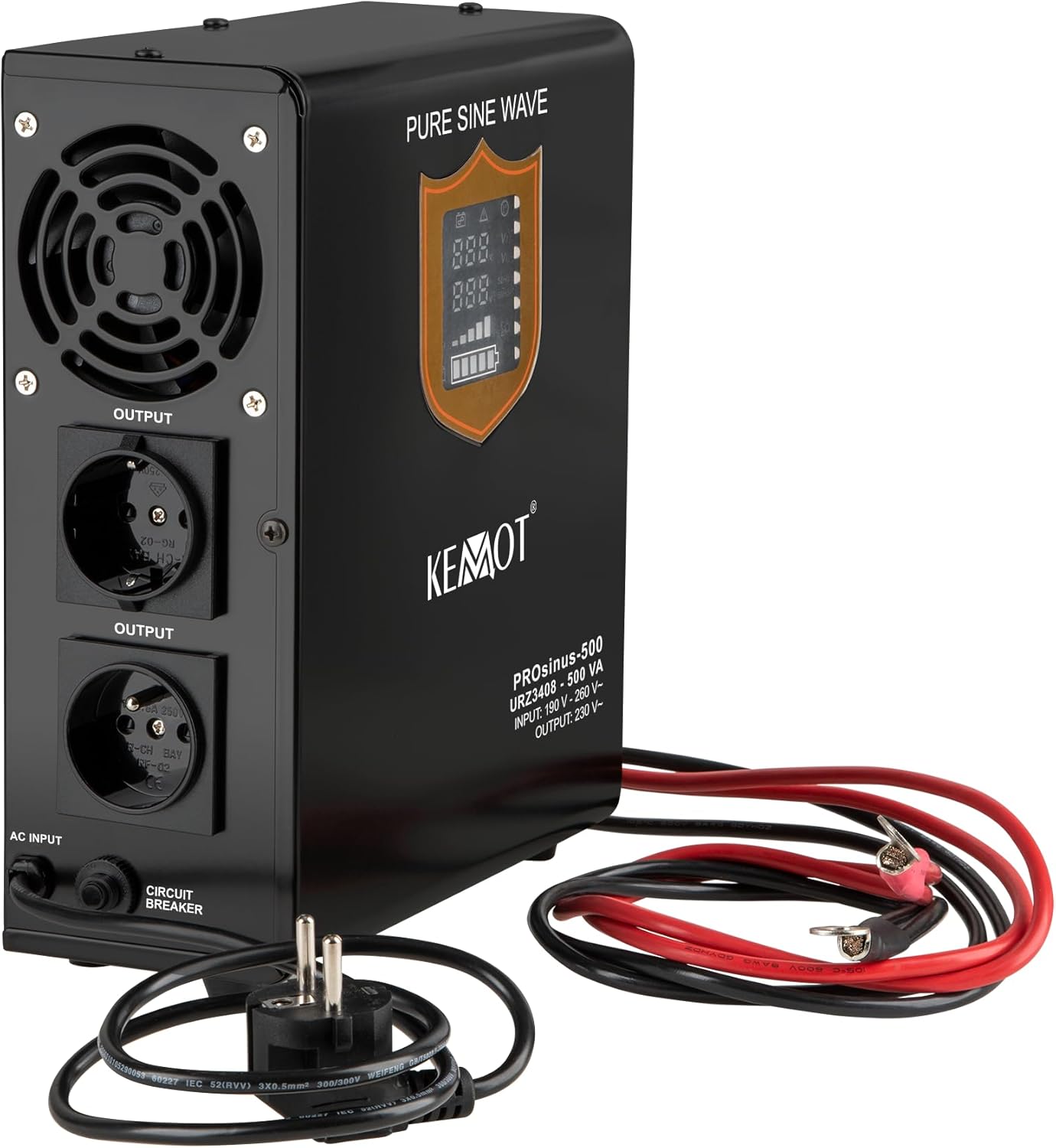
Figure 5: Product Label indicating 2-Year Warranty. This image shows the product packaging or label, clearly displaying a '2 YEARS WARRANTY' badge, confirming the warranty period for the KEMOT PROsinus-500 URZ3408.
9.2. Customer Support
For technical assistance, warranty claims, or further inquiries, please contact your retailer or the KEMOT customer support service. Refer to the product packaging or the manufacturer's website for specific contact details.


