
OttLite F1DY8G59-SHPR
OttLite Renew LED Desk Lamp
Instruction Manual
Product Overview
The OttLite Renew LED Desk Lamp (Model: F1DY8G59-SHPR) is designed to provide superior illumination for various tasks, incorporating OttLite's exclusive ClearSun LED technology to reduce eyestrain and glare. This versatile lamp also features an integrated LCD display for date, time, and ambient temperature, along with a convenient 2.1A USB charging port for your devices.

The OttLite Renew LED Desk Lamp, featuring a modern black design with an adjustable arm and an LCD display on its vertical stand.

The lamp's light panel, showcasing the ClearSun LED technology which is engineered to reduce eyestrain by up to 51% for a healthier viewing experience.
Setup Guide
Unpacking
Carefully remove the lamp and all components from the packaging. Ensure all parts are present: the lamp unit, power adapter, and this instruction manual. Retain packaging for future storage or transport.
Power Connection
Connect the provided power adapter to the DC input port located at the rear base of the lamp. Plug the other end of the adapter into a standard wall outlet (120 Volts). The LCD display should illuminate, indicating power is connected.
The lamp features a 5V, 2.1A USB port on its base, allowing you to conveniently charge tablets, phones, and other compatible devices directly from the lamp.
Operating Instructions
Power On/Off
To turn the lamp on or off, gently touch the power icon (U) on the lamp's base. The lamp will illuminate or extinguish accordingly.
Brightness Settings
The lamp offers six brightness settings. To adjust the brightness, slide your finger along the touch-activated dimmer control located on the lamp's base. This allows you to customize the light output up to 400 lumens to suit your needs.

The lamp's base features a sliding touch dimmer, allowing for seamless adjustment of the light's brightness to your preferred level.
LCD Display Functions
The integrated LCD display shows the current date, time, and ambient temperature. It also includes an alarm function. To adjust these settings, use the control buttons located on the back of the lamp's vertical stand. A dedicated button with an 'X' symbol on the rear of the pedestal can be pressed to turn the LCD display on or off.

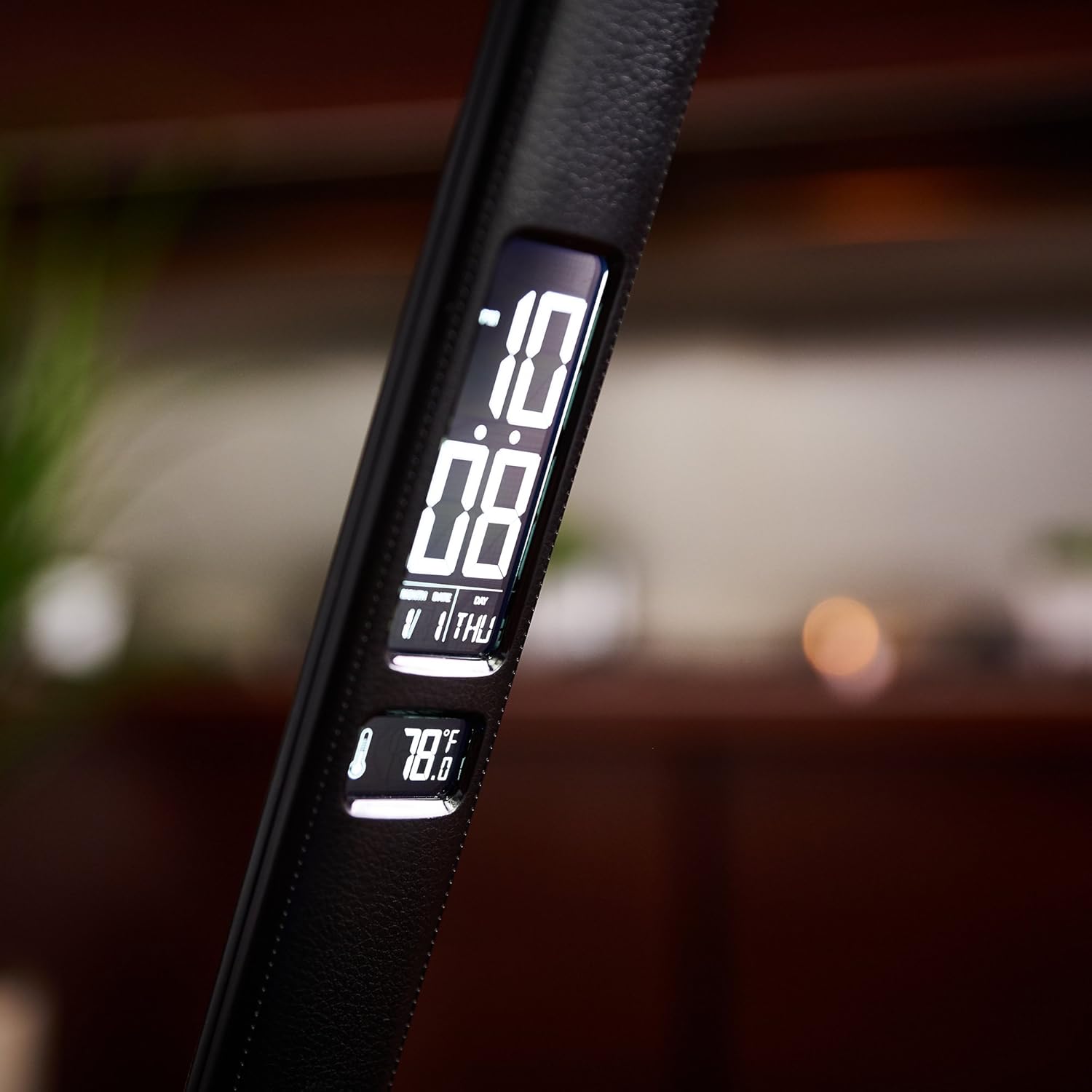
The lamp's digital display provides essential information at a glance, including the current calendar date, time, and ambient temperature.

A detailed view of the lamp's digital display, highlighting the clear and easy-to-read presentation of time, date, and temperature.
Official Product Video: OttLite ClearSun Technology
This video provides an overview of OttLite's ClearSun LED technology, explaining how it helps reduce eyestrain and glare by matching the spectral output of the sun, offering vivid and true-to-life colors for improved visual comfort.
Maintenance
Cleaning
To clean the lamp, ensure it is unplugged from the power outlet. Use a soft, dry cloth to wipe down the surfaces. Avoid using abrasive cleaners, solvents, or harsh chemicals, as these may damage the finish or electronic components.
Storage
When not in use for extended periods, store the lamp in a cool, dry place. The lamp's foldable design allows for compact storage. Keep it away from direct sunlight and extreme temperatures.
Troubleshooting
| Issue | Possible Cause / Solution |
|---|---|
| Lamp does not turn on. | Ensure the power adapter is securely plugged into both the lamp and a working wall outlet. Check if the outlet has power. |
| LCD display is blank or incorrect. | Check if the display has been turned off using the button on the rear of the pedestal. Ensure the lamp has continuous power. The alarm has a battery backup to save settings in case of power interruption. |
| Light flickers or blinks. | Ensure the power connection is stable. If the issue persists, contact customer support. |
| USB charging port not working. | Verify the lamp is powered on. Ensure the device being charged is compatible with 5V, 2.1A USB charging. Try a different USB cable. |
Product Specifications
- Brand: OttLite
- Model Number: F1DY8G59-SHPR
- Dimensions: 7.25 x 5.5 x 14.75 inches (L x W x H)
- Item Weight: 2.86 pounds
- Color: Black
- Material: Faux Leather
- Bulb Type: LED (ClearSun Technology)
- Wattage: 8.4 watts
- Power Source: Corded Electric (Battery backup for LCD display)
- USB Port: 5V, 2.1A
- Special Features: Adjustable, LCD display (Date, Time, Temperature, Alarm), Touch Control
Warranty and Support
For warranty information, technical support, or replacement parts, please contact OttLite customer service. Refer to the contact details provided on the product packaging or the official OttLite website. Please have your model number (F1DY8G59-SHPR) and purchase information ready when contacting support.
You can visit the OttLite Store for more information: OttLite Store on Amazon
Related documentsF1DY8G59-SHPR


Ask a question about this manual
Ask about setup, troubleshooting, compatibility, parts, safety, or missing instructions. Manuals+ will review the question and use this page’s manual context to help answer it.