Introduction
Thank you for purchasing the Muvit SD2 Wireless Bluetooth Speaker. This manual provides essential information for setting up, operating, and maintaining your speaker to ensure optimal performance and longevity. Please read this manual thoroughly before use.
Product Overview
The Muvit SD2 is a compact wireless Bluetooth speaker designed for portable audio. It features a stylish grey fabric finish and intuitive controls.
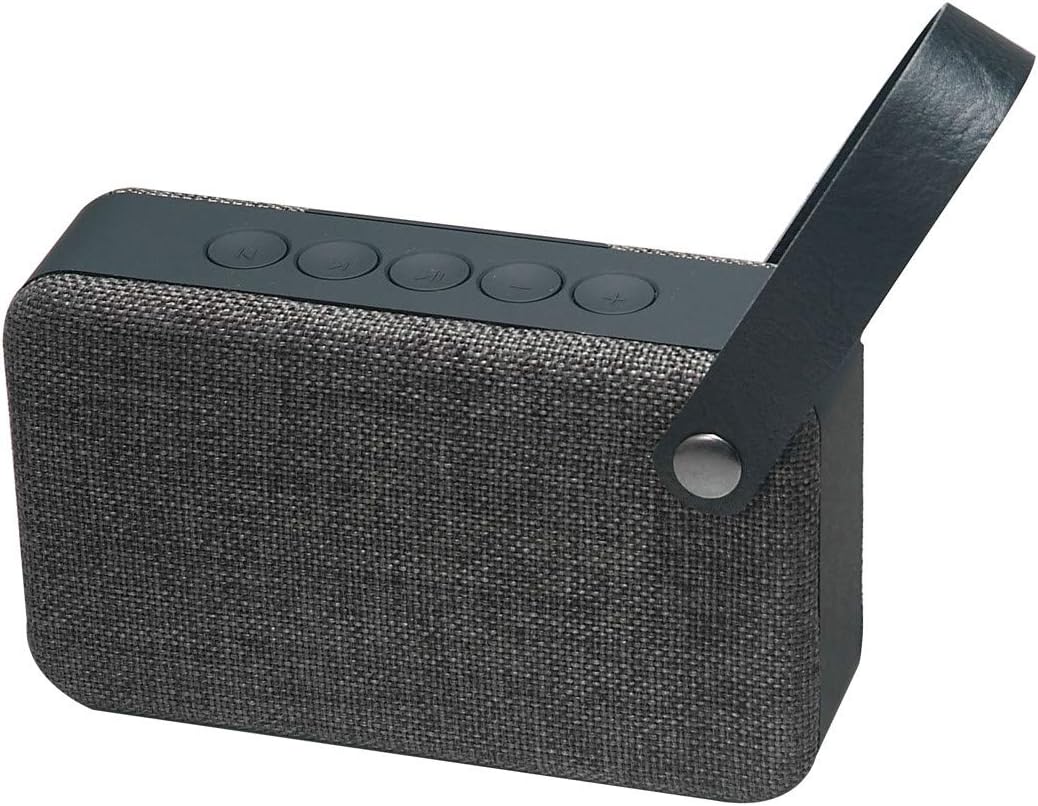
Figure 1: Front-side view of the Muvit SD2 speaker, showcasing its grey fabric design and integrated carrying handle.
Controls and Ports

Figure 2: Top view of the Muvit SD2 speaker, displaying the control buttons for power, play/pause, track navigation, and volume adjustment.

Figure 3: Rear view of the Muvit SD2 speaker, highlighting the charging port and auxiliary input for wired connections.
The speaker features tactile control buttons on the top panel and essential ports on the rear for charging and auxiliary input.
Features
- Compact wireless design with a durable fabric finish.
- Bluetooth 4.1 connectivity for stable wireless audio streaming.
- Operating distance of up to 10 meters (33 feet).
- Approximately 4 hours of playback time at 80% volume.
- Integrated carrying handle for portability.
Technical Specifications
| Bluetooth Version | 4.1 |
| Dimensions | 82 x 50 x 100 mm |
| Weight | 241 g |
| Operating Distance | 10 meters |
| Driver Impedance | 3 Ohms |
| Amplifier Output | 3 W (Max 4 W) |
| Frequency Response | 130 Hz - 20 kHz |
| Signal-to-Noise Ratio | 72 dB |
| Battery Capacity | 350 mAh, 3.7 V |
| Charging Time | 1 - 2 hours |
| Playback Time | Approx. 4 hours (at 80% volume) |
| Power Input | 5 V |
| Control Method | Tactile buttons |
| Compatible Devices | iOS and Android Smartphones |
Setup
1. Charging the Speaker
- Connect the provided charging cable to the charging port on the rear of the speaker (refer to Figure 3).
- Connect the other end of the cable to a USB power adapter (not included) or a computer's USB port.
- The charging indicator light will illuminate. Charging typically takes 1-2 hours.
- Once fully charged, the indicator light may change or turn off. Disconnect the speaker from the power source.
2. Powering On/Off
- To power on, press and hold the Power button (usually marked with a circle and a vertical line) on the top panel until you hear an audible prompt or see an indicator light.
- To power off, press and hold the Power button again until you hear an audible prompt or the indicator light turns off.
3. Bluetooth Pairing
- Ensure the speaker is powered on and within 10 meters of your Bluetooth device.
- The speaker will automatically enter pairing mode, indicated by a flashing LED light and/or an audible prompt.
- On your Bluetooth device (smartphone, tablet, etc.), go to the Bluetooth settings and enable Bluetooth.
- Search for available devices. You should see "Muvit SD2" in the list.
- Select "Muvit SD2" to connect. Once paired, the speaker will provide an audible confirmation, and the LED light will become solid.
- If prompted for a password, enter "0000".
Note: The speaker will automatically attempt to reconnect to the last paired device when powered on, if that device is within range and has Bluetooth enabled.
Operating Instructions
Playing Audio
- Play/Pause: Press the Play/Pause button (often marked with a triangle or two vertical lines) to start or pause playback.
- Volume Up: Press the '+' button to increase the volume.
- Volume Down: Press the '-' button to decrease the volume.
- Next Track: Press and hold the 'Next Track' button (often marked with two triangles and a vertical line).
- Previous Track: Press and hold the 'Previous Track' button (often marked with two triangles pointing left and a vertical line).
Answering/Ending Calls (if supported)
While the product description does not explicitly mention call handling, many Bluetooth speakers include this functionality. If your Muvit SD2 supports it:
- Answer Call: Press the Play/Pause button once when a call comes in.
- End Call: Press the Play/Pause button once during a call to hang up.
- Reject Call: Press and hold the Play/Pause button for 2 seconds when a call comes in.
Maintenance
- Cleaning: Use a soft, dry cloth to wipe the speaker's surface. Do not use abrasive cleaners or solvents.
- Storage: Store the speaker in a cool, dry place away from direct sunlight and extreme temperatures.
- Water Resistance: This speaker is not waterproof. Avoid exposure to water or excessive moisture.
- Battery Care: To preserve battery life, fully charge the speaker before long periods of inactivity and recharge it at least once every three months.
Troubleshooting
| Problem | Possible Solution |
|---|---|
| Speaker does not power on. | Ensure the battery is charged. Connect the speaker to a power source and try again. |
| Cannot pair with Bluetooth device. |
|
| No sound or low volume. |
|
| Sound distortion. |
|
Warranty and Support
Specific warranty information for the Muvit SD2 speaker is typically provided with your purchase documentation. Please refer to the warranty card or contact your retailer for details regarding warranty coverage and support.
For further assistance or technical support, please visit the official Muvit website or contact their customer service department.


