1. Introduction
Thank you for purchasing the Bandai Chibi Tamagotchi, model 41800. This special edition celebrates the 20th anniversary of the original digital pet. This manual provides essential instructions for setting up, operating, and maintaining your Tamagotchi to ensure a long and enjoyable experience.
The Chibi Tamagotchi is a compact virtual pet that allows you to care for a digital creature. Your responsibilities include feeding it, cleaning up after it, and attending to its needs. It is designed to be simple and portable, easily attaching to your bag so you can take it anywhere.
2. Safety Information
Please read all safety instructions before using the product. Keep this manual for future reference.
- Choking Hazard: This product contains small parts and is not suitable for children under 3 years of age. Adult supervision is recommended for younger users.
- Battery Safety: The device uses a button cell battery. Keep batteries out of reach of small children. If swallowed, seek immediate medical attention. Do not mix old and new batteries, or different types of batteries. Dispose of used batteries properly according to local regulations.
- Water Exposure: This device is not waterproof. Avoid exposing it to water or excessive moisture.
- Extreme Temperatures: Do not expose the device to extreme temperatures (hot or cold) or direct sunlight for extended periods.
3. Setup
3.1. Battery Installation (Initial Use)
Your Bandai Chibi Tamagotchi comes with a pre-installed lithium metal button cell battery. For initial use, you may need to remove a protective tab or activate the battery. If the screen does not turn on, follow these steps:
- Locate the battery compartment on the back of the device.
- Using a small screwdriver (not included), carefully open the battery compartment cover.
- Ensure the battery is correctly seated with the positive (+) side facing up. If there's a protective tab, remove it.
- Replace the battery compartment cover and secure it with the screw.
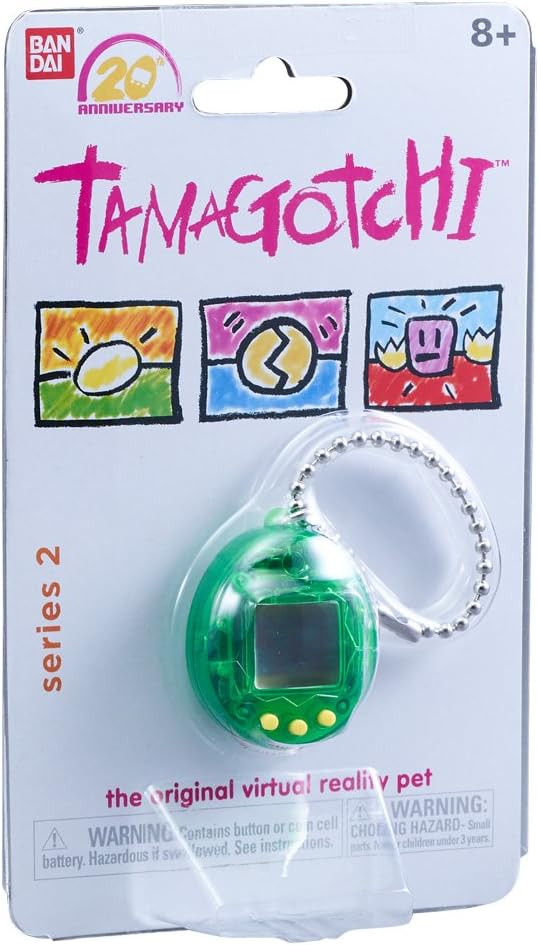
Image: Front view of the green Bandai Chibi Tamagotchi, showing the screen and control buttons. The device is small and egg-shaped, with a keychain attached.
3.2. Initial Activation and Time Setting
After battery activation, your Tamagotchi will display an egg. To begin, you will need to set the time.
- Press the A button (left button) to select the hour.
- Press the B button (middle button) to confirm the hour.
- Repeat for minutes.
- Once the time is set, your Tamagotchi will hatch.
3.3. Sound On/Off
You can toggle the sound feature on or off at any time.
- To turn sound OFF: While on the main screen, press and hold the A button (left) and C button (right) simultaneously.
- To turn sound ON: Repeat the same action (press and hold A and C buttons simultaneously).
4. Operating Your Tamagotchi
The Chibi Tamagotchi features three buttons for interaction: A (left), B (middle), and C (right).
4.1. Basic Care Functions
Your Tamagotchi will alert you when it needs attention. Respond promptly to keep it healthy and happy.
- Feeding: When your Tamagotchi is hungry, an icon will appear. Use the A button to navigate to the food icon, then press B to select. Choose between a meal or a snack.
- Cleaning: If your Tamagotchi makes a mess, a "poop" icon will appear. Navigate to the clean-up icon using the A button and press B to clean.
- Attention: Your Tamagotchi may call for attention for various reasons. Observe the screen for specific icons indicating its needs (e.g., discipline, play, medicine).

Image: Front view of the yellow Bandai Chibi Tamagotchi, showing the screen and control buttons. This model is also egg-shaped and includes a keychain.
4.2. Checking Status
You can check your Tamagotchi's status at any time by navigating through the menu icons using the A button and confirming with the B button.
- Status Screen: Displays age, weight, and happiness/hunger levels.
- Discipline: If your Tamagotchi misbehaves, you may need to discipline it.
4.3. Resetting Your Tamagotchi
To reset your Tamagotchi and start a new pet, locate the small reset button on the back of the device. Use a pointed object (like a pen tip) to gently press the button. This will restart the game from the egg stage.
5. Maintenance
5.1. Cleaning the Device
Wipe the exterior of your Tamagotchi with a soft, dry cloth. Do not use harsh chemicals or abrasive cleaners. Avoid getting moisture into the screen or button areas.
5.2. Battery Replacement
When the battery is low, the screen may dim or the device may stop responding. Replace the battery as follows:
- Locate the battery compartment on the back of the device.
- Using a small screwdriver, open the battery compartment cover.
- Remove the old battery.
- Insert a new CR2032 lithium metal button cell battery, ensuring the positive (+) side faces up.
- Replace the cover and secure it with the screw.
- Dispose of the old battery responsibly.

Image: Front view of the pink Bandai Chibi Tamagotchi, featuring a swirled pattern on its shell, with the screen and control buttons visible. A keychain is attached.
6. Troubleshooting
| Problem | Solution |
|---|---|
| Screen is blank or unresponsive. | Check battery installation. Replace the battery if it is old or depleted. Ensure the protective tab (if any) has been removed. |
| Tamagotchi is not responding to button presses. | Ensure buttons are not stuck. Try resetting the device using the reset button on the back. |
| Sound is not working. | Check if the sound has been turned off (press and hold A + C buttons simultaneously to toggle). |
| Tamagotchi is not growing or behaving as expected. | Ensure you are consistently providing care (feeding, cleaning). The Tamagotchi's growth and behavior depend on the care it receives. |
7. Specifications
- Model Number: 41800
- Display Type: LCD
- Form Factor: Portable
- Product Dimensions (L x W x H): 1.8 x 3.4 x 4.3 cm (0.7 x 1.3 x 1.7 inches)
- Weight: 117.93 grams (4.16 ounces)
- Recommended Age: 8 years and up
- Power Source: Battery Powered
- Battery Type: 1 x Lithium Metal (CR2032), included
- Battery Life: Approximately 3 months
- Controller Type: Button Control
- Language: English
8. Support and Warranty
For product support, frequently asked questions, or warranty information, please visit the official Bandai website or contact their customer service department.
Online Support: www.bandai.com (Please note: This is a general link and may not lead directly to product support for your region. Refer to your product packaging for specific regional support contact details.)
Bandai is committed to providing quality products. If you experience any issues with your Chibi Tamagotchi, please retain your proof of purchase.


