Introduction
This manual provides detailed instructions for the operation and maintenance of the YONGNUO YN568EX III Wireless Master & Slave TTL Flash Speedlite. Please read this manual thoroughly before use to ensure proper functionality and to maximize the product's capabilities.
Safety Information
- Do not disassemble or modify the unit. Unauthorized modifications can lead to electric shock or malfunction.
- Keep the unit dry. Do not expose it to rain, moisture, or high humidity.
- Avoid extreme temperatures. Do not operate or store the unit in excessively hot or cold environments.
- Use only specified batteries. Incorrect battery types or improper installation can cause leakage, overheating, or explosion.
- Keep out of reach of children.
Package Contents
Verify that all items are present in the package:
- 1 x YN-568EX III C Flash Speedlite
- 1 x Mini Stand
- 1 x Protective Pouch
- 1 x Instruction Manual (English and Chinese)

Product Overview
The YONGNUO YN568EX III is a versatile flash unit designed for Canon DSLR cameras, offering both on-camera and off-camera flash capabilities with advanced features.

Key Features
- High Guide Number: GN58 at ISO 100, 105mm.
- Flash Modes: Supports TTL, Manual (M), and Multi (Stroboscopic) flash modes.
- High-Speed Sync (HSS): Synchronizes with shutter speeds up to 1/8000s.
- Zoom Range: Automatic and manual zoom from 24mm to 105mm.
- Wireless Functionality: Supports optical wireless master and slave modes for Canon and Nikon systems.
- Fast Recycling: Approximately 2 seconds for full power output.
- Firmware Upgrade: USB interface for future firmware updates.

Component Identification

Setup
Battery Installation
The YN568EX III requires four AA batteries for operation. Ensure batteries are inserted with correct polarity.
- Open the battery compartment cover located on the side of the flash unit.
- Insert four AA batteries according to the polarity indicators (+/-) inside the compartment.
- Close the battery compartment cover securely.
Mounting on Camera
To mount the flash onto a Canon DSLR camera:
- Slide the flash's hot shoe into the camera's hot shoe mount.
- Tighten the locking ring or lever on the flash unit to secure it to the camera.
Operating Instructions
Power On/Off
To power on the unit, press and hold the ON/OFF button. To power off, press and hold the same button.
Flash Modes
- TTL Mode: Provides automatic flash exposure by measuring the light reflected from the subject.
- Manual (M) Mode: Allows manual control over the flash output power (e.g., 1/1 to 1/128).
- Multi Mode: Fires a series of rapid flashes during a single exposure, suitable for capturing multiple movements of a subject.
High-Speed Sync (HSS)
The YN568EX III supports High-Speed Sync (HSS), enabling synchronization with all shutter speeds up to 1/8000s. This feature is useful for shooting with wide apertures in bright conditions or for freezing fast motion.

Zoom Function
The flash head's focal length can be adjusted automatically or manually between 24mm and 105mm to match the lens's focal length, optimizing light coverage.
Wireless Flash Operation
The YN568EX III supports optical wireless master and slave functions, allowing for flexible off-camera lighting setups.
Master Mode
In optical wireless flash shooting, the YN568EX III can be used as a master unit to trigger YONGNUO and Canon EX series speedlites (excluding the YN585EX). It supports 4 channels, enabling wireless TTL, manual flash, and stroboscopic flash control for multiple slave units.
Slave Mode
The YN568EX III can function as an optical slave, receiving wireless signals from various master units. Compatible master units include YN600EX-RT II, YN568EX II, YN568EX III, Canon 600EX(II)-RT, 580EX II, Nikon SB-910/900/800/700, Nikon internal flashes, and Canon commander signals (e.g., from 7D, 60D, 600D). This enables external TTL, manual flash, and stroboscopic flash capabilities.

Recycling Time
The flash features a high-speed recycling system, with a full output recycling time of approximately 2 seconds. This allows for quicker consecutive shots.
Flash Head Rotation
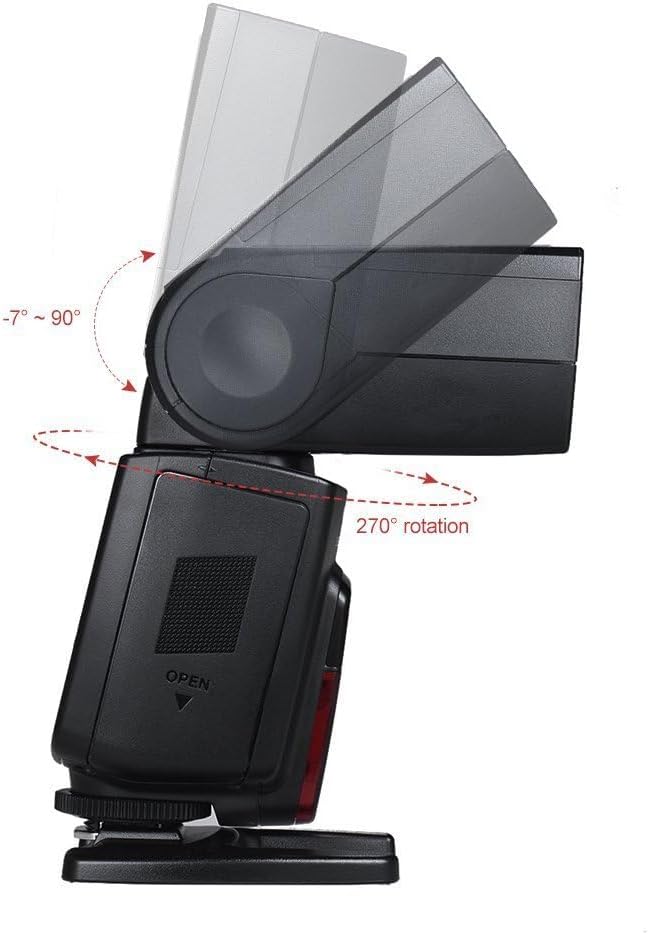
The flash head can rotate horizontally 270 degrees and tilt vertically from -7 to 90 degrees. This flexibility allows for bounce flash photography, directing light off ceilings or walls for softer, more natural illumination.

Firmware Upgrade
The YN568EX III is equipped with a USB interface for firmware upgrades. Users can download the latest firmware from the YONGNUO official website to ensure optimal performance and access new features.
Maintenance
- Clean the flash unit regularly with a soft, dry cloth. Do not use solvents or abrasive cleaners.
- Ensure the hot shoe contacts are clean and free of dust or debris.
- Remove batteries if the unit will not be used for an extended period to prevent leakage.
- Store the flash in a cool, dry place, away from direct sunlight and extreme temperatures.
Troubleshooting
- Flash does not fire: Check battery levels, ensure the flash is securely mounted on the camera, and verify flash settings (mode, power).
- Flash recycling slowly: Replace batteries with fresh ones. Recycling time can increase with low battery power.
- Incorrect exposure: Adjust flash compensation, check camera exposure settings, or switch to manual mode for precise control.
- Wireless triggering issues: Ensure master and slave units are on the same channel and group. Verify line of sight for optical triggering.
Specifications
| Feature | Specification |
|---|---|
| Product Dimensions | 2.44 x 2.83 x 7.4 inches |
| Item Weight | 1.1 pounds |
| Model Number | YN568EX III |
| Batteries Required | 4 AA batteries |
| Compatible Mountings | Canon |
| Battery Life | Approximately 45 Hours (standby) |
| Camera Flash Type | Slave (also Master capable) |
| Flash Sync Speed | Up to 1/8000s (High-Speed Sync) |
| Guide Number | GN58 (ISO 100, 105mm) |
| Zoom Range | 24-105mm (Auto/Manual) |
| Recycling Time | Approx. 2 seconds (full power) |
Warranty and Support
For warranty information, technical support, and service inquiries, please refer to the official YONGNUO website or contact your local authorized distributor. Keep your purchase receipt as proof of purchase for warranty claims.


