
1. Important Safety Information
Read all instructions carefully before installing or using this appliance. Keep this manual for future reference. Failure to follow these instructions may result in electric shock, fire, or injury.
- Ensure the electrical supply matches the rating plate on the hood.
- Installation must be carried out by a qualified technician in accordance with local regulations.
- Do not flambé under the range hood.
- Regularly clean the grease filters to prevent fire hazards.
- This appliance is not intended for use by persons (including children) with reduced physical, sensory or mental capabilities, or lack of experience and knowledge, unless they have been given supervision or instruction concerning use of the appliance by a person responsible for their safety.
2. Product Overview
The FABER T-Light Island Hood is designed for efficient air extraction and filtration in your kitchen. It features a sleek stainless steel finish, LED lighting, and touch controls for ease of use.
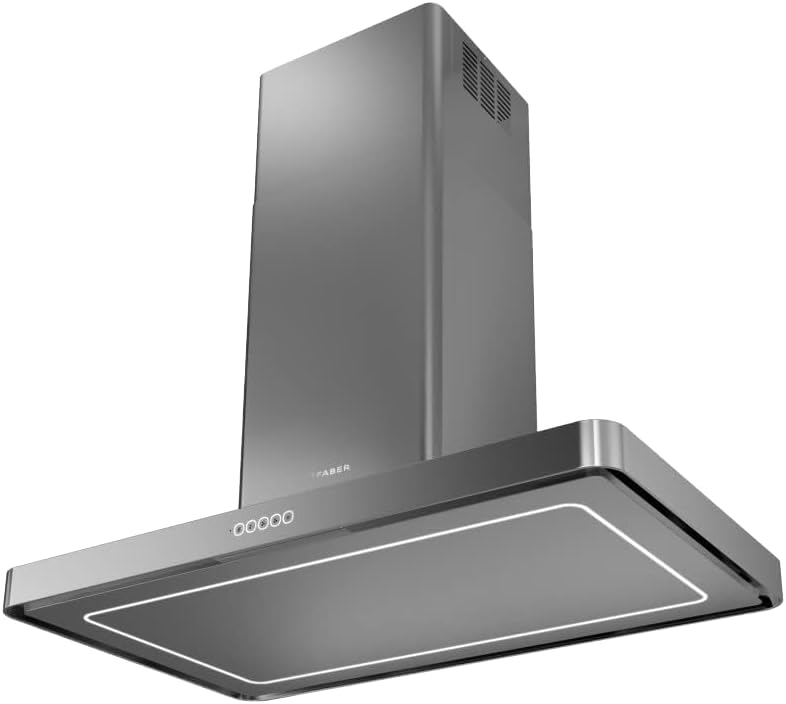
Figure 1: Front view of the FABER T-Light Island Hood, showcasing its stainless steel finish and control panel.

Figure 2: The FABER T-Light Island Hood integrated into a kitchen environment, demonstrating its island mounting type.
3. Setup and Installation
This island hood is designed for ceiling mounting above a cooking surface. Proper installation is crucial for optimal performance and safety.
3.1 Unpacking
Carefully remove the hood from its packaging. Check for any damage during transit. Retain packaging materials for potential future transport or service.
3.2 Mounting
The hood is designed for island installation. Ensure the ceiling structure can support the weight of the hood (approximately 16 kg). Maintain the recommended distance between the cooking surface and the hood as per local building codes and the hood's specifications.

Figure 3: Technical drawing illustrating the dimensions (in mm) for installation, including width (998 mm), depth (598 mm), and adjustable height (Min. 705 - Max. 1000 mm).
3.3 Electrical Connection
Connect the hood to a 240V electrical supply. All electrical connections must comply with local regulations and be performed by a qualified electrician.
3.4 Ducting
Connect the air outlet to a suitable ducting system. The hood has an air outlet diameter of 150/120 mm. Ensure the ducting is as short and straight as possible to maximize airflow efficiency.
4. Operating Instructions
The FABER T-Light Island Hood features intuitive touch controls for easy operation.
4.1 Power On/Off
Press the power symbol on the Squarcle Touch control panel to turn the hood on or off.
4.2 Fan Speed Adjustment
Use the '+' and '-' symbols on the touch panel to increase or decrease the fan speed. The hood offers multiple speed settings to suit different cooking needs, with a maximum airflow of 690 m³/h.
4.3 Lighting Control
Press the light symbol to activate the perimeter LED lighting. Press again to turn off the lights. The LED lighting provides efficient illumination of your cooking area.
5. Maintenance
Regular maintenance ensures the longevity and optimal performance of your hood.
5.1 Cleaning the Grease Filters
The hood is equipped with self-supporting, dishwasher-safe grease filters. These filters should be cleaned regularly (approximately every 2-4 weeks, depending on usage) to maintain effective grease capture and prevent fire hazards.
- Turn off the power supply to the hood.
- Carefully remove the grease filters.
- Wash the filters by hand with hot soapy water or place them in a dishwasher on a low-temperature cycle.
- Ensure filters are completely dry before re-installing.
5.2 Cleaning the Hood Surface
Clean the stainless steel surfaces with a soft cloth and a non-abrasive cleaner specifically designed for stainless steel. Avoid using abrasive pads or harsh chemicals that could damage the finish.
6. Troubleshooting
If you encounter issues with your hood, refer to the following common problems and solutions:
- Hood not turning on: Check the power supply and ensure the hood is properly plugged in. Verify the circuit breaker has not tripped.
- Low suction power: Clean or replace the grease filters. Check for obstructions in the ducting system. Ensure the ducting is correctly installed and not kinked.
- Excessive noise: Ensure the hood is securely mounted. Check for loose components or obstructions in the fan. Verify the ducting is properly sealed and free of leaks.
- Lights not working: Check if the LED lights are properly connected. If individual LEDs are out, contact customer support for replacement.
For problems not listed here, or if the issue persists, contact FABER customer support.
7. Specifications
| Feature | Specification |
|---|---|
| Brand | FABER |
| Model Number | F-110.0456.264 |
| Type of Mounting | Island |
| Type of Controls | Touch (Squarcle Touch) |
| Voltage | 240V |
| Weight | 16 kg |
| Product Dimensions (L x W x H) | 100 x 60 x 77 cm (adjustable height) |
| Airflow Capacity | 690 m³/h |
| Material | Stainless Steel |
| Noise Level | 50 Decibel |
| Energy Class | A |
| Lighting | Perimeter LED |
| Grease Filter | Self-supporting, dishwasher-safe |
| Air Outlet Diameter | 150/120 mm |
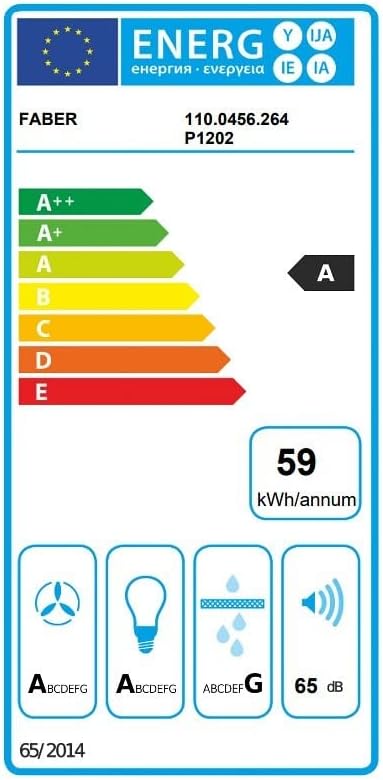
Figure 4: Energy label for the FABER T-Light Island Hood, indicating an energy class A rating and a noise level of 65 dB (note: 50 dB is likely the minimum, 65 dB max).
8. Warranty and Support
Information regarding product warranty and customer support is not provided within this document. Please refer to the separate warranty card included with your product or visit the official FABER website for details on warranty coverage, service centers, and technical assistance.


