
Faber 110.0439.951
Faber 110.0439.951 Cooker Hood User Manual
Model: 110.0439.951
1. Product Overview
The Faber 110.0439.951 is a high-performance cooker hood designed for integration into kitchen cabinets. It features an electronic sensor control, an auto-start function, and an EVO diffuser for efficient air extraction. The unit is equipped with bright LED lighting and constructed from durable stainless steel, ensuring both functionality and a sleek aesthetic in your kitchen.

Figure 1.1: Front view of the Faber 110.0439.951 Cooker Hood, showcasing its stainless steel finish and integrated LED lights.
2. Setup and Installation
Proper installation is crucial for the optimal performance and safety of your cooker hood. This model is designed for built-in mounting within a kitchen cabinet.
2.1 Important Dimensions and Clearances
- Product Dimensions: 32 cm (depth) x 90 cm (width) x 33.9 cm (height).
- Weight: Approximately 9.2 kg.
- Air Outlet Diameter: Ø 150/120 mm.
- Minimum Distance from Hob: The minimum distance between the lowest part of the hood and the highest point of the hob should be 53 cm. This clearance is essential for safety and efficient extraction.

Figure 2.1: Technical drawing illustrating the dimensions and recommended clearances for installation. Note the air outlet diameter and overall unit size.

Figure 2.2: The Faber cooker hood seamlessly integrated into a kitchen cabinet, demonstrating its built-in mounting type.
3. Operating Instructions
The Faber 110.0439.951 cooker hood is equipped with user-friendly electronic sensor controls for easy operation.
3.1 Control Panel
The electronic sensor control panel is located on the front of the hood. It allows you to adjust fan speed and lighting.
3.2 Fan Speed Settings
The hood offers three standard fan speeds and an additional intensive operating mode for powerful extraction when needed.
- Speed 1 (Low): Ideal for light cooking or maintaining air quality.
- Speed 2 (Medium): Suitable for general cooking tasks.
- Speed 3 (High): For heavier cooking or when more extraction is required.
- Intensive Mode: Provides maximum extraction power for a limited time to quickly clear strong odors or smoke. The hood will automatically revert to a lower speed after a set period.
3.3 Lighting
The hood is fitted with two energy-efficient LED lights, providing ample illumination for your cooking area. Use the dedicated button on the control panel to switch the lights on or off.
4. Maintenance and Cleaning
Regular maintenance ensures the longevity and efficient operation of your Faber cooker hood.
4.1 Grease Filter Cleaning
The cooker hood is equipped with a cassette-type grease filter, which is washable in a dishwasher. It is recommended to clean the grease filter regularly, depending on your cooking habits, to maintain optimal air extraction performance.
- Carefully remove the grease filter from the hood. Refer to the installation diagram for filter location.
- Place the filter in your dishwasher. Use a standard dishwasher detergent.
- Run a normal wash cycle.
- Allow the filter to dry completely before re-installing it into the hood.
Note: The filter may discolor slightly after dishwasher cleaning, but this does not affect its performance.
4.2 Exterior Cleaning
Clean the stainless steel exterior of the hood with a soft cloth and a mild, non-abrasive cleaning agent. Avoid using harsh chemicals or abrasive pads, as these can damage the finish.
5. Troubleshooting
This section provides solutions to common issues you might encounter with your cooker hood. If the problem persists, please contact customer support.
- Hood not turning on:
- Check if the power cord is securely plugged into a working outlet.
- Verify that the circuit breaker has not tripped.
- Poor extraction performance:
- Ensure the grease filters are clean and not clogged.
- Check for any obstructions in the ducting system.
- Verify that the fan speed is set appropriately for the cooking task.
- Unusual noise:
- Check if the grease filters are correctly installed.
- Ensure there are no loose parts or foreign objects in the fan area.
- Lights not working:
- Check if the LED lights need replacement. Consult the specifications for bulb type.
6. Technical Specifications
Detailed technical specifications for the Faber 110.0439.951 Cooker Hood.
| Feature | Specification |
|---|---|
| Brand | Faber |
| Model Number | 110.0439.951 |
| Product Dimensions | 32 x 90 x 33.9 cm |
| Item Weight | 9.2 Kilograms |
| Material | Stainless Steel |
| Finish Type | Brushed |
| Mounting Type | Built-in Mount |
| Control Type | Electronic (Sensor) |
| Number of Speeds | 3 + Intensive Mode |
| Light Source Type | LED (2 lights) |
| Wattage | 240 watts |
| Ventilation Type | Exhaust |
| Air Outlet Diameter | Ø 150/120 mm |
| Efficiency (Airflow) | 280 to 670 m³/h |
| Pressure | 420 to 520 Pa |
| Sound Level | 53 to 70 dB |
| Energy Efficiency Class | A |
| Grease Filter | Cassette, Dishwasher Safe |
| Batteries Required? | No |
| Included Components | 1 x Cooker Hood, Mounting Set, User Manual |
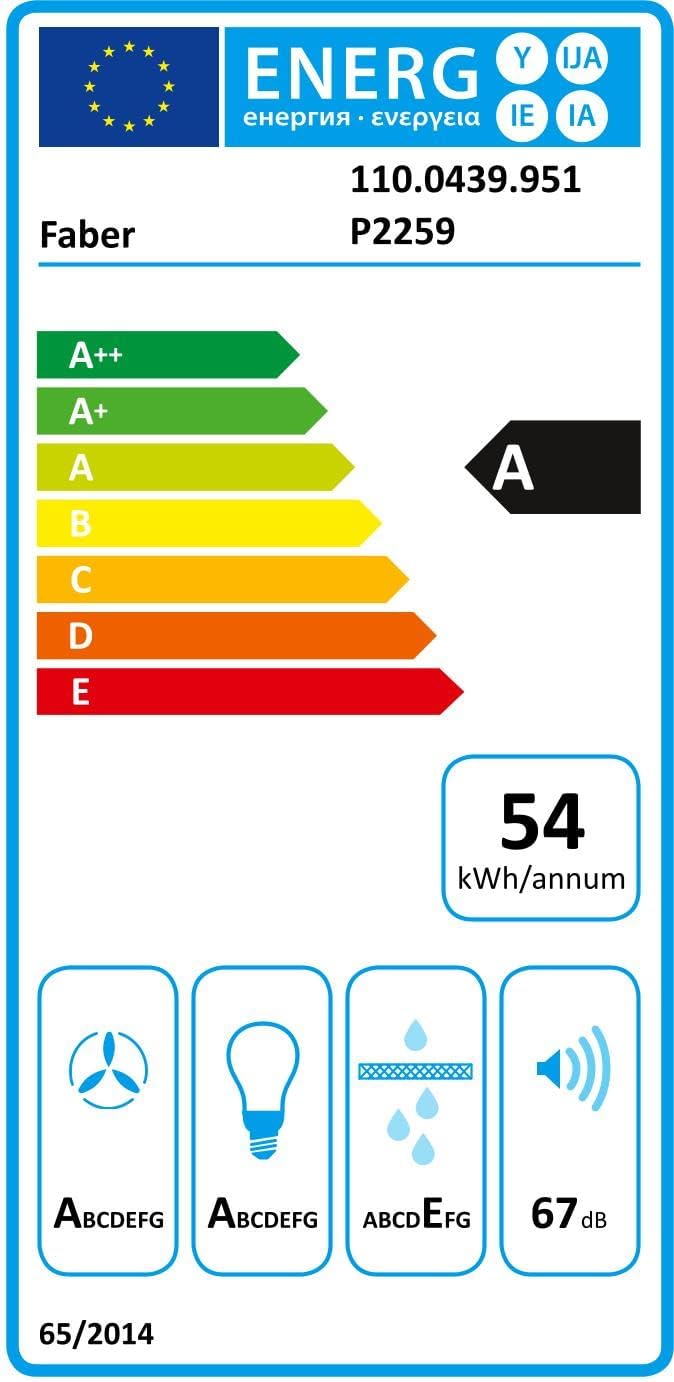
Figure 6.1: The energy efficiency label for the Faber 110.0439.951 cooker hood, indicating its 'A' energy class rating and other performance metrics.
7. Warranty and Support
For warranty information, technical support, or service inquiries, please contact Faber customer service using the details below.
- Manufacturer: Faber S.p.A.
- Customer Service Name: Faber_Customer_Service_
- Email: hs-eprel-info.eu@faberspa.com
- Website: www.faberspa.com
- Telephone: +39 0732 691691
- Address: Viale XIII Luglio 160, 60044 Fabriano (An), Italy
- EPREL Registration Number: 1310531 (View on EPREL Database)
Related Documents - 110.0439.951
 |
Faber Classica Plus Range Hood: Installation & User Guide Comprehensive installation instructions and user guide for the Faber Classica Plus range hood (models CLPL30SSV2, CLPL36SSV2), covering safety, mounting, operation, and maintenance. |
 |
Faber IN-NOVA ZERO DRIP X/WH Installation Manual Comprehensive installation guide for the Faber IN-NOVA ZERO DRIP X/WH range hood, detailing assembly steps, safety warnings, and technical specifications for proper setup. |
 |
Faber Cylindra I Evo Plus Installation Manual Detailed installation guide for the Faber Cylindra I Evo Plus range hood, including parts list, step-by-step instructions, safety precautions, and dimensional data. |
 |
Faber Glamlight Zero Drip Plus Bkm A80Kl Hood User Manual | Installation, Operation & Maintenance Guide Download the official user manual for the Faber Glamlight Zero Drip Plus Bkm A80Kl Hood. Find detailed instructions on installation, safe operation, cleaning, maintenance, controls, and technical specifications for your kitchen extractor hood. |
 |
Faber Cloud User Guide: Connect & Control Your Range Hood Comprehensive user guide for the Faber Cloud system, detailing how to connect your Faber range hood to the app, integrate with Amazon Alexa, Google Home, and Siri, and troubleshoot connectivity issues. Learn to control your kitchen appliance remotely. |
 |
Faber FABERJET CLASSO 7688 Designer Hood: Instructions Manual This comprehensive instructions manual provides essential information for the Faber FABERJET CLASSO 7688 Designer Hood, covering safety precautions, installation procedures, operating instructions, cleaning and maintenance guidelines, and troubleshooting tips. |
Ask a question about this manual
Ask about setup, troubleshooting, compatibility, parts, safety, or missing instructions. Manuals+ will review the question and use this page’s manual context to help answer it.