RASTAR Ferrari La Ferrari RC Car Instruction Manual
Model: AC-50100
Brand: RASTAR
Introduction
This manual provides detailed instructions for the RASTAR Ferrari La Ferrari RC Car, Model AC-50100. Please read this manual thoroughly before operating the vehicle to ensure proper use and longevity of the product. This 1/14 scale replica offers an authentic driving experience with meticulous attention to detail.
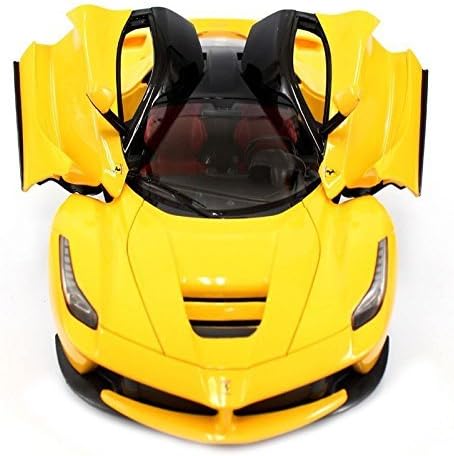
Image: The RASTAR Ferrari La Ferrari RC Car in yellow, showcasing its detailed design.
1. Setup
1.1 Unboxing
Carefully remove all components from the packaging. Ensure all items listed in the "What's in the Box" section are present.
Ferrari La Ferrari RC Car (Model AC-50100)
Remote Control
Rechargeable Battery (7.4V)
USB Charging Cable
Small Screwdriver
Image: Top-down view of the RASTAR Ferrari La Ferrari RC Car, highlighting its sleek design.
1.2 Battery Installation (RC Car)
Locate the battery compartment on the underside of the RC car.
Use the provided screwdriver to open the battery compartment cover.
Connect the rechargeable 7.4V battery to the car's battery connector.
Carefully place the battery inside the compartment and secure the cover with the screwdriver.
Ensure the car's power switch (located near the battery compartment) is in the "OFF" position before installation.
Image: The bottom of the RC car, indicating the battery compartment and power switch.
1.3 Battery Installation (Remote Control)
Locate the battery compartment on the back of the remote control.
Open the battery compartment cover.
Insert 4 AA batteries (not included) into the compartment, ensuring correct polarity (+/-).
Close the battery compartment cover.
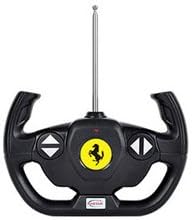
Image: The remote control unit, featuring a steering wheel design.
1.4 Remote Control Wheel Assembly
The steering wheel for the remote control may need to be attached. Simply align the wheel with the designated slot on the side of the remote control and push it firmly into place until it clicks securely.
2. Operating Instructions
2.1 Power On and Syncing
Ensure both the RC car and the remote control have fresh or fully charged batteries installed.
Turn on the RC car using the switch on its underside.
Turn on the remote control using its power switch.
The car and remote should automatically sync. If not, turn both off and on again.
2.2 Basic Controls
Forward/Reverse: Use the trigger on the remote control. Pull the trigger towards you for forward motion, and push it away from you for reverse. The remote offers variable speed control.
Steering: Rotate the steering wheel on the side of the remote control left or right to steer the car in the desired direction.
The RC car has a control range of up to 30 meters, allowing for ample space during operation.
Video: A 1/14 Licensed Le Mans Series Remote Control Car, demonstrating similar operational characteristics.
3. Maintenance
3.1 Battery Charging
To charge the RC car's rechargeable battery:
Connect the rechargeable battery to the provided USB charging cable.
Plug the USB cable into a compatible USB power source (e.g., computer, USB wall adapter).
The charging indicator on the USB cable will show the charging status (e.g., red light for charging, green light for fully charged).
A full charge typically takes approximately 2 hours. Do not leave batteries unattended while charging.
Always disconnect the battery from the charger once fully charged.
3.2 Cleaning
To maintain the appearance and functionality of your RC car:
Wipe the car's body with a soft, dry cloth to remove dust and dirt.
Avoid using harsh chemicals or abrasive cleaners, as these can damage the finish.
Keep the car and remote control away from water and moisture.
4. Troubleshooting
4.1 Car Not Responding to Remote Control
Check if both the car and remote control are powered on.
Ensure batteries in both devices are fully charged and correctly installed.
Turn both devices off and then on again to re-establish the connection.
Make sure you are within the operating range (up to 30 meters).
Avoid operating multiple RC cars with the same frequency in close proximity, as this can cause interference.
4.2 Car Moving Slowly or Not at All
The rechargeable battery in the car may be low. Recharge it fully.
Check the AA batteries in the remote control and replace them if necessary.
Ensure the car is being operated on a smooth, flat surface for optimal performance.
5. Specifications
Feature
Detail
Product Dimensions
17 x 9 x 7.5 inches
Item Weight
2 pounds
Model Number
AC-50100
Manufacturer Recommended Age
12 years and up
Car Battery
7.4V Rechargeable Battery (included)
Remote Control Batteries
4 AA batteries (not included)
Scale
1:14
6. Warranty & Support
For warranty information or technical support, please refer to the manufacturer's official website or contact their customer service directly. Keep your purchase receipt as proof of purchase.
Ask a question about this manual
Ask about setup, troubleshooting, compatibility, parts, safety, or missing instructions. Manuals+ will review the question and use this page’s manual context to help answer it.