
USA Toyz Laser Tag Toy Guns 4-Pack
USA Toyz Laser Tag Toy Guns Instruction Manual
Model: Laser Tag Toy Guns 4-Pack
Introduction
Welcome to the exciting world of USA Toyz Laser Tag! This 4-pack laser tag set provides an immersive and safe multiplayer shooting game experience for kids and adults. Designed for dynamic play, these blasters feature advanced gun target technology, multiple firing modes, and interactive sound and vibration effects. Please read this manual carefully to ensure proper setup, operation, and enjoyment of your new laser tag set.
Package Contents
Your USA Toyz Laser Tag 4-Pack includes the following items:
- 4 x Laser Tag Blasters (various colors)
- 1 x Training Bot (if included in your specific package)
- 1 x USB Charging Cable (for Training Bot, if applicable)
- 1 x Instruction Manual (this document)

Image: The complete 4-pack laser tag set, ready for multiplayer action.
Setup
Battery Installation
- Each laser tag blaster requires (4) AA batteries (not included).
- Locate the battery compartment on the bottom of the blaster handle.
- Using a small Phillips head screwdriver, unscrew the battery compartment cover.
- Insert (4) AA batteries, ensuring correct polarity (+/-).
- Replace the battery compartment cover and secure it with the screw.
Initial Power On
Once batteries are installed, slide the ON/OFF switch (usually located near the handle) to the 'ON' position. The blaster will emit a sound and light up, indicating it's ready for play.
Operating Instructions
Team Selection
Before starting a game, select your team color. Each blaster allows you to choose from multiple team colors (e.g., Red, Blue, Green, White). Press the team selection button (often located on the side or top of the blaster) until your desired team color is displayed.
Firing Modes
Your laser tag blasters come with 4 distinct firing modes, each with unique sound effects, damage output, and reload times:
- Pistol: Low damage, fast reload, high ammo.
- Shotgun: Medium damage, slower reload, moderate ammo.
- Submachine Gun: Rapid fire, medium damage, moderate ammo.
- Rocket Launcher: High damage, slowest reload, low ammo.
To switch between firing modes, press the weapon selector button (refer to the diagram below). Experiment with each mode to find your favorite!

Image: Detailed view of the blaster showing the weapon selector and its four distinct firing modes.
Life Meter
Each blaster features a life meter, typically indicated by a series of lights or bars. When hit by an opponent, your life meter will decrease. The number of hits required to deplete your life meter varies by firing mode and game settings. When your life meter reaches zero, your blaster will be temporarily deactivated, indicating you are out of the game.

Image: A close-up of the blaster's life meter, showing how hits are registered.
Reloading
When your blaster runs out of ammunition for its current firing mode, you will hear an empty clip sound. To reload, simply press the reload button or pull back the grip (depending on the model). A successful reload will be indicated by a sound effect.

Image: Demonstrating the quick-action reload feature of the laser tag blaster.
Infrared Sensors
The blasters are equipped with infrared sensors that detect hits from opposing blasters. These sensors are typically located on the front and/or top of the blaster. Ensure these sensors are not obstructed during play for accurate hit detection. The infrared lasers are kid-safe with less than 1mW output.
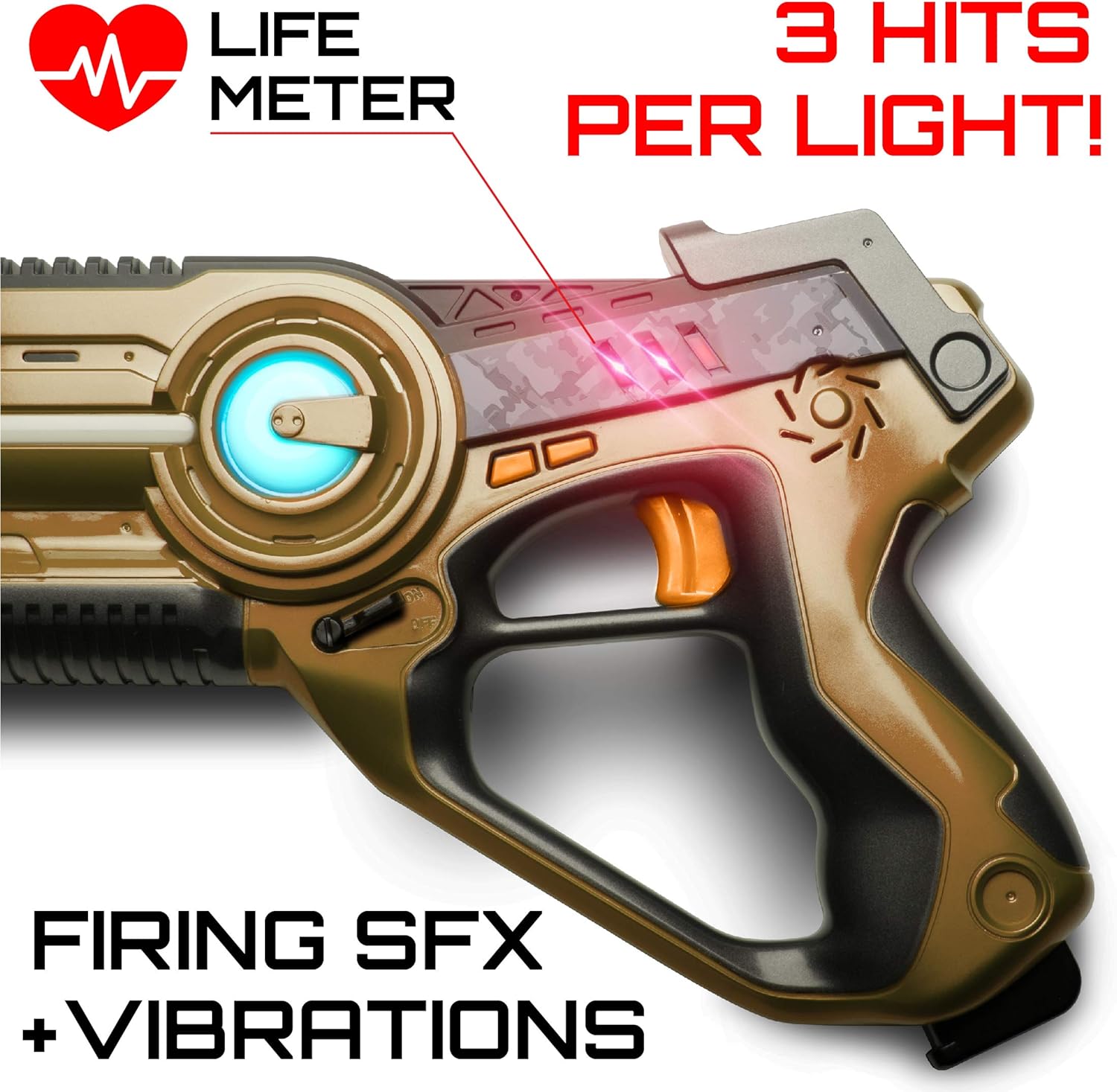
Image: Highlighting the safe infrared sensors on the laser tag blaster.
Maintenance
- Clean the blasters with a soft, dry cloth. Do not use harsh chemicals or abrasive cleaners.
- Do not immerse the blasters in water or expose them to excessive moisture.
- Remove batteries from the blasters if they will not be used for an extended period to prevent leakage and damage.
- Store the blasters in a cool, dry place away from direct sunlight.
Troubleshooting
| Problem | Possible Cause | Solution |
|---|---|---|
| Blaster not powering on. | Low or dead batteries; incorrect battery installation. | Replace with fresh AA batteries; ensure correct polarity. |
| Blaster not registering hits. | Obstructed infrared sensor; out of range. | Ensure sensors are clear; move closer to opponent (within 130 ft range). |
| Blaster not firing. | Out of ammo; low batteries. | Perform a reload; replace batteries. |
Specifications
- Product Dimensions: 17.8 x 11.5 x 4.8 inches (Package)
- Item Weight: 3.64 pounds
- Recommended Age: 8 - 8 years (Manufacturer recommended)
- Battery Requirement: 4 x AA batteries per blaster (not included)
- Laser Output: Less than 1mW (Kid-safe infrared)
- Range: Up to 130 feet
Warranty & Support
USA Toyz stands behind the quality of its products. For any questions, concerns, or warranty information, please visit the official USA Toyz store on Amazon or contact their customer support directly. Keep your purchase receipt as proof of purchase.