
G-Technology 0G06053-1
G-Technology 1TB G-DRIVE mobile SSD R-Series Instruction Manual
Model: 0G06053-1
1. Introduction
The G-Technology G-DRIVE mobile SSD R-Series is a durable and portable external solid-state drive designed for reliable data storage and transfer. It features robust protection against water, dust, drops, and crushing, making it suitable for various environments. With high-speed USB-C connectivity, it offers fast data transfer rates for efficient workflow.

Figure 1: Front view of the G-Technology G-DRIVE mobile SSD R-Series.
2. What's in the Box
Verify that all items are present in the package:
- G-DRIVE mobile SSD R-Series device
- USB-C to USB-C cable
- USB-C to USB-A cable
- Quick Start Guide (Documentation)
- 3-Year Limited Warranty information

Figure 2: The G-DRIVE mobile SSD R-Series shown with its included USB-C to USB-C and USB-C to USB-A cables.
3. Setup
3.1 Connecting the Device
- Select the appropriate cable (USB-C to USB-C or USB-C to USB-A) for your computer's port.
- Connect one end of the cable to the USB-C port on the G-DRIVE mobile SSD R-Series.
- Connect the other end of the cable to an available USB port on your computer.
- The device is bus-powered and does not require an external power adapter.

Figure 3: Close-up view of the USB-C port on the G-DRIVE mobile SSD R-Series.
3.2 Initial Use and Formatting
The G-DRIVE mobile SSD R-Series is pre-formatted for macOS. For Windows users, reformatting the drive to NTFS is necessary for optimal compatibility and stability. Detailed instructions for formatting can be found on the G-Technology support pages. If cross-platform use between Mac and PC is required, exFAT formatting is an option, though NTFS is generally more stable for Windows-only use.
4. Operating the Device
4.1 Data Transfer
The G-DRIVE mobile SSD R-Series offers super-fast transfer rates up to 560MB/s, utilizing the latest generation USB-C connectivity (USB 3.1 Gen 2). This allows for quick saving, editing, and archiving of large files. Simply drag and drop files to and from the drive, or use your operating system's copy/paste functions.
4.2 Compatibility
The drive is compatible with both PC (Windows 7 and later) and Mac (macOS 10.10 and later) operating systems. Its versatile USB-C port ensures readiness for a wide range of laptops and desktops.
4.3 Portability
Designed to be compact and lightweight, the G-DRIVE mobile SSD R-Series is ideal for on-the-go professionals. Its small form factor allows it to be easily carried in a bag or pocket, providing access to your data wherever you need it.
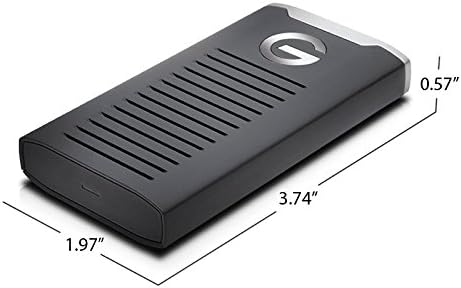
Figure 4: The compact dimensions of the G-DRIVE mobile SSD R-Series.
5. Maintenance and Care
5.1 Durability Features
The G-DRIVE mobile SSD R-Series is built for durability, featuring:
- IP67 water and dust resistance
- 3-meter drop protection (on a carpeted concrete floor)
- 1000lb crushproof rating
- Shock and vibration resistant solid state drive technology
5.2 General Care
To ensure the longevity of your device:
- Avoid exposing the drive to extreme temperatures.
- Keep the ports clean and free of debris.
- While durable, avoid intentional drops or excessive force.
- Disconnect the drive safely using your operating system's eject function before unplugging.
6. Troubleshooting
6.1 Drive Not Recognized on Windows
If the drive is not recognized on a Windows computer, it may need to be reformatted. The drive is pre-formatted for macOS. Refer to the G-Technology support website for detailed instructions on how to reformat the drive for Windows (NTFS) or cross-platform use (exFAT).
6.2 Slow Transfer Speeds
Ensure you are using a USB 3.1 Gen 2 compatible port on your computer for optimal transfer speeds. Older USB ports (e.g., USB 2.0 or USB 3.0) will result in slower performance. Performance can also vary depending on your hardware, software components, and configurations.
6.3 Device Feels Warm During Use
It is normal for the device to become warm during extended use, especially during large data transfers. The aluminum casing is designed to help dissipate heat. This typically does not affect performance or reliability.
7. Specifications
| Feature | Detail |
|---|---|
| Digital Storage Capacity | 1 TB |
| Hard Drive Interface | USB 3.1 |
| Connectivity Technology | USB |
| Special Features | Water and Dust Resistant (IP67), Shock and Vibration Resistant, Crushproof |
| Compatible Devices | Laptop (PC; Mac) |
| Installation Type | External Hard Drive |
| Color | Black |
| Item Dimensions LxWxH | 3.74 x 1.97 x 0.57 inches |
| Item Weight | 3.03 ounces |
| Operating System | Mac OS 10.10+; Windows 7+ |
8. Warranty and Support
8.1 Limited Warranty
The G-DRIVE mobile SSD R-Series comes with a 3-Year Limited Warranty. Please retain your proof of purchase for warranty claims.
8.2 Technical Support
For technical assistance, product registration, or to access the full user manual and FAQs, please visit the official G-Technology support website. You can find the latest drivers, software, and troubleshooting guides there.
For additional information, visit the G-Technology Store on Amazon.
Related documents0G06053-1


Ask a question about this manual
Ask about setup, troubleshooting, compatibility, parts, safety, or missing instructions. Manuals+ will review the question and use this page’s manual context to help answer it.