
Chefman RJ45-Black
Chefman Electric Vacuum Sealer
Model: RJ45-Black
Instruction Manual
Introduction
The Chefman Electric Vacuum Sealer is designed to preserve food freshness and extend storage life. This versatile appliance creates an airtight seal, preventing freezer burn and reducing food waste. It is suitable for various items, including food for Sous Vide cooking, and can also be used to protect valuables and documents from environmental damage.
Important Safety Information
Before operating the Chefman Electric Vacuum Sealer, please read all instructions carefully. Failure to follow these instructions may result in electric shock, fire, or injury. Keep this manual for future reference.
- Ensure the appliance is placed on a stable, flat, heat-resistant surface.
- Do not immerse the appliance, cord, or plug in water or other liquids.
- Keep hands clear of the sealing strip during operation as it becomes hot.
- Unplug the appliance from the outlet when not in use and before cleaning.
- Do not operate the appliance with a damaged cord or plug.
- This appliance is for household use only.
Parts and Features
The Chefman Electric Vacuum Sealer features a compact design with intuitive controls for efficient food preservation.
- One-Touch Operation: Fully automated vacuum sealing and sealing functions.
- Integrated Cutter: Allows for custom bag sizes from a roll.
- Starter Kit: Includes a vacuum sealer roll for immediate use.
- Versatile Use: Ideal for preserving food, preparing for Sous Vide, and protecting non-food items.
- Compact Design: Measures approximately 15 inches wide by 5.5 inches deep for easy storage.

Image: The Chefman Electric Vacuum Sealer shown with vacuum-sealed carrots, highlighting its ability to keep food fresh up to 5x longer and its integrated cutter.

Image: A top-down view of the Chefman Electric Vacuum Sealer, displaying the 'Seal', 'Cancel', and 'Vacuum Seal' control buttons.
Setup
- Unpack the vacuum sealer and all accessories.
- Place the unit on a clean, dry, and flat surface.
- Ensure the power cord is accessible and plug the unit into a standard electrical outlet.
- Familiarize yourself with the control panel: Seal, Cancel, and Vacuum Seal buttons.
Operating Instructions
This section details how to use your Chefman Electric Vacuum Sealer for optimal food preservation.
Creating a Custom Bag from a Roll
- Open the vacuum sealer lid.
- Place the vacuum sealer roll into the designated slot.
- Pull out the desired length of bag material.
- Use the integrated cutter to cut the bag to size.
- Place one end of the cut bag onto the sealing strip.
- Close the lid and press down firmly on both sides until you hear a click, indicating it's locked.
- Press the Seal button. The indicator light will illuminate.
- Once the sealing process is complete, the light will turn off. Open the lid and remove the sealed bag.
Vacuum Sealing Food
- Place the food item into the custom-made bag or a pre-made vacuum sealer bag, ensuring at least 3 inches of space between the food and the open end of the bag.
- Lay the open end of the bag flat into the vacuum channel, ensuring it is smooth and free of wrinkles.
- Close the lid and press down firmly on both sides until it locks.
- Press the Vacuum Seal button. The appliance will automatically remove air and then seal the bag.
- Once the process is complete, the indicator light will turn off. Open the lid and remove the vacuum-sealed bag.
Tips for Best Results
- For moist foods, pre-freeze them for a short period to prevent liquids from being drawn into the vacuum channel.
- Ensure the sealing area is clean and dry before each use.
- When using for Sous Vide cooking, the vacuum seal ensures efficient heat transfer and locks in flavor and moisture.
- Vacuum-packed food can be reheated in a microwave; always puncture the bag before heating.
Video: Official manufacturer video demonstrating the three easy steps to use the Chefman Electric Vacuum Sealer for cutting, sealing, and vacuum sealing bags.
Maintenance and Cleaning
Regular cleaning and maintenance will ensure the longevity and optimal performance of your vacuum sealer.
- Always unplug the appliance before cleaning.
- Wipe the exterior of the unit with a damp cloth. Do not use abrasive cleaners.
- Clean the vacuum channel and sealing strip with a soft, damp cloth to remove any food residue. Ensure these areas are completely dry before next use.
- Do not immerse the appliance in water.
Troubleshooting
If you encounter issues with your Chefman Electric Vacuum Sealer, refer to the following common problems and solutions:
- Appliance does not turn on: Ensure the power cord is securely plugged into a working electrical outlet.
- Bag does not vacuum or seal properly:
- Check that the lid is firmly closed and locked on both sides.
- Ensure the open end of the bag is placed correctly within the vacuum channel and is free of wrinkles.
- Verify that the sealing strip and vacuum channel gaskets are clean and undamaged.
- For bags containing liquids, ensure the liquid does not enter the vacuum channel. Pre-freezing or using a vertical angle for sealing liquids may improve results.
- Incomplete seal: The sealing strip may be dirty or worn. Clean the strip or contact customer support if the issue persists.
Specifications
- Brand: Chefman
- Model Number: RJ45-Black
- Material: Plastic
- Color: Black
- Product Dimensions (L x W x H): 15" x 15" x 5.5"
- Power Source: Corded Electric
- Voltage: 120 volts
- Wattage: 110 watts
- Operation Mode: Automatic
- Included Components: Starter Kit (vacuum sealer roll)
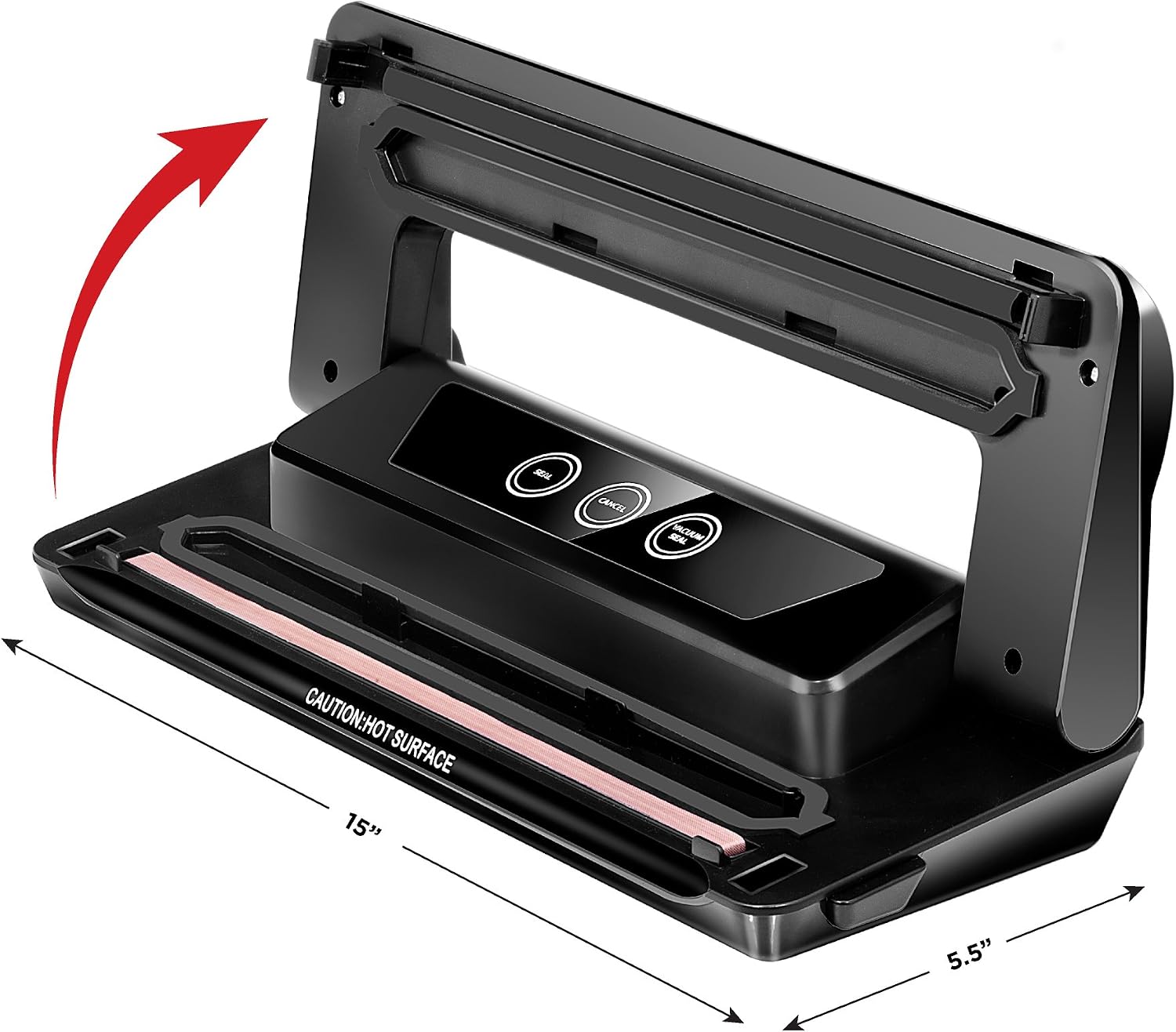
Image: The Chefman Electric Vacuum Sealer with its length and depth dimensions indicated.
Warranty and Support
The Chefman Electric Vacuum Sealer comes with a 1-year hassle-free warranty. For detailed warranty information, product registration, or customer support, please refer to the official user guide or contact Chefman customer service.
You can also download the complete User Guide in PDF format here.
Related documentsRJ45-Black


Ask a question about this manual
Ask about setup, troubleshooting, compatibility, parts, safety, or missing instructions. Manuals+ will review the question and use this page’s manual context to help answer it.