
1. Introduction and Product Overview
The Nexans millimat/100 N-HEAT electric underfloor heating system provides an efficient and comfortable indoor climate. This system is designed for easy installation and offers a long lifespan with minimal maintenance requirements. It is an economical solution for heating various spaces, allowing for flexible temperature control in individual rooms.
This manual provides essential information for the safe and correct installation, operation, and maintenance of your Nexans millimat/100 N-HEAT heating mat and the accompanying CDFR-003 thermostat.

Image 1.1: Nexans millimat/100 N-HEAT electric underfloor heating mat installed in a bathroom setting, illustrating its application for comfortable floor heating.
2. Safety Information
Important: Installation and electrical connections must be performed by a qualified electrician in accordance with all local and national electrical codes and regulations. Failure to do so may result in electric shock, fire, or other hazards.
- Always disconnect power before installing or servicing the heating system.
- Do not cut or overlap the heating cables.
- Ensure the heating mat is fully embedded in the leveling compound or tile adhesive.
- Do not install the heating mat under fixed objects such as bathtubs, toilets, or permanent cabinetry.
- The system must be protected by a Residual Current Device (RCD).
3. Setup and Installation
Proper installation is crucial for the performance and longevity of your underfloor heating system. Consult the detailed installation guide provided with your product for specific instructions. The following is a general overview.
3.1 Components
- Heating Mat: The millimat/100 N-HEAT consists of a double resistance wire, FEP insulation, solid copper earth conductor, fiberglass mesh, PVC outer sheath, and aluminum coating. It has a total thickness of 4.5 mm and a width of 50 cm.
- Thermostat: The CDFR-003 thermostat controls the floor temperature.
- Floor Sensor: Included with the thermostat to measure floor temperature.

Image 3.1: A rolled Nexans millimat/100 N-HEAT heating mat, illustrating the construction of the mat with its integrated heating cables.
3.2 Installation Steps (General)
- Prepare the Subfloor: Ensure the subfloor is clean, dry, level, and free from debris. Apply a suitable primer if necessary.
- Plan Mat Layout: Determine the optimal placement of the heating mat, avoiding areas under permanent fixtures. Ensure the mat covers the desired heating area without overlapping.
- Install Floor Sensor: Route the floor sensor cable in a conduit to the thermostat location and position the sensor head centrally between two heating cables.
- Lay the Heating Mat: Unroll the mat onto the prepared subfloor. The self-adhesive backing helps secure it. Cut the mesh (not the heating cable) to turn the mat as needed.
- Electrical Connection: Connect the heating mat's cold lead and the floor sensor to the CDFR-003 thermostat. All electrical connections must be made by a qualified electrician.
- Test the System: Before applying flooring, perform resistance and insulation tests on the heating mat and sensor to ensure proper functionality.
- Apply Flooring: Cover the heating mat with a suitable leveling compound or tile adhesive, ensuring the mat is fully encapsulated. Install your chosen floor covering (tiles, laminate, etc.).

Image 3.2: Illustrative cross-section of the underfloor heating system, demonstrating the mat's placement beneath the final floor covering.
4. Operating Instructions (CDFR-003 Thermostat)
The CDFR-003 thermostat allows you to control the temperature of your underfloor heating system. Modern thermostats offer advanced energy-saving functions, such as temperature reduction during specific times of the day or night.
4.1 Basic Operation (Example Thermostat)

Image 4.1: Example of a digital thermostat, similar to the CDFR-003, showing its display and control buttons.
- Power On/Off: Use the designated power button (often a symbol like ⏻ or I/O) to turn the heating system on or off.
- Temperature Setting: Use the up (▲) and down (▼) arrows or a rotary dial to adjust the desired floor temperature.
- Mode Selection: Some thermostats offer different modes (e.g., comfort, economy, frost protection). Refer to your specific CDFR-003 manual for mode selection.
- Programming: For energy efficiency, program the thermostat to reduce temperature during unoccupied periods or at night.
For detailed instructions on programming and advanced features, please refer to the specific user manual provided with your CDFR-003 thermostat.
5. Maintenance
The Nexans millimat/100 N-HEAT electric underfloor heating system is designed to be maintenance-free once properly installed. The heating cables themselves do not require periodic servicing.
- Thermostat: Periodically check the thermostat for proper operation. Ensure the display is clear and buttons respond correctly.
- Cleaning: Clean the thermostat surface with a soft, dry cloth. Do not use abrasive cleaners or solvents.
- Professional Inspection: If you suspect any issues with the electrical components, contact a qualified electrician for inspection.
6. Troubleshooting
If your underfloor heating system is not functioning as expected, consider the following troubleshooting steps:
- No Heat:
- Check if the thermostat is powered on.
- Verify the thermostat settings; ensure the desired temperature is set above the current floor temperature.
- Check your electrical panel for tripped circuit breakers or RCDs.
- Uneven Heating:
- Ensure no large, insulating objects are placed directly on the heated floor area.
- Allow sufficient time for the system to reach the set temperature, especially after initial activation.
- Thermostat Display Issues:
- If the display is blank, check the power supply to the thermostat.
- If error codes appear, consult the specific CDFR-003 thermostat manual.
For any persistent issues or if you are unsure about electrical components, always contact a qualified electrician or Nexans customer support.
7. Technical Specifications
The following table outlines the general technical specifications for the Nexans millimat/100 N-HEAT electric underfloor heating system. Specific values may vary based on the mat size and power output.
| Feature | Specification |
|---|---|
| Heating Power Density | 100 or 150 W/m² |
| Total Power Range | 100 W to 1800 W (depending on mat size) |
| Max. Continuous Operating Temperature (Outer Sheath) | 65 °C |
| Conductor Resistance Tolerance | -5% / +10% |
| Nominal Voltage | 230 V |
| Total Thickness | 4.5 mm |
| Mat Width | 50 cm |
| Conductor Type | Double resistance wire |
| Insulation | FEP |
| Earth Conductor | Solid copper |
| Outer Sheath | PVC with aluminum coating |
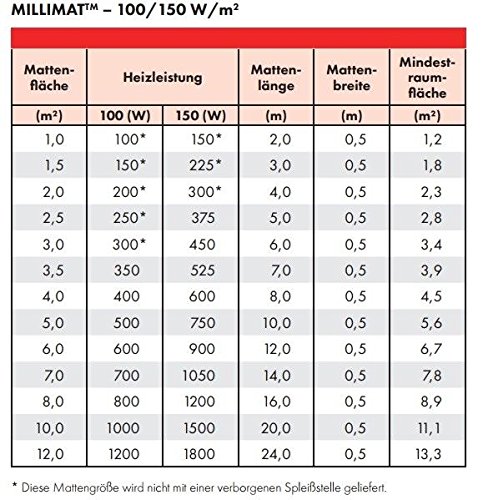
Image 7.1: Detailed table of millimat/100 and millimat/150 specifications, including mat area, heating power, and dimensions.
8. Warranty and Support
Information regarding specific warranty terms for the Nexans millimat/100 N-HEAT system and CDFR-003 thermostat is typically provided with the product packaging or available on the manufacturer's official website. Please retain your proof of purchase for warranty claims.
For technical support, installation queries, or warranty service, please contact Nexans customer service or visit their official website. Ensure you have your product model number (millimat/100 N-HEAT) and any relevant purchase details ready.
Manufacturer: Nexans
Model Reference: 4711 (Internal reference, refer to millimat/100 N-HEAT for product model)


