
1. Introduction
Thank you for choosing the XTUGA BK510 Single Channel Wireless In-Ear Monitor System. This system is designed to provide professional-grade audio monitoring for musicians, performers, and presenters. It features UHF wireless technology with 100 selectable channels, ensuring clear and reliable sound transmission. This manual will guide you through the setup, operation, and maintenance of your new in-ear monitor system.
2. Safety Information
Please read and understand all safety instructions before operating this device. Keep this manual for future reference.
- FCC Compliance: Most users do not need a license to operate this wireless microphone system. However, operation is subject to certain restrictions: the system must not cause harmful interference, must operate at a low power level (not exceeding 50 milliwatts), and has no protection from interference received from any other device.
- FCC Regulations: Purchasers should be aware that the FCC is currently evaluating the use of wireless microphone systems, and these rules are subject to change. For more information, contact the FCC at 1-888-CALL-FCC (TTY: 1-888-TELL-FCC) or visit the FCC's wireless microphone website: fcc.gov/cgb/wirelessmicrophones.
- Electrical Safety: To prevent electric shock, do not open the device casing. Refer all servicing to qualified personnel.
- Power Source: Use only the provided power adapter. Ensure the voltage matches the device requirements.
- Water and Moisture: Do not expose the device to water, rain, or excessive moisture.
- Heat: Keep the device away from heat sources such as radiators, heat registers, stoves, or other heat-producing appliances.
- Ventilation: Ensure proper ventilation around the transmitter unit. Do not block any ventilation openings.
- Earphone Volume: Avoid listening at high volume levels for extended periods to prevent hearing damage.
3. Package Contents
Verify that all items listed below are included in your package. If any items are missing or damaged, please contact your retailer.
- 1x XTUGA BK510 Transmitter Unit
- 1x XTUGA BK510 Bodypack Receiver
- 1x Detachable Antenna
- 1x Power Adapter (DC 12V-18V)
- 2x Audio Cables (1/4" TS to 1/4" TS)
- 1x Pair of Earbud Headphones (White)

Image: XTUGA BK510 Single Channel Wireless In-Ear Monitor System package contents, showing the transmitter, bodypack receiver, antenna, power adapter, two audio cables, and white earbud headphones.
4. Product Overview
4.1 Transmitter Unit
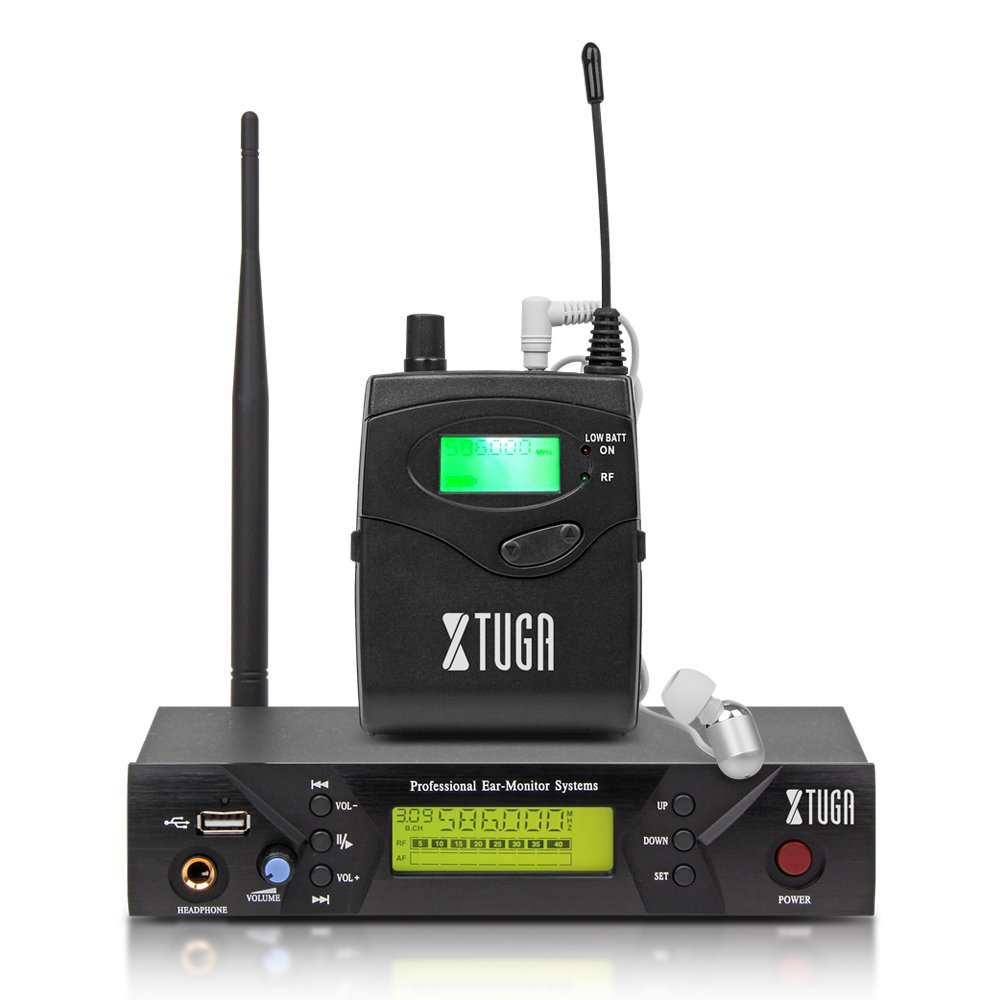
Image: Front panel of the XTUGA BK510 transmitter unit, featuring a USB port, headphone output, volume control, channel selection buttons (UP/DOWN), SET button, power button, and an LCD display.
- USB Port: For connecting USB devices (e.g., for playback or recording, specific functionality may vary).
- HEADPHONE Output: 3.5mm jack for wired headphone monitoring directly from the transmitter.
- VOLUME Knob: Adjusts the output volume for the HEADPHONE output.
- UP/DOWN Buttons: Used to navigate and select channels or frequencies.
- SET Button: Confirms selections or enters settings menus.
- POWER Button: Turns the transmitter unit on or off.
- LCD Display: Shows current channel, frequency, and other operational information.

Image: Rear panel of the XTUGA BK510 transmitter unit, showing the DC IN power input, AF IN (L) and AF IN (R) combo XLR/TRS inputs, AF LEVEL (Left/Right) adjustment knobs, and the ANTENNA connector.
- DC IN (12V-18V): Power input for the included power adapter.
- AF IN (L)/(R): Combo XLR/TRS inputs for connecting audio sources (e.g., mixer output).
- AF LEVEL (Left/Right): Rotary knobs to adjust the input audio level for each channel.
- ANTENNA Connector: For attaching the detachable antenna.
4.2 Bodypack Receiver

Image: Front view of the XTUGA BK510 bodypack receiver, showing the LCD display, LOW BATT indicator, RF indicator, and control buttons.
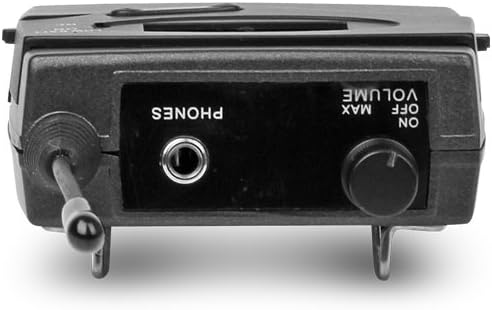
Image: Top view of the XTUGA BK510 bodypack receiver, showing the PHONES output jack and the ON/OFF/VOLUME knob.

Image: XTUGA BK510 bodypack receiver with the battery compartment open, showing slots for two AA batteries and the belt clip on the back.
- LCD Display: Shows current channel, frequency, and battery status.
- LOW BATT Indicator: Illuminates when battery power is low.
- RF Indicator: Illuminates when receiving a radio frequency signal from the transmitter.
- ON/OFF/VOLUME Knob: Turns the receiver on/off and adjusts the headphone volume.
- PHONES Output: 3.5mm jack for connecting in-ear headphones.
- Battery Compartment: Holds two AA batteries.
- Belt Clip: For attaching the bodypack to clothing or a belt.
5. Setup Guide
- Connect Transmitter Antenna: Screw the detachable antenna onto the ANTENNA connector on the rear panel of the transmitter unit. Ensure it is securely fastened.
- Power the Transmitter: Connect the provided power adapter to the DC IN (12V-18V) port on the rear of the transmitter, then plug the adapter into a suitable power outlet.
- Connect Audio Source: Use the included 1/4" TS cables (or XLR cables, not included) to connect your audio source (e.g., mixer's auxiliary output, monitor send) to the AF IN (L) and/or AF IN (R) inputs on the transmitter's rear panel. For mono operation, typically use AF IN (L).
- Install Receiver Batteries: Open the battery compartment on the bodypack receiver and insert two AA batteries, observing correct polarity (+/-). Close the compartment securely.
- Connect Headphones to Receiver: Plug your in-ear headphones into the PHONES output jack on the bodypack receiver.
6. Operating Instructions
- Power On Transmitter: Press the POWER button on the transmitter's front panel. The LCD display will illuminate.
- Power On Receiver: Rotate the ON/OFF/VOLUME knob on the bodypack receiver clockwise until it clicks and the LCD display illuminates.
- Select Channel/Frequency (Transmitter):
- Use the UP/DOWN buttons on the transmitter to browse through the available 100 UHF channels.
- Press the SET button to confirm your desired channel. The display will show the selected frequency.
- Choose a channel that is clear of interference in your operating environment.
- Sync Receiver to Transmitter: The bodypack receiver should automatically sync to the transmitter's frequency. If not, consult the receiver's specific instructions (often involves holding a SET or SYNC button on the receiver while the transmitter is broadcasting). Ensure the RF indicator on the receiver is lit, indicating a successful connection.
- Adjust Audio Input Level (Transmitter): Play audio through your connected source. Adjust the AF LEVEL (Left/Right) knobs on the rear of the transmitter until the audio level is appropriate without clipping (distortion). Monitor the audio through the transmitter's HEADPHONE output if desired.
- Adjust Monitoring Volume (Receiver): Put on your in-ear headphones. Slowly rotate the ON/OFF/VOLUME knob on the bodypack receiver to adjust the listening volume to a comfortable level. Avoid excessively high volumes to protect your hearing.
- Begin Monitoring: Your XTUGA BK510 system is now ready for use.
7. Maintenance
- Cleaning: Wipe the units with a soft, dry cloth. Do not use liquid cleaners or solvents.
- Battery Replacement: When the LOW BATT indicator on the bodypack receiver illuminates, replace both AA batteries with fresh ones. Remove batteries if the receiver will not be used for an extended period.
- Storage: Store the system in a cool, dry place away from direct sunlight and extreme temperatures.
- Antenna Care: Handle the antenna carefully to avoid bending or breaking.
8. Troubleshooting
| Problem | Possible Cause | Solution |
|---|---|---|
| No sound from receiver. |
|
|
| Interference or static. |
|
|
| Low audio quality (e.g., lack of bass). |
|
|
| LOW BATT indicator on receiver is lit. | Batteries are low. | Replace both AA batteries immediately. |
9. Specifications
| Feature | Detail |
|---|---|
| Model | BK510 |
| Brand | XTUGA |
| Connectivity Technology | Wired, Wireless (RF) |
| Wireless Communication | UHF (100 Channels) |
| Transmitter Material | Metal |
| Bodypack Receiver Batteries | 2 AA batteries (required) |
| Transmitter Power Input | DC 12V-18V |
| Transmitter Dimensions | 17.72 x 11.81 x 4.72 inches |
| Item Weight (approx.) | 3.34 pounds (total package) |
| Special Features | Lightweight (receiver), Volume Control |
| Manufacturer | Made in China |
10. Warranty and Support
Warranty: No specific warranty information is provided within this user manual. For details regarding warranty coverage, terms, and conditions, please refer to the product packaging, the purchase receipt, or contact the manufacturer directly.
Support: For technical assistance, troubleshooting beyond this guide, or inquiries about your XTUGA BK510 system, please contact XTUGA customer support. You may find contact information on the official XTUGA website or through your original point of purchase.
FCC Information: For regulatory questions concerning wireless microphone systems, you can contact the FCC at 1-888-CALL-FCC (TTY: 1-888-TELL-FCC) or visit fcc.gov/cgb/wirelessmicrophones.


